How to Transfer Your Naver Search Ads Agency
 임재복
임재복
Hi there — in this post, we’ll walk through how to hand your Naver search ads over to Growth. We’ve attached screenshots for every step, so just follow along with this post in order and you’ll be set.
To have Growth manage your Naver search ads, you first need to register Growth as your account’s ad agency. This process is called a “transfer.” Letting the advertiser keep account ownership while delegating operating authority to an agency is a standard practice in digital advertising — major platforms like Google Ads use the exact same account-and-agency management framework.
On the official Naver Search Ads platform, you can run several ad types — Site Search Ads, Shopping Search Ads, Content Search Ads, Brand Search Ads, and more. The transfer only needs to happen once, and it covers registration across all of these ad types going forward.
Ready? Let’s get started.
How to Transfer Search Ads to a Marketing Agency
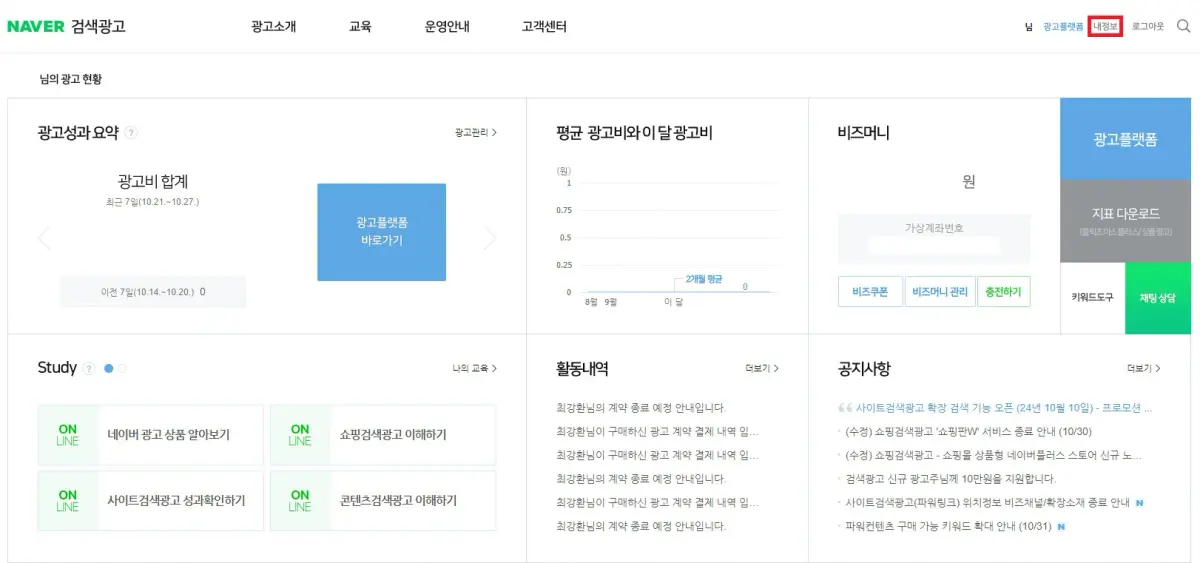
Once you’re logged into Naver Search Ads, as shown above, click [My Info] in the top right.
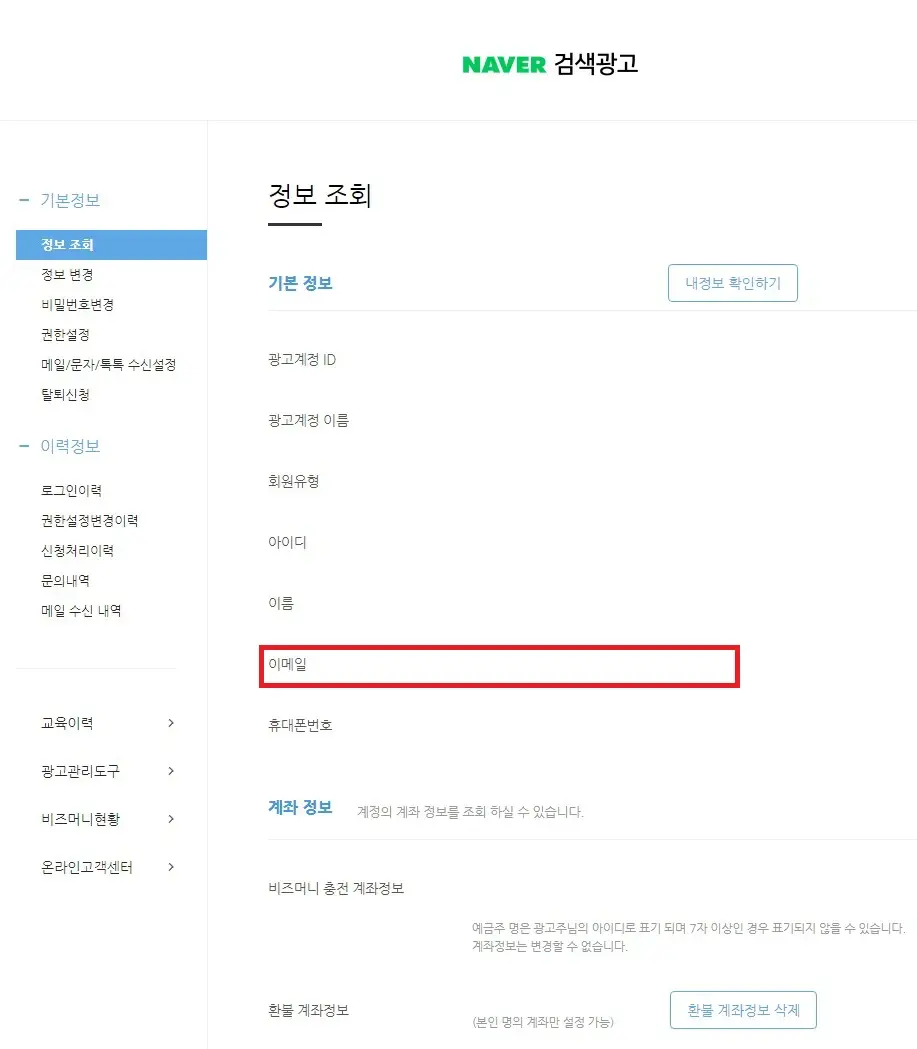
You’ll then see the email address on file for your account, as shown above.
① Your Naver Search Ads ID
② The email address registered to your Naver Search Ads account
Send us those two pieces of information, and Growth will kick off the transfer process — Naver will then send a verification email to you, the advertiser.

As shown above, you’ll receive an email titled “[Naver Search Ads] Notice of Change to Ad Account Manager and Tax Invoice Issuer.” Click into that email, and
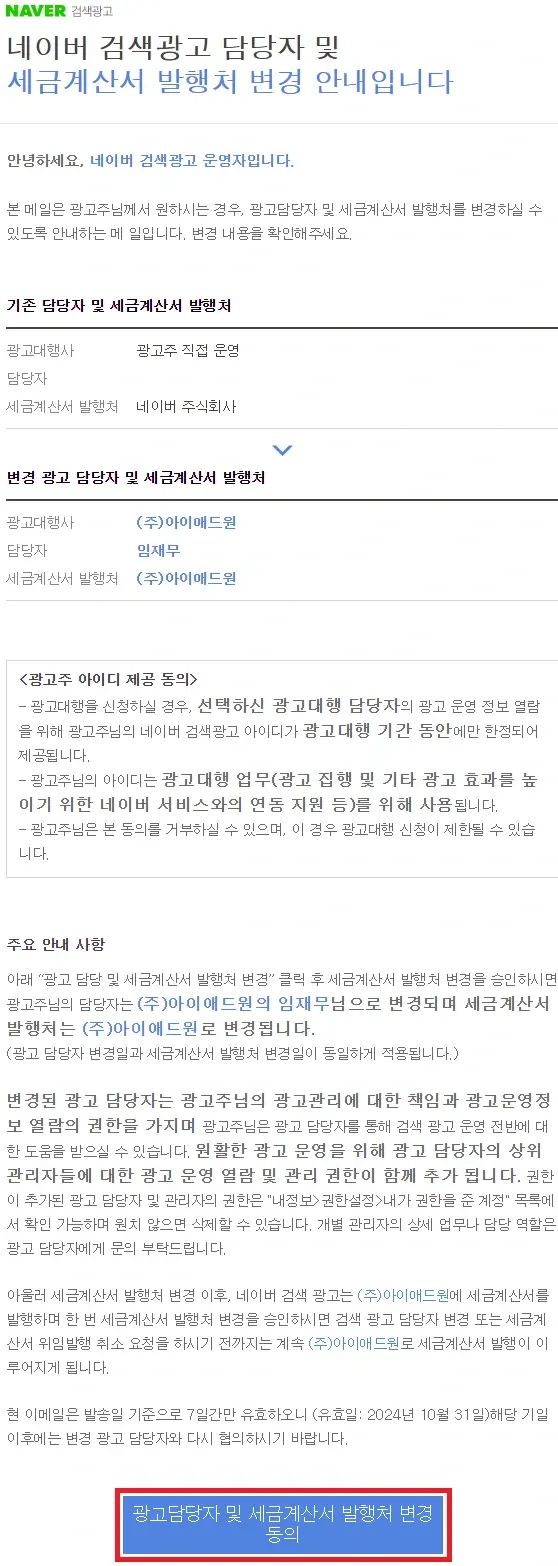
you’ll see an email matching the screenshot above.
Here’s a quick summary of what it says:
1) Whether you consent to registering iAD1 as your ad account’s agency (iAD1 is Growth’s parent agency).
2) Whether you consent to Growth issuing the tax invoice for the ad spend run through Naver Search Ads.
Those are the two items covered.
Both are required to have Growth manage your Naver search ads.
Click the blue “Consent to Change of Ad Account Manager and Tax Invoice Issuer” button at the bottom of the email, and you’ll be taken to Naver Search Ads, as shown in the screenshot below.
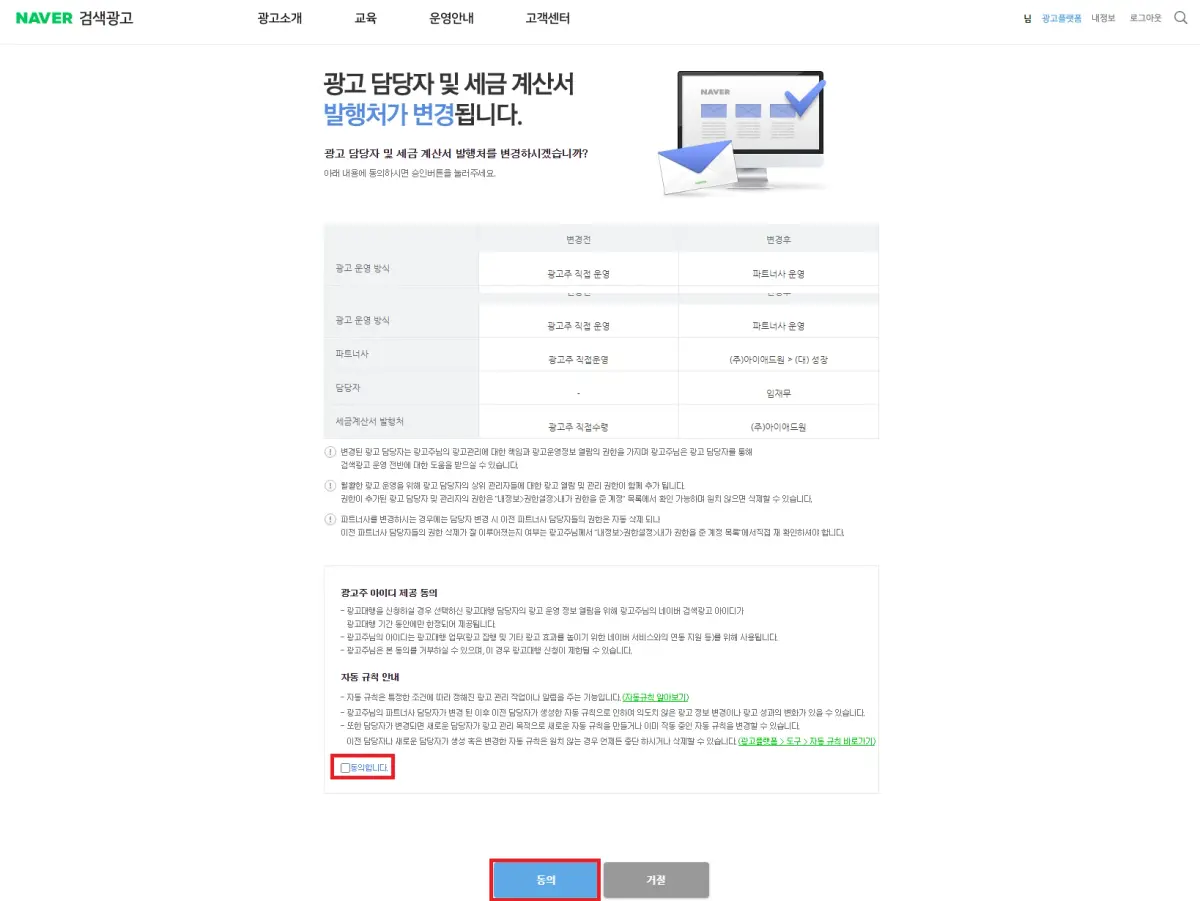
Check the “I agree” box at the bottom, then click the blue “Agree” button — and that’s it. That covers everything you need to do on your end, so just let your Growth account manager know you’ve confirmed the verification email.
We’ve now walked through the whole process of handing your Naver search ads over to Growth. It can look a little involved at first glance, but follow the steps in order and the transfer is genuinely simple to complete.
Once the transfer is complete, you can launch every ad type — site search ads, brand search ads, and more — with Growth. Search ads aren’t a set-it-and-forget-it thing; they need ongoing management and optimization at the account and campaign level (search ad accounts are typically structured in an account → campaign → ad group hierarchy), and after the transfer, that ongoing management becomes Growth’s job. If anything comes up during the transfer process, feel free to reach out to your Growth account manager anytime. We’re with you for the long run on running successful ad campaigns.
Recommended Reading
- A comparative guide to Naver search ads and other performance marketing channels, covering their characteristics and how to drive results — Performance Marketing References — Looking for Real Results?
- The easy-to-miss traps in measuring search ad performance, and how to allocate your ad budget correctly — The Limits of Ad Budgets: The ROI and ROAS Trap
- A systematic A/B testing methodology for continuously improving your Naver search ad campaigns — A/B Testing: How to Consistently Improve Ad Performance
- The essential guide to ROAS — what it means and how to use it as your core metric for evaluating search ad performance — ROAS (Return on Ad Spend)
- A current, objective comparison of Naver search ads against other digital marketing channels — Which Marketing Channel Actually Works? A Fresh 2025 Analysis
Related Reading
If you want to apply this to your own business — if you need a concrete diagnosis of your specific situation, reach out through our contact page. We answer with the one customer who becomes revenue in mind — not raw traffic volume.
Frequently Asked Questions
What exactly is a Naver search ads “transfer”?
A transfer is the process of registering Growth (the agency) as the ad agency on your advertiser account. Account ownership stays with you, the advertiser — only operating authority is delegated to the agency. You only need to do this once; once complete, registration is finished across every ad type, including site, shopping, content, and brand search ads.
What do I need to send the agency to start the transfer?
Two things: ① your Naver Search Ads ID, and ② the email address registered to your Naver Search Ads account. Send us that information and Growth will start the transfer process, and Naver will send a verification email to you as the advertiser. You can find the registered email under the “My Info” menu in Naver Search Ads.
What am I actually agreeing to in the verification email?
The “Notice of Change to Ad Account Manager and Tax Invoice Issuer” email covers two consent items: ① registering Growth’s parent agency (iAD1) as your ad agency, and ② having Growth issue the tax invoice for ad spend run through Naver Search Ads. Both items are required for the transfer.
When is the transfer process actually complete?
Click the “Consent to Change of Ad Account Manager and Tax Invoice Issuer” button at the bottom of the verification email, then check “I agree” on the page it takes you to and click “Agree” — that finishes everything required on the advertiser’s end. From there, just let your Growth account manager know you’ve confirmed the verification email.