Broken Links and SEO: How They’re Connected, and How to Fix Them
 임재복
임재복
Ever felt that flash of confusion from a broken link? You’ve probably run into the message “404 Page Not Found” more than once.
Most users leave the site within seconds of seeing that message.
Did you know this small error is quietly eroding your website’s SEO ranking?
That’s because search engines like Google evaluate sites with lots of errors negatively.
In this post, we’ll cover everything from what broken links actually are to how to fix and prevent them.
Just a handful of simple strategies can boost your site’s credibility and improve your search rankings.
What Are Broken Links, and What Causes Them?
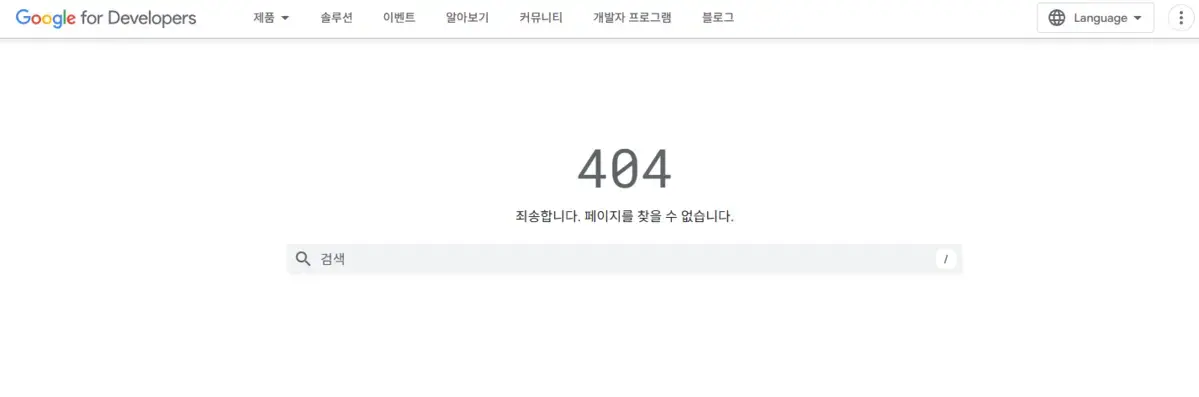
What Exactly Is a 404 Error?
If you run a website long enough, you’ll eventually find links that don’t open properly.

These are called “broken links”: instead of guiding a visitor to the intended page, they lead to an error page.
The most common error code is 404 Not Found, returned when the web server can’t find the requested page. According to MDN Web Docs, a 404 only communicates that a resource is “not there” — it doesn’t specify whether that absence is temporary or permanent. If you’ve deleted a page for good, it’s better practice to return 410 Gone instead.
Broken links can also involve several other HTTP status codes, including 410 Gone (a permanently removed page) and 403 Forbidden (no access permission).
Broken links don’t just hurt the visitor experience — they also negatively affect how search engines crawl your site.
The Main Causes Behind Broken Links
There are a variety of reasons broken links show up on a website.

The exact type of error varies depending on a site’s structure and how it’s run, but the following causes are the most common.
First: links that still point to a page that’s since been deleted.
It’s common to delete outdated pages as part of routine content updates.
But if a link pointing to that page still exists somewhere else, a visitor who clicks it lands straight on a 404 error page.
This problem is especially common when a blog post or product page gets deleted without updating the links that referenced it.
Second: links break because of a mistyped URL.
Whether internal or external, a link won’t connect properly if the URL isn’t entered accurately.
A typo, a stray space, or mixing HTTP and HTTPS can all break a link.
Even something as small as a missing or extra trailing slash (“/”) at the end of a URL can cause some servers to misread it.
Third: an existing URL becomes invalid after a domain or site-structure change.
When a company rebrands and switches to a new domain, old URLs stop working.
Restructuring a site’s category layout or reorganizing directories during a redesign breaks the URLs of existing pages just as surely.
For instance, if a page that used to live at “www.example.com/blog/article-1” moves to “www.example.com/news/article-1,” every link pointing to the old URL breaks at once.
Setting up a 301 redirect is essential to prevent this.
Fourth: links can also break when an external site changes.
External links, which you have no direct control over, are prone to disappearing pages or shifting URLs over time.
News articles, research reports, or external blog posts get deleted or move to a new domain, and the link that pointed to them simply breaks.
Links from public institutions or academic organizations are no exception — their URL structures can change too, so they need regular auditing.
Finally, there’s broken resource links: images, CSS, JavaScript, and the like.
If a file gets deleted or its URL changes while an image, stylesheet (CSS), or script (JavaScript) is being loaded, that’s an immediate problem.
Resource errors can break your site’s design or stop functionality from working entirely.
For instance, a website’s logo image might break, or a critical script might fail to run, leaving a specific button unresponsive.
This hits the user experience directly, and the damage is even greater in environments with a lot of mobile users.
To prevent these problems, you need to periodically check every link on your site and carefully manage any URL structure changes whenever you do a redesign.
How Broken Links Negatively Affect SEO
The Impact on SEO
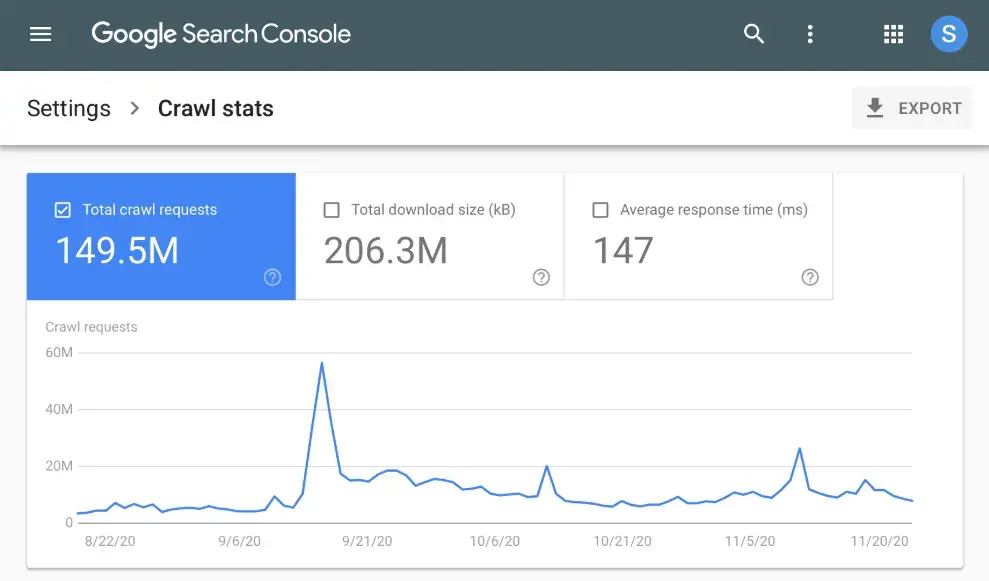
Broken links don’t just hurt the user experience — they also have a real negative effect on search engine optimization (SEO).
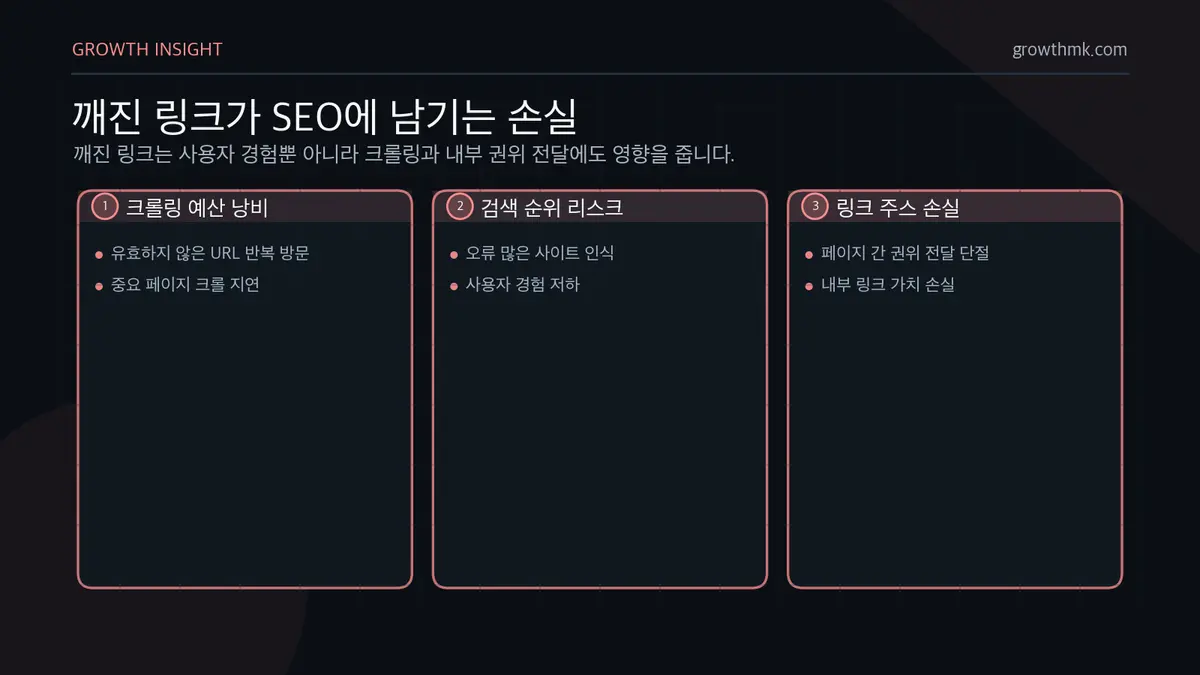
Search engines like Google crawl your website to assess page quality, and a high volume of broken links leads them to see your site as less trustworthy.
When a search engine finds several of these links across your site, it concludes the site isn’t being well maintained.
First, it wastes crawl budget.
Google’s crawler allocates a set crawl budget for exploring your website. When broken links are common, the crawler burns that budget crawling invalid pages instead. Google’s crawl budget management guide explains that pages returning “soft 404s” keep getting crawled and waste budget, and recommends reducing low-quality or error-prone URLs.
That means the pages that actually matter may not get crawled in a timely manner.
Second, it leads to lower search rankings.
Google downgrades error-heavy websites to protect the overall search experience. When a user clicks through and lands on a 404 error page, Google judges that page’s quality to be low and adjusts its search ranking accordingly.
Third, you lose link juice.
Internal links are what transfer SEO value between pages within a site.
“Link juice” refers to the authority or value one page passes to another through a hyperlink.
It’s a value search engines weigh heavily when determining a page’s ranking.
But when a broken link exists, that link juice never reaches the important page it was meant to flow to — it simply gets cut off. That page’s SEO impact drops accordingly.
Fourth, reduced dwell time drags down your SEO performance.
When a user can’t find the information they’re looking for and leaves your site, search engines rate that page’s quality lower.
That, in turn, erodes domain trust and pushes your search rankings down as well.
How to Fix and Manage Broken Links

A Systematic Fix Process
Set Up a 301 Redirect
The most reliable fix for links pointing to a deleted page is a 301 redirect.
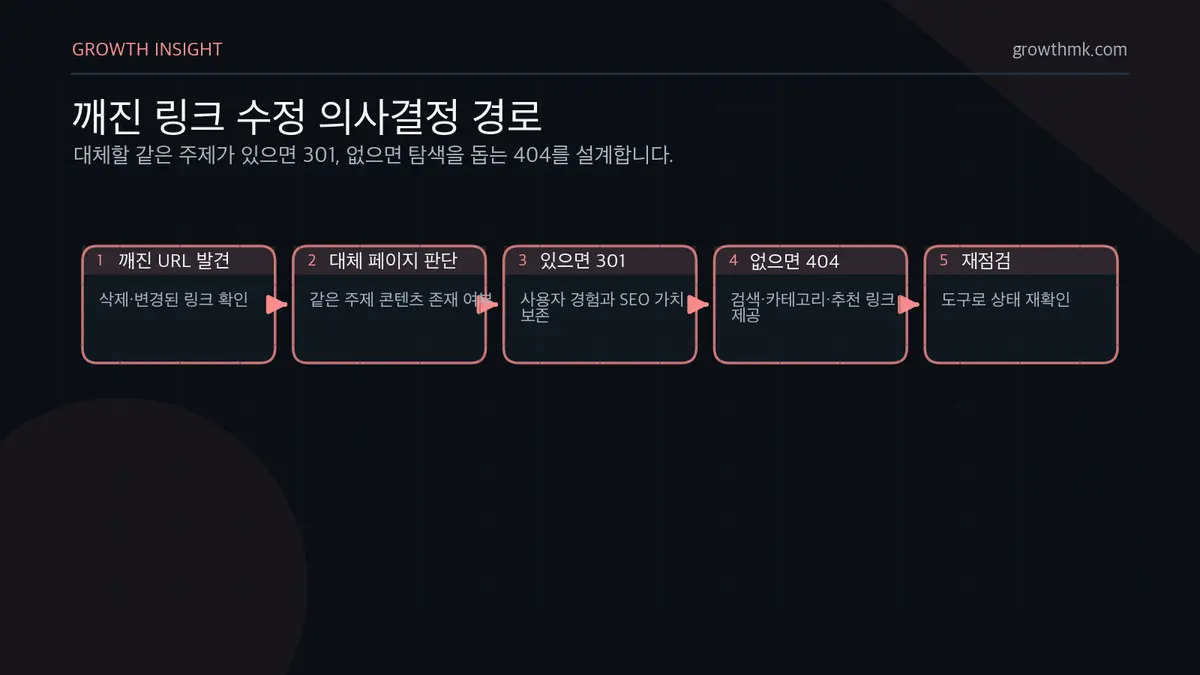
A 301 redirect automatically connects a deleted page’s old URL to a new page. That way, users reach the information they’re after without hitting a dead end.
Search engines view redirects favorably too, and they pass along the SEO value the old URL had built up to the new URL. MDN Web Docs confirms that when a search engine receives a 301 (Moved Permanently) response, it transfers the link value from the original URL to the new one.
That said, overusing 301 redirects can hurt site performance, so it’s best to use them only when a genuinely suitable replacement page exists.
Redirecting to an unrelated page will actually get evaluated negatively by search engines, so only link to a page covering similar content or the same topic.
A 404 Page Optimization Strategy
When a page genuinely can’t be replaced, optimizing your 404 page with the user experience in mind becomes essential.
A bare, generic 404 error page only leaves visitors with a bad impression — you need to rework it into something genuinely useful.
A well-designed 404 page reduces bounces and can guide visitors toward further exploration within your site.
Add a search function, or include links to your major category pages.
For example, showing recommended posts that make it easy to find similar content, or linking to a customer support page, are both effective approaches.
Layer in design that reflects your brand identity, and the user experience improves even further.
Don’t just leave a bare “Page not found” message sitting there — leave a good impression with an eye-catching design and friendly copy.
Diagnosis and Ongoing Management
Broken links naturally crop up over time, so you need a proactive management process.
It helps to build a habit of checking that internal and external links are still working whenever you edit or publish content.
Here are the core strategies website administrators can use for this.
Managing Internal and External Links
Start by verifying that every internal link on your site actually works.
The more complex your internal link structure, the more errors tend to accumulate, so it’s worth keeping things systematically organized.
Especially on large sites, you should regularly update your sitemap (XML and HTML) and use Google Search Console’s internal link analysis feature to manage link health.
You also need to keep checking whether your external links are still alive.
External sites can change at any time, so it’s safer to link primarily to trusted, well-established domains.
Link to sites with a stable operating history — public institutions, major media outlets, academic organizations — and use SEO monitoring tools to check external link status so you can respond immediately if a problem crops up.
Using Automated Monitoring Tools
Checking links one by one manually is inefficient — you need automated tools catching and fixing them regularly.
That’s the only way to consistently monitor link health across your site and resolve issues quickly.
Key automated monitoring tools:
- Google Search Console detects on-site errors and monitors 404 error pages and crawling issues.
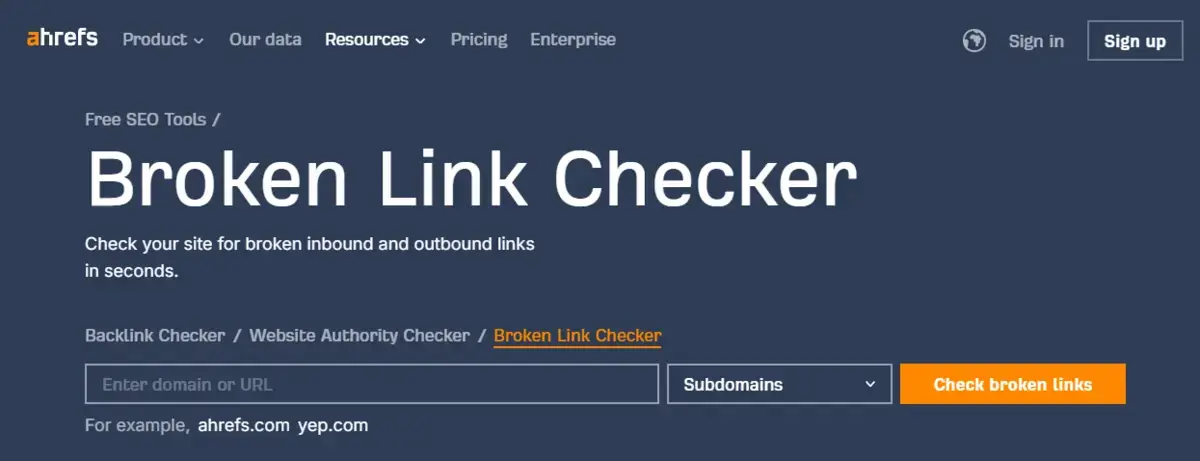
- Ahrefs Broken Link Checker analyzes internal and external links and reports broken ones.
- Screaming Frog SEO Spider crawls your entire website to identify broken links and generates detailed reports.
- SEMrush Site Audit automatically checks site health and even provides guidance for fixes.
The higher a site’s traffic, the harder it becomes to protect SEO performance without automated monitoring.
Using CMS Plugins
If your website runs on a CMS, a plugin that automatically detects and fixes broken links is an efficient solution.
On WordPress in particular, the Broken Link Checker plugin automatically scans every link on your site to find and fix errors.
Plenty of other CMS platforms have plugins that solve this same problem.
Ahrefs Broken Link Checker analyzes the health of your internal and external links to support SEO optimization, while SEMrush Site Audit Tool monitors technical errors on your website.
WP Link Status automatically detects link errors and offers immediate fixes, and Drupal Link Checker detects and reports broken links on Drupal-based websites.
Joomla Broken Link Checker provides automatic link-status monitoring for sites running the Joomla CMS.
Using a CMS plugin lets you manage your website far more systematically, while reducing the SEO losses that broken links cause.
Leveraging User Feedback
Setting up a user feedback system is an effective way to catch problems fast.
Give visitors a clear way to report a broken link the moment they find one, and your team can resolve the issue quickly.
Here are strategies a company website can use to make this happen.
Add a Report Button to Your 404 Page
When visitors land on a 404 (page not found) page, they often leave without receiving any guidance at all.
To prevent that, add a “report a broken link” button so visitors can easily flag it the moment they encounter one.
It’s a good idea to set things up so that clicking the button opens a report form with the broken URL and the visitor’s location auto-filled in.
Pairing this with a search function or links to your major categories, so visitors can keep browsing after reporting, helps lower your bounce rate too.
Build a Feedback System Connected to Customer Support
It’s also important to connect your reporting system to your customer support team so there’s a clear response process in place.
Letting customers report broken links via email, a contact form, or chat makes your response time far faster.
For example, adding a “Report a Broken Link” category to your customer inquiry system, so users can flag errors directly, is an effective approach.
An auto-reply message like “Thanks for the report — we’ll get this fixed shortly” also helps preserve visitor trust.
Managing broken links isn’t just fixing errors — it’s a process of protecting your company’s digital assets and staying competitive.
Maintaining and optimizing consistently opens up more business opportunities and strengthens customer trust.
Worth Reading Next
- The A-to-Z Guide to Search Engine Optimization Marketing
- How to Write Title Links That Boost Search Rankings (+ Prompts)
- SEO Marketing Case Studies — Content Strategy Built on Keyword Analysis
- Video Search Optimization: How to Use YouTube Titles, Descriptions, and Tags
- Why Image Search Optimization Matters, and How to Do It
Want to apply this to your own business? — See how Growth approaches it on our SEO services page, or if you need a diagnosis of your specific situation, reach out through Contact us. We’ll answer with an eye on the one customer who becomes revenue — not just traffic volume.
Frequently Asked Questions
What’s the difference between 404 and 410 (Gone)?
404 Not Found only communicates that the requested page “cannot be found” — it doesn’t specify whether that absence is temporary or permanent. 410 Gone, on the other hand, specifically means the resource has been “permanently removed.” If you’ve deleted a page for good and have no replacement, returning 410 instead of 404 communicates your intent more clearly to search engines. (Per MDN Web Docs.)
Do broken links really hurt search rankings?
It’s less that a broken link directly docks your ranking, and more that secondary effects accumulate. When crawlers repeatedly visit invalid URLs, it wastes crawl budget, which can keep important pages from being crawled in time; when internal links break, the link value (link juice) that would have passed between pages is lost. Visitors bouncing off a 404 also sends a negative user-experience signal. The impact grows larger the bigger your site.
What’s the best way to find broken links automatically?
Manual checks are inefficient, so automated tools are the way to go. Use Google Search Console to monitor indexing and crawl errors, and Ahrefs Broken Link Checker, Screaming Frog SEO Spider, or SEMrush Site Audit to analyze internal and external links in bulk. If you’re running WordPress or another CMS, a plugin like Broken Link Checker can automatically scan and fix links across your site.
Should a deleted page use a 301 redirect or a 404?
If a similar replacement page exists, redirecting with a 301 is the better choice — it preserves both the user experience and SEO value together. That said, redirecting indiscriminately to unrelated pages can actually be evaluated negatively, so only link to pages covering the same topic. If there’s no replacement page, it’s better to reduce bounces with an “optimized 404 page” that includes search and links to major categories.