H1 Tags: What They Are and How to Use Them Correctly for SEO
 임재복
임재복
The H1 tag is the top-level heading element in a webpage’s structure — not just a design choice, but one of the core pillars of SEO. Using the H1 tag strategically can make or break your search engine optimization results. In this article, we’ll take a deep dive into H1 tags, from the technical fundamentals to practical optimization strategies.
What is an H1 tag, and why does it matter?
The H1 tag isn’t just large text — it’s the core HTML element that defines a webpage’s identity. Understanding exactly how search engines evaluate H1 tags, and why they matter, is the starting point for effective SEO.
The role of the H1 tag in search engine algorithms
Google’s search algorithm has continually evolved, but the role of heading elements remains just as relevant. In its SEO Starter Guide, Google recommends breaking content into paragraphs and sections with headings to help users navigate the page. Heading tags — H1 above all — act as a signal that communicates a page’s structure and topic to both search engines and users.
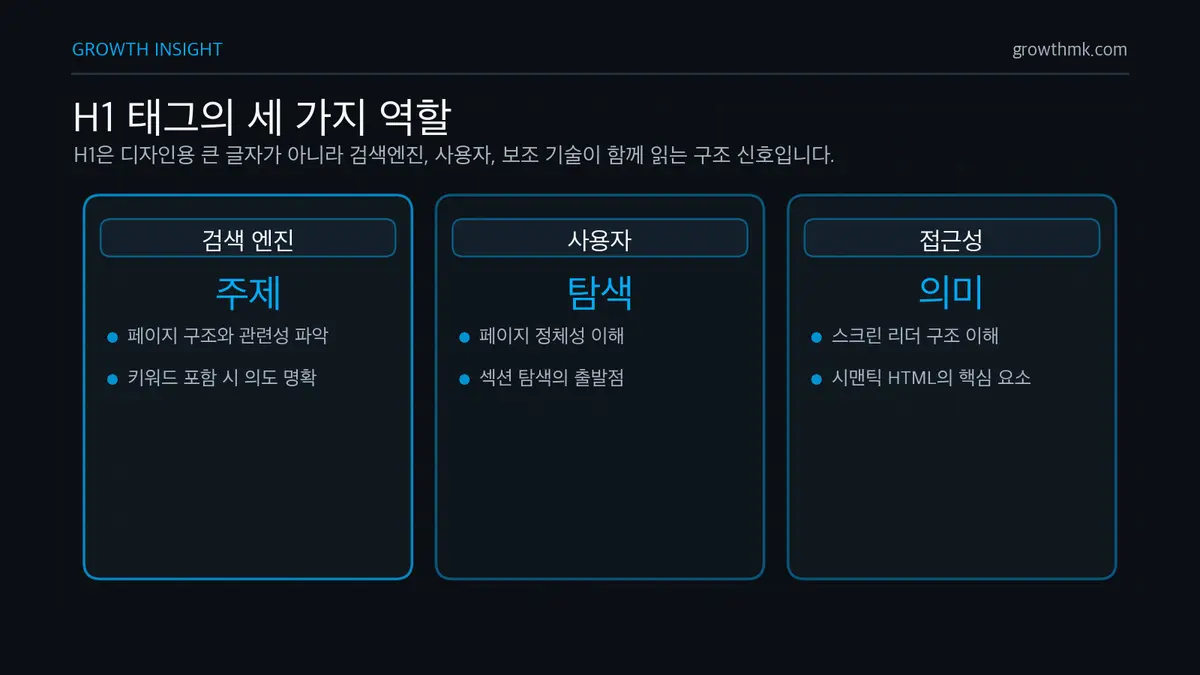
When a search engine crawler visits a page, the H1 tag is analyzed first among the structural hierarchy of the HTML document. Notably, when a keyword relevant to the page’s topic appears in the H1, the relevance score for that keyword tends to rise.
Conversion Rate Optimization Strategies for E-commerce Websites
The role of the H1 tag in semantic HTML and web accessibility
Under semantic web principles, HTML elements should reflect content’s meaning and structure — not just its visual appearance. The H1 tag is a core element of this semantic markup, playing an important role in helping assistive technologies like screen readers understand page structure.
The W3C’s Web Accessibility Initiative (W3C WAI) explains that headings should be nested by rank, with H1 reserved for the most important heading, and that browsers, plugins, and assistive technologies use this structure for in-page navigation. In other words, a clear heading structure is a foundational accessibility element, not just an SEO tactic. Implementing H1 tags with accessibility in mind offers benefits such as:
- Screen reader users can immediately grasp the page’s topic
- Improved content navigation via keyboard
- A clear content structure for users with cognitive disabilities
Data-Driven Marketing: An Analytics Methodology That Doubles Conversion Rates
What real data shows about the H1 tag’s impact on search results
In its helpful content guidance, Google explains that search rankings aren’t determined by any single factor, but rather a comprehensive evaluation of how useful a page is to users. When the H1 clearly reflects the topic, it becomes obvious what search intent the page satisfies — making it easier for both users and search engines to gauge the content’s relevance.
Especially since Google’s 2022 Helpful Content Update, the importance of an H1 tag that clearly reflects user intent has only grown.
When the H1 tag stays consistent with the page’s Title tag while offering more detail, CTR (click-through rate) tends to be higher — because it increases the match between what users expect from the search result and what the page actually delivers.
Deep strategies for H1 tag optimization

Optimizing H1 tags takes a strategic approach that goes well beyond simply inserting a keyword.
Keyword integration strategy — balancing primary keywords and LSI keywords
An effective H1 tag naturally integrates your primary keyword with LSI (Latent Semantic Indexing) keywords. Since natural language processing algorithms like Google’s BERT understand context, semantic relevance matters more than simply listing keywords.
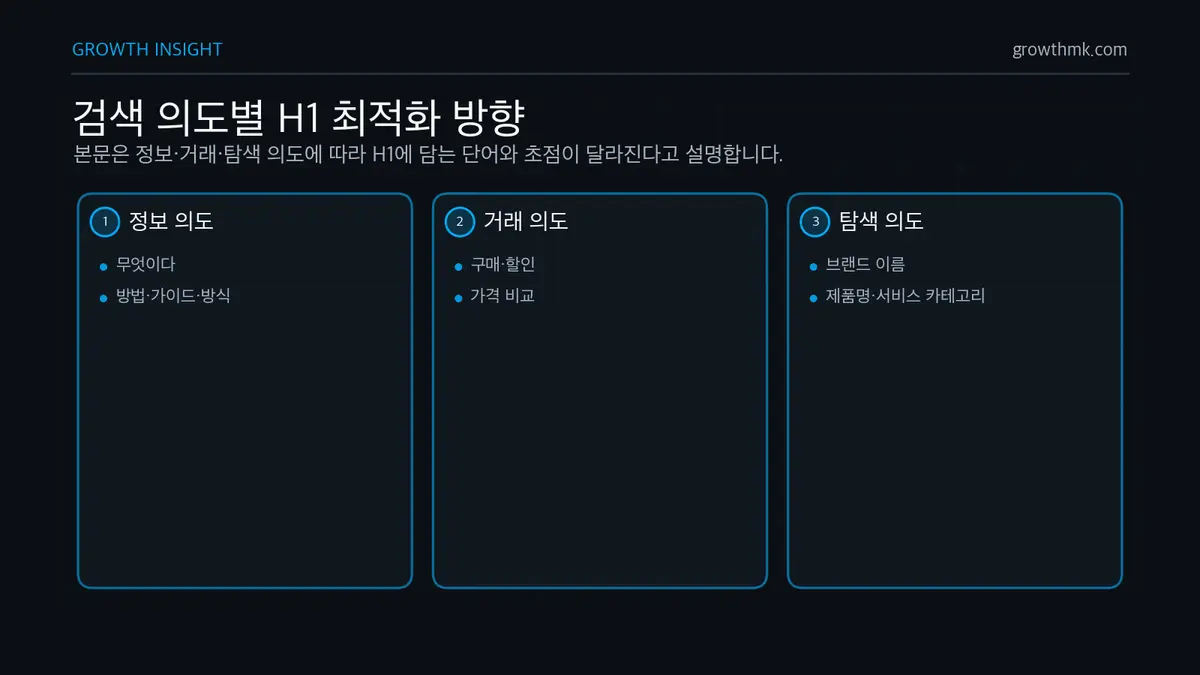
Use advanced keyword research tools (Ahrefs, SEMrush, Google Search Console) to identify your primary keyword’s search intent and related LSI keywords. You can optimize your H1 tag based on search intent as follows:
- Informational intent: include words like “what is,” “how,” “guide,” “method”
- Transactional intent: include words like “buy,” “discount,” “price comparison”
- Navigational intent: include brand names, product names, service categories
Maximizing CTR with emotional triggers and numbers
Boosting click-through rate (CTR) is one of SEO’s core goals. Strategically using emotional triggers and numbers in your H1 tag can significantly improve CTR.
According to research from the Nielsen Norman Group, headlines that include the following elements see higher engagement than those that don’t:
- Numbers (odd numbers tend to be especially effective)
- Emotional adjectives (“essential,” “revolutionary,” “surprising”)
- Value propositions (“save time,” “cut costs,” “boost efficiency”)
- Urgency phrases (“now,” “immediately,” “limited”)
That said, an overly clickbait-y H1 can actually increase bounce rate, so keep it consistent with the actual content.
Industry-specific H1 strategy: B2B vs. B2C vs. informational content
Your H1 tag strategy should shift depending on your industry and business model.
- B2B websites
- Use industry-specific terminology and jargon
- Emphasize business value like ROI, efficiency, and cost savings
- Maintain a tone that emphasizes credibility and expertise
- Example: <h1>Enterprise Cloud Migration: A Solution That Cuts Operating Costs by 30%</h1>
- B2C websites
- Use emotional benefits and consumer-focused language
- Emphasize the direct benefit of the product/service
- Choose concise, easy-to-understand terms
- Example: <h1>Homemade Pasta in 5 Minutes: An Easy Recipe Even Beginners Can Follow</h1>
- Informational content
- Use a question-format H1 or a “how-to” approach
- Hint at a specific problem-solving method
- Convey expertise with an authoritative tone
- Example: <h1>WordPress Performance Optimization: An Expert’s Guide to Cutting Load Time Under 2 Seconds</h1>
An integrated approach to the H1 tag and page structure
The H1 tag doesn’t exist in isolation — it needs to connect organically with the page’s overall structure. Let’s look at how to present a clear content structure to both search engines and users.
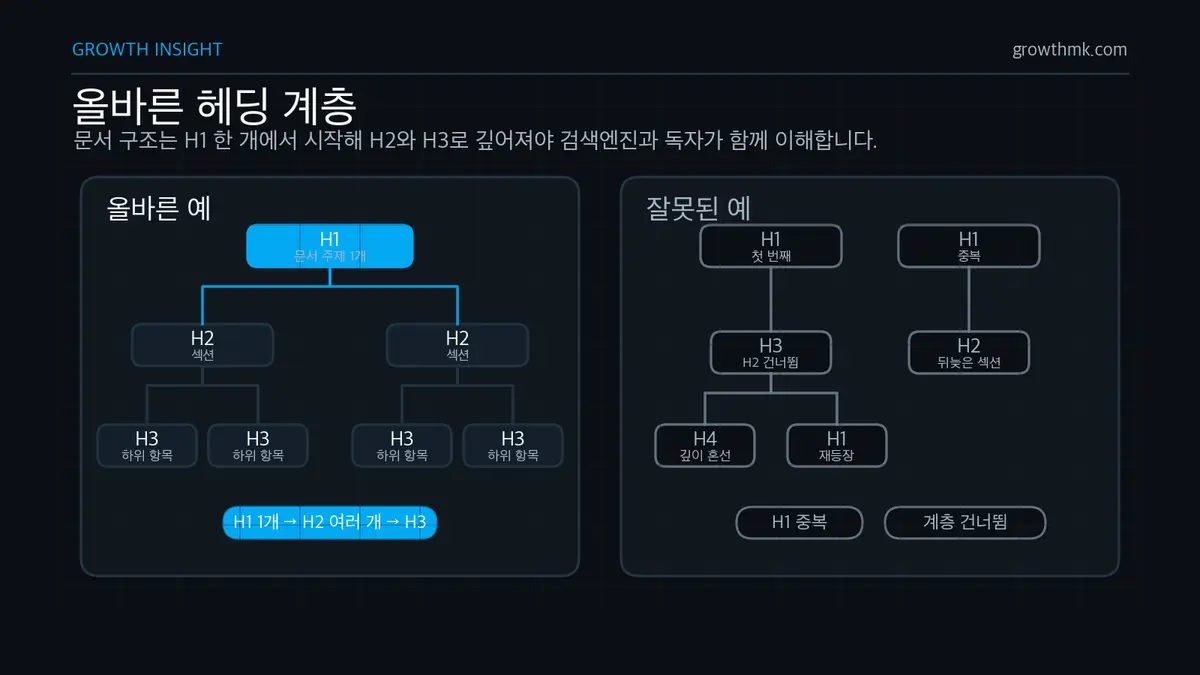
The H1–H6 hierarchy: the content architecture search engines prefer
Search engines understand a page’s topic and structure more accurately through a well-organized heading hierarchy. The W3C WAI heading guide recommends not skipping heading ranks — for example, jumping straight from H2 to H4 — because a logical heading structure that respects each level gives both users and search engines a clear content map.
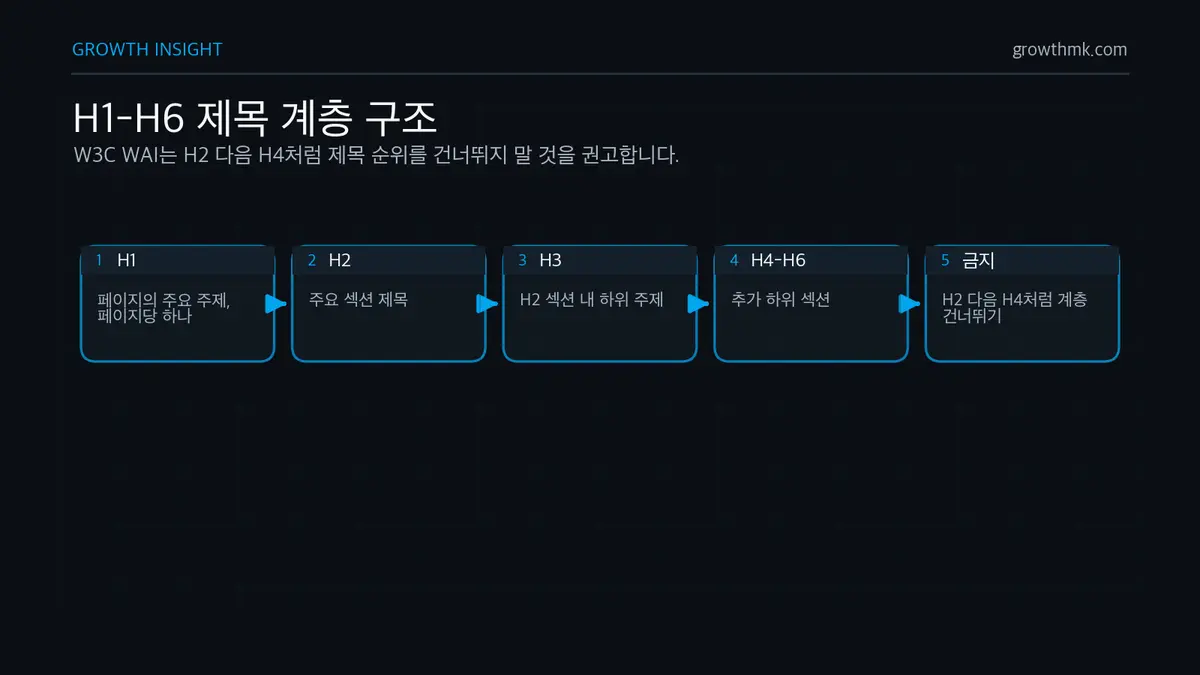
An ideal heading hierarchy looks like this:
- H1: the page’s main topic (use only one per page)
- H2: major section headings
- H3: subtopics within an H2 section
- H4–H6: additional subsections
This kind of hierarchy gives search engine crawlers a clear topic map and is particularly helpful for building Google’s Knowledge Graph. Research suggests that webpages with an organized heading structure are more likely to be selected for rich results like featured snippets.
Connecting Schema.org markup with your H1 tag strategy
Structured data helps search engines understand your content’s meaning more precisely. Connecting the H1 tag with Schema.org markup can significantly boost your visibility in search results.
When using Schema.org types like Article, BlogPosting, HowTo, or FAQPage, it’s especially important that your H1 tag’s text matches the name or headline property. Google’s Article structured data documentation recommends putting a concise title in the headline property, noting that this structured data helps display better titles, images, and date information in search results.
Connecting structured data with your H1 this way increases the odds of qualifying for enhanced search displays like rich results and knowledge panels. Google notes that structured data helps content stand out more in search results, though the actual CTR improvement varies by industry, keyword, and competitive landscape.
Technical implementation and fixing common H1 mistakes
The technical implementation of the H1 tag is often overlooked, but it has a major impact on SEO performance. How you style and dynamically handle your H1 can affect SEO in unexpected ways. Here are the key points to keep in mind during development.
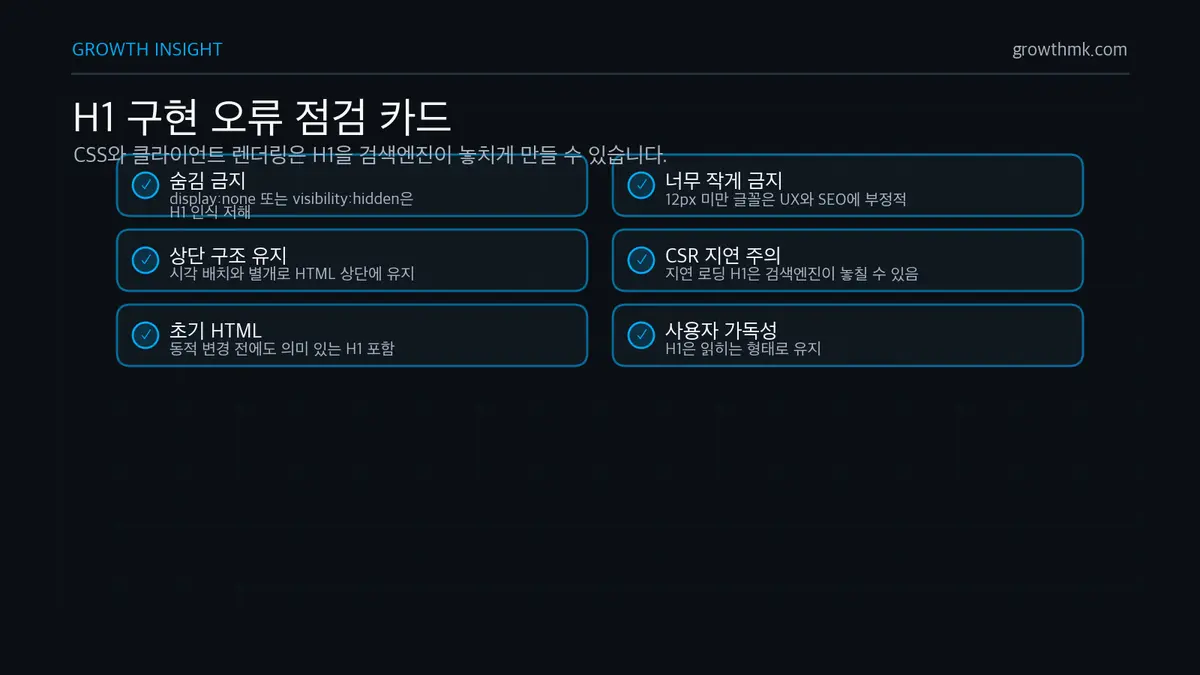
There are a few CSS-related points worth watching out for:
- Properties like display: none or visibility: hidden can cause search engines to ignore the H1.
- An overly small font size (under 12px) can hurt both user experience and SEO.
- Even if CSS visually repositions the H1 elsewhere, it’s best to keep it at the top of the HTML structure.
If you’re using JavaScript, keep these points in mind when building your H1 tag:
- If the H1 loads with a delay under client-side rendering, search engines may miss it entirely
- If you dynamically change H1 content, the initial HTML should still contain a meaningful H1
- Given Google’s rendering delay, if your H1 depends on JavaScript, consider server-side rendering (SSR) or static site generation (SSG)
Measuring results and A/B testing your H1 tag
Optimizing your H1 tag isn’t a one-time task — it’s an ongoing process of testing and data analysis. A systematic approach lets you measure and optimize the effectiveness of your H1 tag to improve overall website performance.
How to measure the SEO impact of an H1 tag change
To understand the real effect of changing your H1 tag, first establish a clear baseline for the state before the change.
Before changing anything, record your search rankings for target keywords, visitor click-through rate, organic traffic volume, bounce rate, and average time on page. You need this baseline to accurately compare results after the change.
Running the test in a controlled environment matters. Avoid creating two pages with identical content that only differ by H1 tag — search engines may flag this as duplicate content.
Instead, select a group of similar pages and apply the change to only one group, or compare the performance of the same page across different time periods.
Web analytics tools and Google Search Console let you track the effect of an H1 tag change more precisely. If you configure your analytics tool to capture H1 text, you can spot patterns in which types of headlines perform best.
When analyzing test results, give yourself enough time to collect data. You’ll typically need at least one to two months of data after an H1 change to draw meaningful conclusions.
Also account for external variables like seasonality or search algorithm updates. It’s important to develop the judgment to distinguish simple correlation from actual causation.
How to design an effective H1 tag A/B test
A/B testing is the most reliable method for optimizing your H1 tag. A successful A/B test starts with a clear hypothesis. For example, you might hypothesize that a question-format headline drives higher CTR than a plain declarative one, or that a headline with a number increases time on page. A hypothesis that emotionally worded headlines drive higher conversion rates is also worth testing.
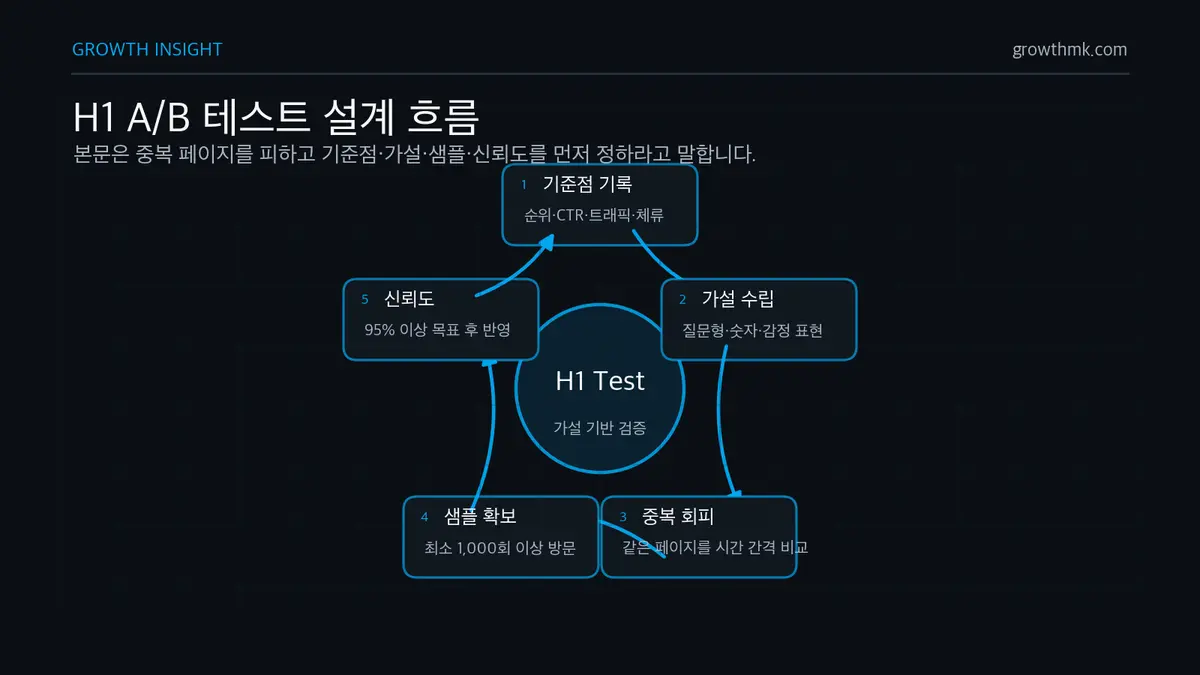
You need a sufficient data sample to trust your test results. Start testing on your highest-traffic pages, and aim to collect at least 1,000 visits’ worth of data to reach statistically meaningful results. Aim for 95% confidence or higher.
A/B testing tools (Google Optimize shut down in September 2023, so current alternatives include Optimizely, VWO, and similar tools) make it easy to test various H1 variants. Test the original headline alongside question-format, number-included, and emotionally worded versions simultaneously to see which approach performs best.
When analyzing results, it helps to segment by different user groups. Comparing new vs. returning visitors, mobile vs. desktop users, search-driven vs. social-driven visitors, and regional differences in response lets you build a more refined strategy.
Finally, when evaluating results, don’t look at a single metric in isolation — consider several together. A change can be considered successful if CTR rises, bounce rate falls, and conversion rate improves.
On the other hand, if CTR rises but bounce rate also increases, that signals a clickbait risk — the headline is driving clicks, but the actual content isn’t meeting expectations.
Conclusion: Maximizing SEO results through strategic use of the H1 tag
We’ve now covered the H1 tag broadly — from its technical fundamentals to optimization strategies and future trends. The key insight is this: the H1 tag isn’t just a design element, but an important bridge that connects search engines and users.
Core H1 tag optimization checklist
Here’s a comprehensive checklist for successful H1 tag optimization.
✓ Naturally include your target keyword
✓ Reflect a topic that precisely matches the page’s content
✓ Keep it an appropriate length (under 50–70 characters)
✓ Directly satisfy the user’s search intent
✓ Include emotional or value elements that drive clicks
✓ Optimize for readability on mobile
✓ Use exactly one H1 tag per page
✓ Position it at the top of a logical heading hierarchy
✓ Follow semantic HTML and web accessibility principles
✓ Keep improving through regular A/B testing
Why ongoing H1 tag optimization matters
SEO isn’t a one-time task — it’s a continuous process of improvement. The same is true of your H1 tag, which needs regular analysis and optimization:
- Quarterly search trend analysis and H1 tag adjustments
- Benchmarking H1 tags against competitors’ top-ranking pages
- Optimization based on user behavior data
- Strategy adjustments in response to search algorithm updates
H1 tag optimization sits at the intersection of technical SEO and content marketing. Apply the strategies and principles in this guide, and you’ll be able to build effective webpages that deliver value to both search engines and users.
SEO keeps changing, but the fundamental principle of providing clear, valuable content never does. The H1 tag is the first element that puts that principle into practice — and it’s your first moment of contact with the user. Optimize that moment strategically to maximize your SEO results.
Related reading
- The Complete Technical SEO Guide: a practical hub linking crawling, indexing, rendering, speed, and structure
- The canonical tag
- Why sitemaps matter and 3 ways to create one
- How to fix Open Graph tag errors
- What are SSL certificates and HTTPS, and why do they matter?
If you want to apply this to your own business — you can see Growth’s approach on our SEO services page, and if you need a concrete diagnosis of your situation, reach out via Contact us. We answer based on the one customer who becomes revenue, not on traffic volume.
Frequently Asked Questions (FAQ)
Can I use multiple H1 tags on one page?
HTML5 technically allows an H1 per section, but to communicate a page’s topic as clearly as possible, it’s safest to use exactly one meaningful H1 at the top of the page. Following the W3C WAI’s recommendation — assigning H1 to the single most important heading, then structuring everything below it through H2, H3, and so on without skipping levels — helps both search engines and assistive technology accurately understand your page structure.
Do the H1 tag and Title tag need to match?
They don’t need to be identical. The Title tag is what appears in search results and browser tabs, while the H1 is the top-level heading within the page body. Both should point to the same topic, but writing the H1 to be a bit more specific to the body’s context can improve the match between what users expect from the search result and what the page actually delivers.
Do I need to include a keyword in my H1 tag?
Naturally including the primary keyword that represents your topic does help. That said, Google recommends avoiding keyword stuffing — repeating the same word. Reflect the phrasing users actually search for, but write it as a natural, readable sentence.
Does hiding the H1 tag with CSS cause SEO problems?
Hiding an H1 with display:none or visibility:hidden can prevent search engines from recognizing it as the page’s main heading. Even if you visually position it differently for design reasons, it’s best to keep the H1 meaningfully present in the HTML structure and readable to users.
Marketing Insights
Marketing insights, delivered weekly
Practical growth and GEO/B2B marketing insights, summarized in your inbox every week.
Subscribe for insights