Why Do Orphan Pages Happen? Main Causes and How to Fix Them
 임재복
임재복
An orphan page is a page that has no internal links pointing to it, leaving it isolated within your website.
When search engines can’t find a page, crawling and indexing break down. No traffic comes in, and search rankings suffer too.
If you run a website, you’ve probably wondered at some point, “Why isn’t this specific page showing up in search?”
No matter how good your content is, it’s useless if it isn’t properly linked.
If an important page has been left neglected, ignored by both search engines and users, it’s time to fix it.
In this article, we’ll walk through practical ways to find these pages and fix the problem.
If you want to unlock your website’s full value and boost your search performance, read on.
What is an orphan page?
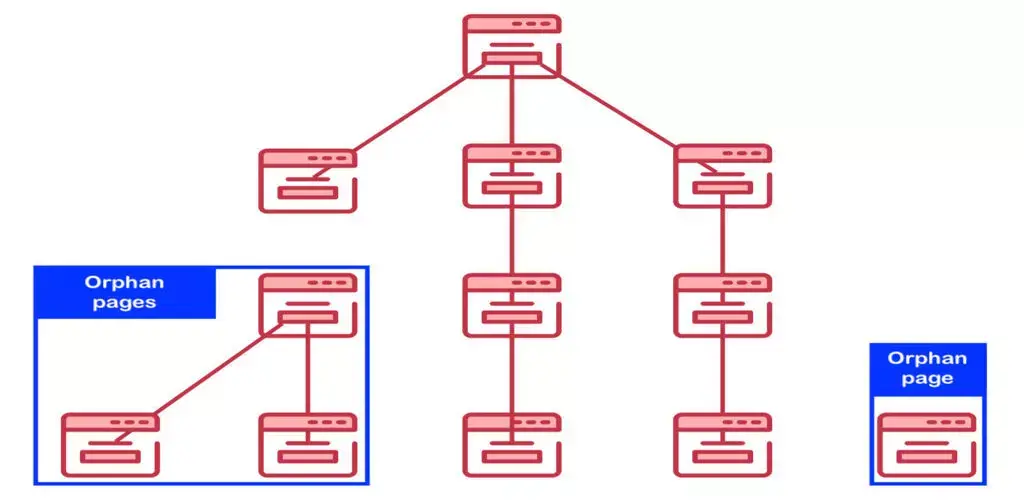
An orphan page is a web page that receives no internal links from any other page on the website.
Think of it like a building with no address on any map. Without knowing the exact address (URL), no one can find it.
Search engines discover and index pages by following internal links. Without that connective tissue, search engine crawlers have a hard time finding the page.
As a result, it rarely shows up in search results, and website visitors can’t reach it through normal navigation either.
Pages like this exist outside the website’s structure. Even if they’re technically indexable, there’s a real risk that search engines simply never index them.
That’s because there’s no path connecting them to the site’s other important pages.
This often happens when links aren’t properly updated during a site migration or redesign, or when a temporary page never gets deleted.
Main causes of orphan pages
Orphan pages show up on websites for a range of reasons.
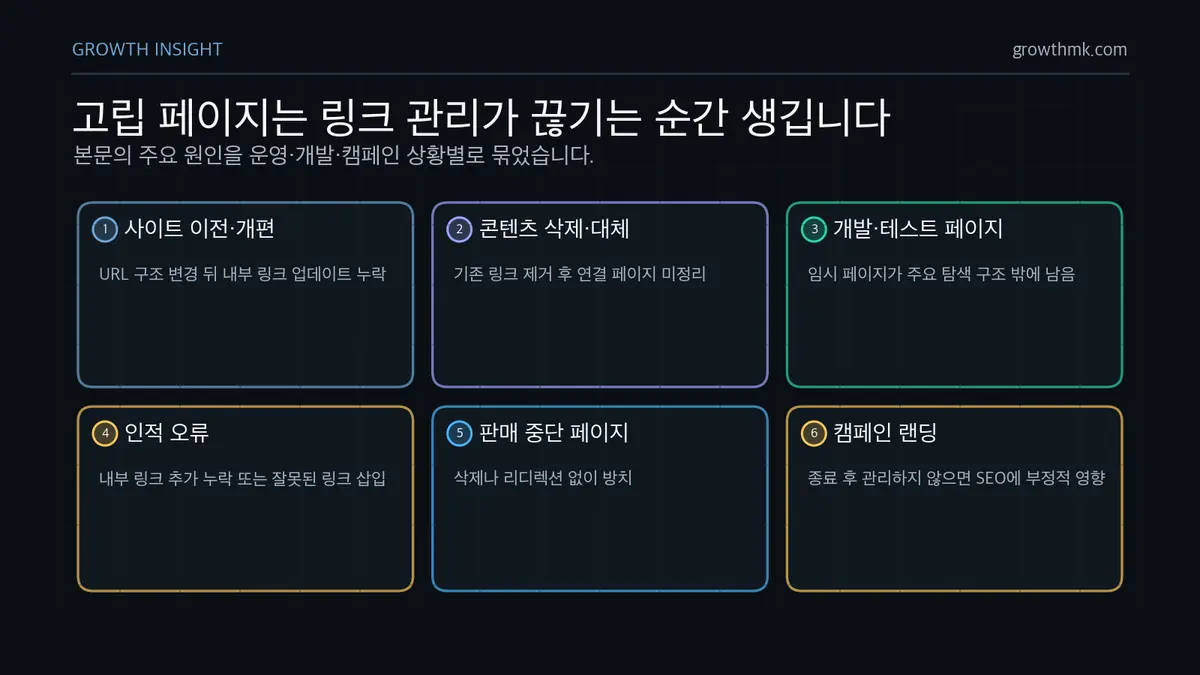
The most common cause is failing to properly update internal links during a site migration or redesign.
When a website’s structure or URLs change, the links pointing to existing pages need to be updated to match the new structure. If some links get missed in the process, the page they pointed to is left orphaned.
The same thing happens when content gets updated or deleted.
If old content is removed or replaced with new content and the old links are taken down,
but the other links pointing to that content aren’t updated, that page becomes an orphan page.
It also happens when a temporary page created during development or testing is accidentally left in place instead of being deleted.
These pages aren’t part of the site’s main navigation structure, so they easily end up with no internal links pointing to them.
Human error is another cause that can’t be ignored.
If someone forgets to add an internal link, or adds the wrong one, while publishing content or managing the site, the page ends up orphaned.
It also happens when pages for discontinued products or services are left unaddressed.
Since these pages no longer need to drive purchases or usage, internal links to them are often removed first. But if the page itself isn’t deleted or redirected to a related page, it’s left orphaned.
There’s also the case of landing pages built for a specific campaign or promotion, which are intentionally left unlinked from the site’s main navigation or other pages.
Of course, that kind of isolation is intentional. But if the page isn’t managed after the campaign ends, it can hurt SEO.
How to fix orphan pages
Fixing the orphan pages you find on your website plays a big part in improving SEO performance.
Take a close look at each page’s value and purpose before deciding on the right fix.
The most common and effective fix is adding internal links that point to the orphan page.
When other relevant pages on the site link to the orphan page, search engine crawlers can find and index it.
In fact, Google Search Central’s guide to links states plainly that “every page you care about should have at least one link from another page on your site.” Google notes that it discovers pages only by following <a> elements with an href attribute. That’s why adding internal links is the most fundamental way to bring an orphan page back into search engines’ view.
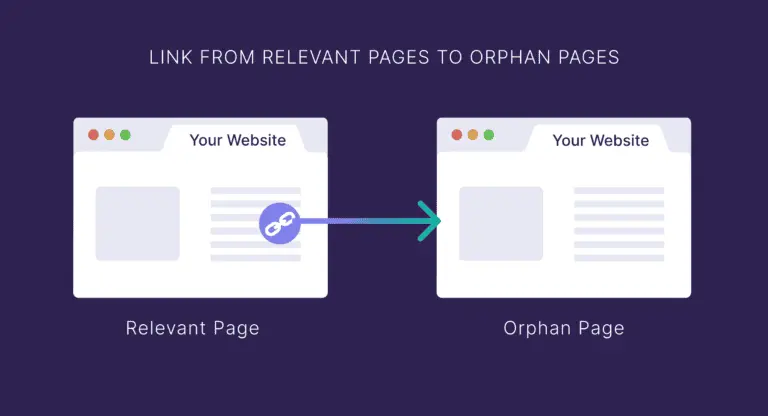
Users benefit too, since they can now reach the page through internal links, which improves the overall user experience.
When you add internal links, it’s best to write clear, descriptive anchor text that includes relevant keywords.
If the page is no longer needed, or its content has no real value, another option is deleting it and returning a 410 Gone status code.
A 410 status code tells search engines the page has been permanently removed, so it gets dropped from search results faster.
Sometimes an orphan page’s content is similar to, or overlaps with, another related page’s content.
In that case, merge the content into a single page, then either delete the remaining page or set up a 301 redirect to the merged page.
A 301 redirect tells search engines the page has permanently moved to a different URL, and passes on the link value the old page had built up to the new one.
For landing pages that were intentionally left out of the site’s structure,
if you don’t want them to show up in search results, you can add a noindex meta tag to block search engine indexing.
A noindex tag tells search engine crawlers they can still crawl the page, but not to show it in search results.
According to Google’s official documentation, once Googlebot crawls a page with a noindex rule, it excludes that page from search results entirely, regardless of whether other sites link to it.
If orphan pages remain, update your XML sitemap to let search engines know about your website’s current structure.
Including all live pages in your sitemap helps search engines crawl and index your content more efficiently.
Google’s sitemap overview documentation defines a sitemap as “a file that provides information about the pages, videos, and other files on your site, and the relationships between them.” It notes that adding pages to a sitemap improves discoverability especially for pages that crawlers might otherwise miss due to insufficient incoming links. Combining stronger internal linking with sitemap updates is the safest approach.
If you want to apply this to your own business — you can see Growth’s approach on our SEO service page, and if you need a concrete diagnosis of your situation, reach out through contact us. We answer based on the one customer who becomes revenue — not on traffic volume.
Frequently Asked Questions (FAQ)
What’s the difference between an orphan page and an orphaned URL?
An orphan page has no internal links, while a truly orphaned URL isn’t even in the sitemap and can only be reached through external links.
Either way, both are pages search engines struggle to index.
Is it ever okay to leave a page as an orphan?
Some ad campaign landing pages or pages meant only for specific customers are sometimes intentionally kept without internal links.
Just make sure your sitemap is properly maintained so search engines can still reach the page when needed.
How many internal links is the right number?
There’s no fixed rule for how many internal links a page should have. That said, aim to link it from at least two or three related pages so search engines can find it easily.
On the other hand, too many links can actually hurt readability.
How quickly do search rankings respond after fixing an orphan page?
Even after you add internal links and clean up your site structure, it takes time for search engines to pick up on the change.
Requesting indexing in Google Search Console usually shows results within a few weeks, and it typically takes 1 to 3 months to see a meaningful effect on search rankings.
Of course, the exact timeline depends on your site’s size and how competitive your space is.
Related reading
Marketing Insights
Marketing insights, delivered weekly
Practical growth and GEO/B2B marketing insights, summarized in your inbox every week.
Subscribe for insights