Canonical Tag
 임재복
임재복
Overview
The canonical tag is a core HTML element in website optimization — it tells search engines which of several similar pages is the “original” or “standard” version.
Introduced jointly by Google, Microsoft (Bing), and Yahoo in 2009, this tag has become an effective tool for solving the web’s duplicate content problem. It’s especially recognized as an essential element of SEO optimization for e-commerce sites and large content platforms.
Syntax and Format
A canonical tag is a form of <link> element inserted into the <head> section of an HTML document. The most basic syntax looks like this.
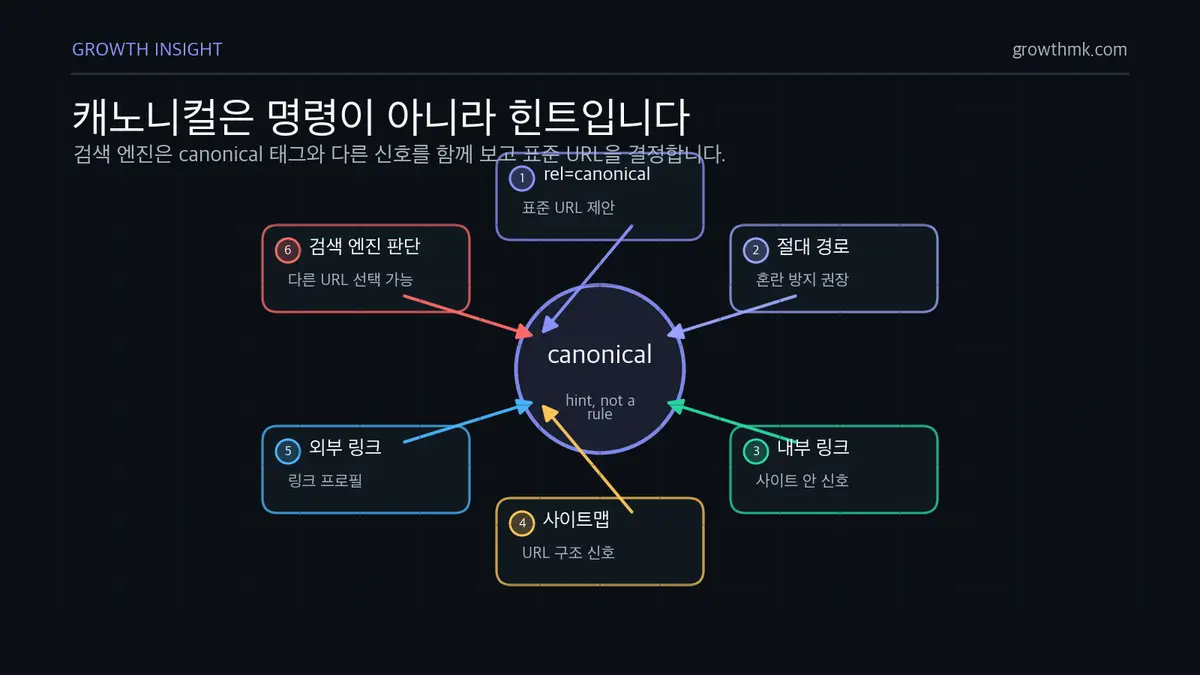
<link rel="canonical" href="https://example.com/page/" />Here, rel=”canonical” marks this link as expressing a canonical relationship, and the href attribute points to the original or standard URL. This URL can be expressed as either an absolute path or a relative path, but using an absolute path with the full URL is strongly recommended to avoid confusing search engines.
Technically, a canonical tag functions as a hint, not a directive. That means search engines are likely to honor it, but they make their final decision by weighing it alongside other signals. Google’s own documentation states plainly that “canonicalization is a hint, not a rule, and Google may choose a different page as canonical.”
Search engines evaluate internal link patterns, sitemap information, and external link profiles together to decide which URL actually gets indexed.
Duplicate Content and Why the Canonical Tag Matters
What Causes Duplicate Content
There are various reasons duplicate content shows up on a website. The most common cause is a range of URL variants, such as:
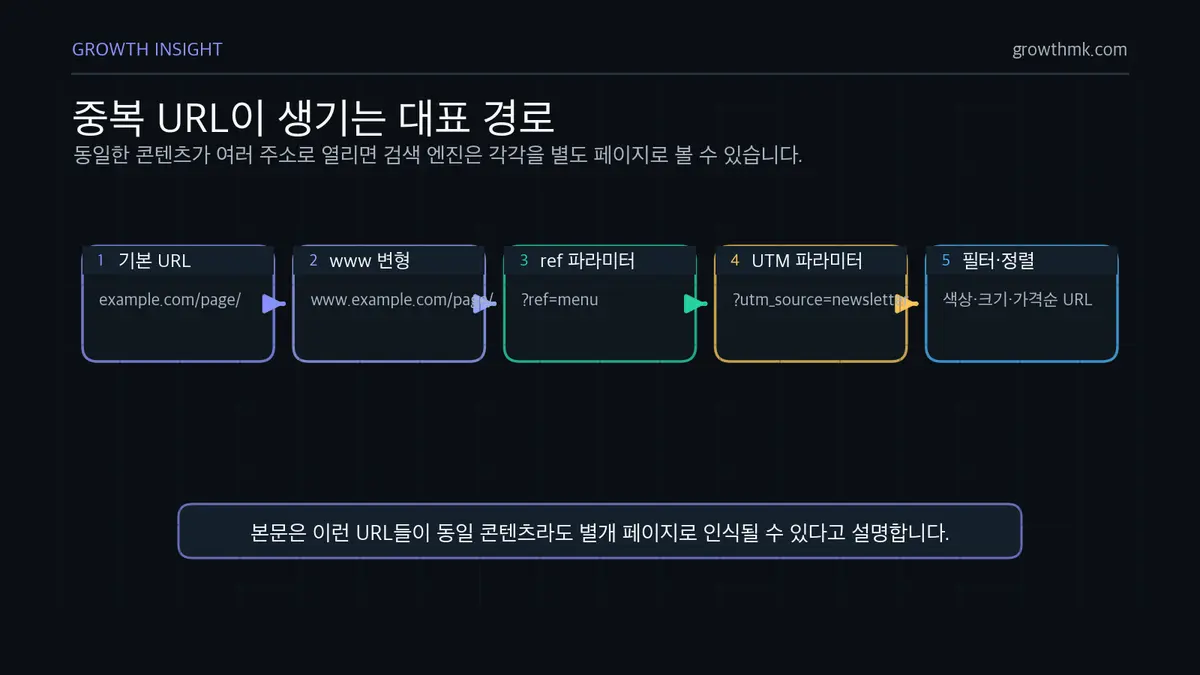
https://example.com/page/
https://www.example.com/page/
https://example.com/page/?ref=menu
https://example.com/page/?utm_source=newsletter
All of these URLs serve identical content, but a search engine may treat each one as a separate page. Duplicate content problems get even worse on e-commerce sites, where a product often appears under multiple categories, or where the URL changes based on filtering and sorting options.
How Duplicate Content Affects SEO
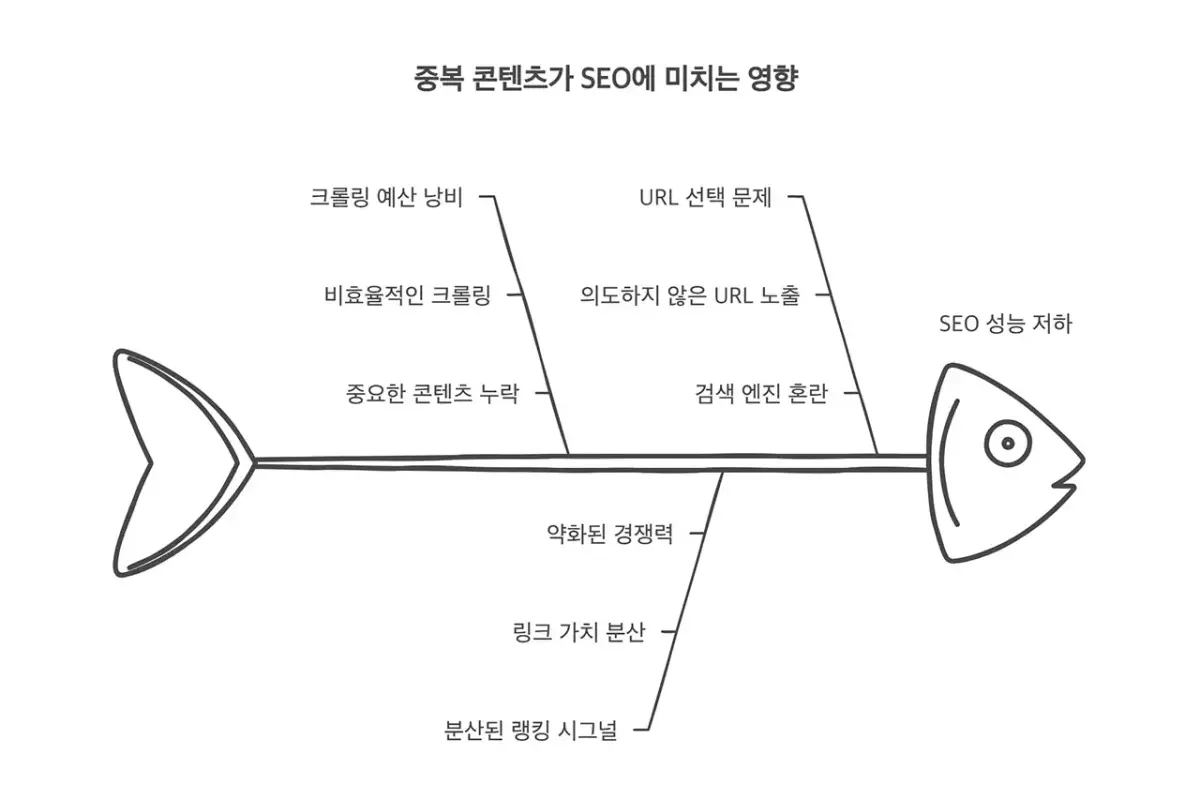
Duplicate content has several negative effects on search engine optimization.
First, it wastes search engine crawl budget. The crawl budget allocated to each website is limited, so if resources get spent crawling duplicate pages, important content may not get indexed properly.
Second, page ranking signals get diluted. When identical content exists at multiple URLs, link value and other SEO signals get split up, weakening competitiveness in search results.
Third, it becomes harder for the search engine to decide which version of a page to display in results, which can cause an unintended URL to show up instead.
These problems reduce a website’s search visibility and can ultimately lead to less organic traffic. So effectively managing duplicate content is an important part of any SEO strategy.
How the Canonical Tag Solves This
The canonical tag elegantly solves the duplicate content problem. It lets a website owner explicitly specify which of several URL versions should be treated as the “standard” one that search engines should prioritize. It’s a real advantage: it provides a clear signal to search engines without hurting the user experience.
Using a canonical tag delivers benefits like:
- Consolidating ranking signals into a single URL, strengthening competitiveness in search results
- Improving crawling and indexing efficiency
- Controlling which URL version appears in search results
- A degree of protection against content scraping (unauthorized copying)
Scenarios for Using a Canonical Tag
The canonical tag is useful in a wide range of situations.
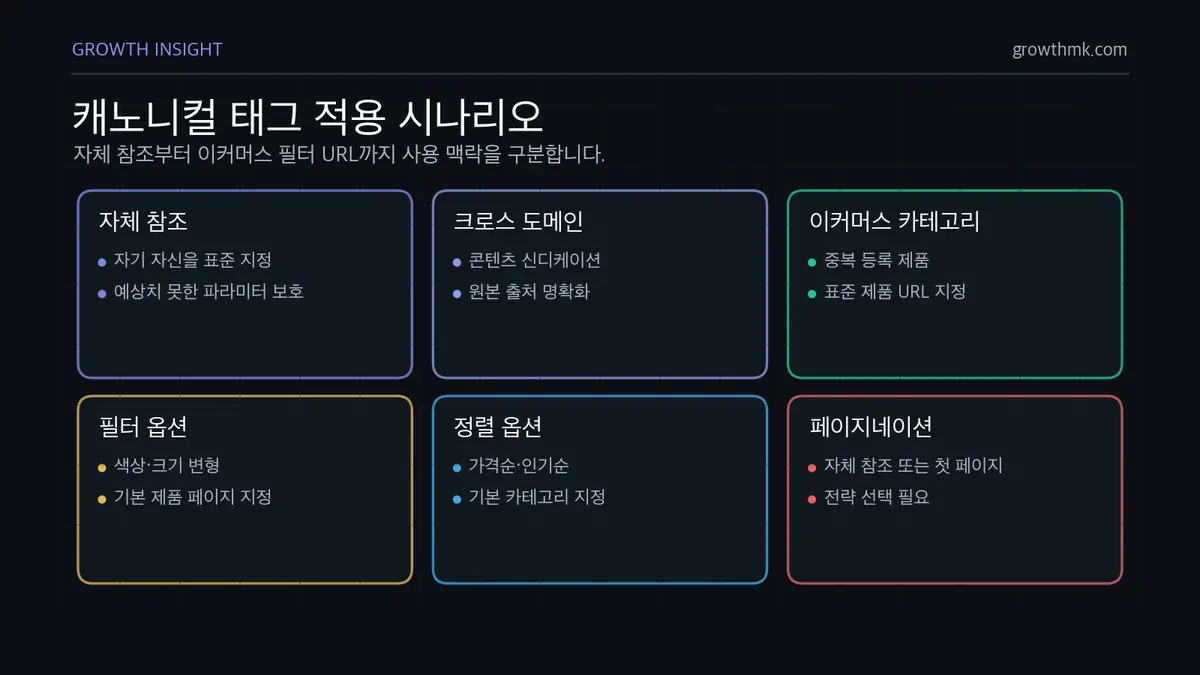
Self-Referencing Canonical
A self-referencing canonical is when a page includes a canonical tag that points to itself. This strengthens URL standardization, helping search engines recognize multiple variants of the same page as one and the same.
It also protects a page from unexpected parameters or session IDs added by a user or system. It’s also effective at preventing what’s known as canonical hijacking — another site claiming your content as its own.
For these reasons, applying a self-referencing canonical to every web page is a widely recommended baseline best practice among SEO experts.
Cross-Domain Canonical
A cross-domain canonical designates a page on a different domain as the original. This is especially useful in content syndication scenarios, where the same content is distributed across multiple sites and you need to clearly identify the original source.
On internationalized websites that use a different domain for each language, it’s used to define the relationship between the different language versions.
It’s also useful for separating a development or staging environment from a production environment — you can set a cross-domain canonical tag so the search engine doesn’t treat the two as duplicate content, and designate the live production page as the original.
Use on E-Commerce Sites
The canonical tag plays a particularly important role on e-commerce platforms like online shopping sites. When a product is registered under multiple categories, you can designate one standard product URL as the canonical across the different category URLs, preventing confusion for search engines.
When filtering options like color or size get reflected as URL parameters, you can also designate the base product page as canonical, solving the problem of countless URL variants being generated.
Similarly, for URLs that change based on various sort options — by price, by popularity, and so on — it’s common to designate the base category page as canonical.
For paginated product listing pages, you can either use a self-referencing canonical on each page, or choose a strategy where the first page is designated as canonical.
Comparing Related Concepts
Canonical Tag vs. a 301 Redirect
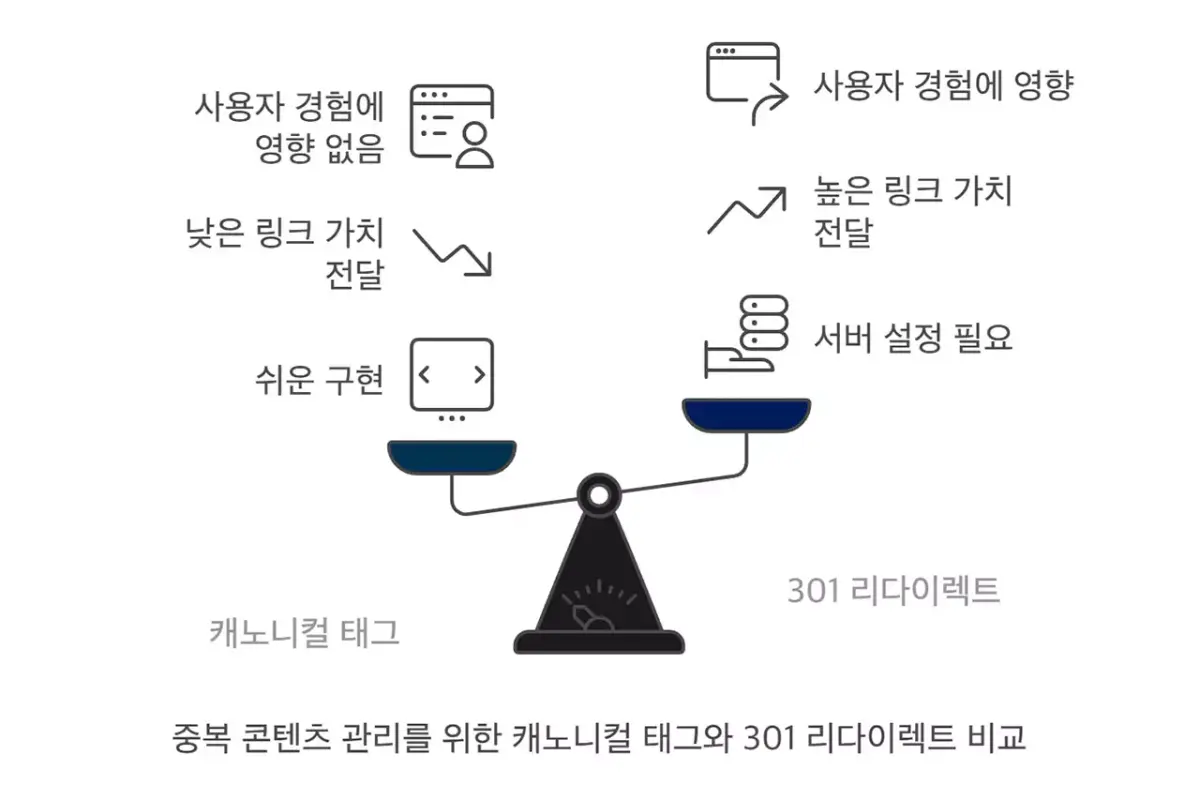
Both the canonical tag and a 301 redirect are tools for solving duplicate content problems, but they work differently and suit different situations. A 301 redirect signals that a URL has permanently moved to a different URL, and both users and search engines automatically get sent to the new URL.
A canonical tag, by contrast, only tells the search engine the original URL, without affecting the user experience.
A 301 redirect fits situations involving a permanent change, such as a URL structure change, a domain migration, or a website consolidation. It has the advantage of directly passing link value and guaranteeing that users always land on the latest URL.
But it requires a server configuration change, and it comes with the added complexity of managing redirects for every old URL.
A canonical tag, on the other hand, is ideal when you need multiple URL variants to exist — for filtering and sorting options, session IDs, tracking parameters, and so on. It’s easy to implement, since it only requires adding one line to the HTML head section, and it has the advantage that users can still access every URL version.
That said, it can pass link value slightly less efficiently than a 301 redirect, and there’s no guarantee the search engine will always follow the canonical instruction.
The key question to consider when choosing is: “Does the user need to notice this change too?” If, from a user experience standpoint, every variant URL needs to remain accessible, a canonical tag is the better solution; if you want to always send users to the new URL, a 301 redirect is the better fit.
Canonical Tag vs. the Meta Robots Tag
Among meta robots directives, the noindex directive in particular is often compared with the canonical tag. Used in a form like <meta name=”robots” content=”noindex, follow”>, this tag directly instructs a search engine not to index a given page. It acts as a stronger signal than the canonical tag. According to Google, a page with noindex applied is excluded from search results entirely, regardless of whether other sites link to it.
The noindex tag suits pages you want excluded from search results entirely — internal search results pages, cart pages, user account pages, or duplicate pages that need to be audited out, for example.
A canonical tag, by contrast, doesn’t remove a page from search results entirely — it specifies which URL version should be indexed.
Using both tags together is generally not recommended. Applying noindex and a canonical tag at the same time sends contradictory signals — noindex says “don’t index this page,” while the canonical tag says “this URL should be indexed.”
In this situation, Google generally prioritizes the noindex directive, but this kind of conflicting signal can hurt SEO. In fact, Google recommends against using noindex for canonicalization purposes, and suggests rel="canonical" as the preferred solution.
So it’s important to choose the right tag based on the page’s purpose and the outcome you want. If you want a page to never appear in search results at all, use noindex; if the page should remain accessible but only a specific URL version should show up in search results, use a canonical tag.
Common Mistakes and Best Practices
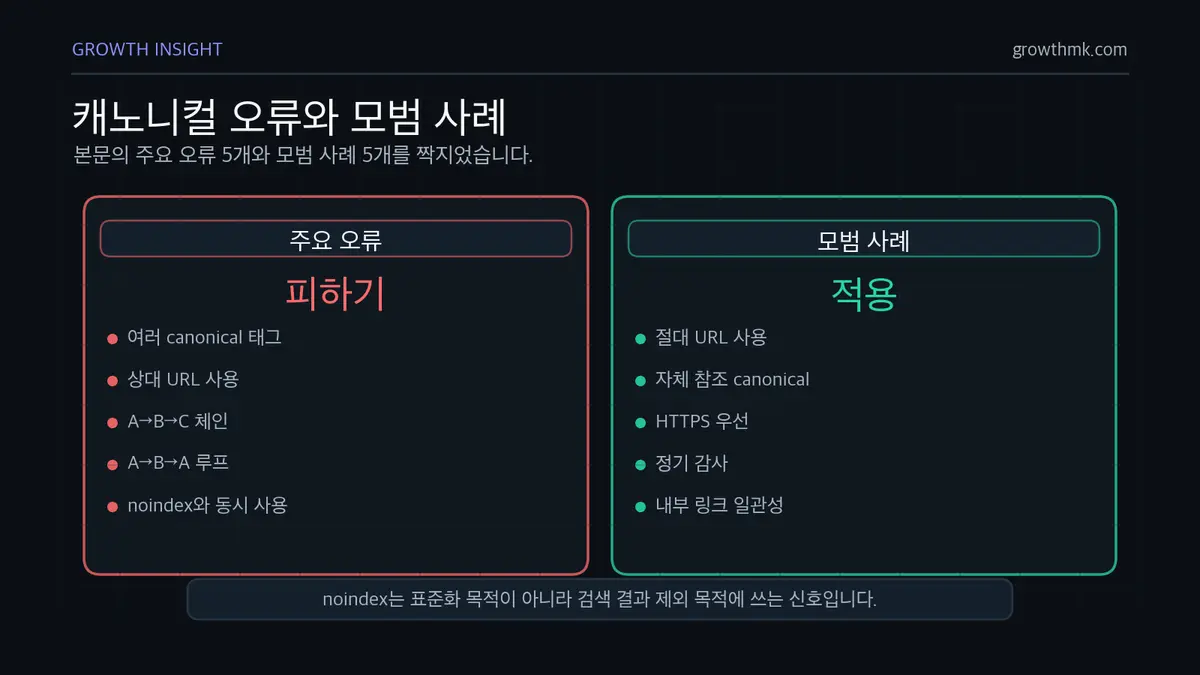
Common Mistakes
- Using multiple canonical tags: having more than one canonical tag on a single page confuses search engines.
- Using a relative URL instead of an absolute one: search engines may misinterpret it.
- Canonical chains: a canonical relationship linked across multiple hops, like A→B→C, can confuse search engines.
- Canonical loops: a circular reference, like A→B→A.
- Using noindex and a canonical tag together: this can send contradictory instructions.
Best Practices
- Use absolute URLs: always use the full URL to avoid confusion.
- Apply self-referencing canonicals: set a self-referencing canonical as the default on every page.
- Prioritize HTTPS: if both HTTP and HTTPS versions exist, designate HTTPS as the canonical.
- Audit regularly: periodically check that your canonical tag implementation is correct.
- Keep internal links consistent: use the canonical URL in internal links as well.
Related Reading
- The Complete Technical SEO Guide: A Practical Hub Connecting Crawling, Indexing, Rendering, Speed, and Structure
- Why Sitemaps Matter, and 3 Ways to Generate One
- How to Fix Open Graph Tag Errors
- What Is an H1 Tag, and How Do You Use It Correctly?
- What Are SSL Certificates and HTTPS, and Why Do They Matter?
If you’d like to apply this to your own business — you can see Growth’s approach on our SEO service page, and if you need a specific situational diagnosis, reach out through Contact Us. We’ll answer based on the one customer who becomes revenue — not the volume of traffic.
Frequently Asked Questions (FAQ)
If I add a canonical tag, will Google always choose that URL as the standard?
No. Because a canonical tag works as a hint rather than a rule, Google can weigh it alongside other signals — internal link patterns, the sitemap, external links — and choose a different URL as the standard instead. That said, consistent canonicalization and clean internal linking significantly increase the odds that Google chooses the URL you intended.
Should I use a canonical tag or a 301 redirect?
The key question is: “Does the user need to notice this change too?” If users also need to move to the new URL — a domain migration or URL structure change, for instance — a 301 redirect fits best. If every URL variant needs to stay accessible — filters, sorting, tracking parameters — a canonical tag fits best.
Can I use noindex and a canonical tag together?
It’s not recommended. The two tags send contradictory signals — “don’t index this” versus “index this URL.” Google recommends using rel="canonical" instead of noindex for canonicalization purposes, and a page with noindex applied gets excluded from search results entirely.
Does the canonical URL need to be an absolute path?
Yes. Google recommends using an absolute path that includes the full domain, rather than a relative path. A relative path risks being misinterpreted by search engines, and canonical chains (A→B→C) or loops (A→B→A) also cause confusion, so they should be avoided.
Marketing Insights
Marketing insights, delivered weekly
Practical growth and GEO/B2B marketing insights, summarized in your inbox every week.
Subscribe for insights