Why Sitemaps Matter — and 3 Ways to Create One
 임재복
임재복
Without a sitemap, can a search engine really understand your website’s structure?
If a page you want indexed isn’t showing up in search, or important content seems to be missing from results, the culprit may simply be that the search engine never indexed it properly in the first place.
A sitemap is the tool that helps search engines discover and index every page on your site quickly and accurately. Used well, it doesn’t just maximize search visibility — it improves the user experience too.
In this article, we’ll walk through what a sitemap is, why it matters, and how to build and maintain one effectively.
If you’re looking to strengthen your site’s search optimization and boost performance, read on.
What Is a Sitemap?
A Map of Your Website’s Structure
Every company and individual running a website wants that site to surface smoothly in search results.

But search engines don’t automatically recognize every page on a website — and that’s exactly where a sitemap comes in. Google itself notes that sitemaps help because Googlebot may not discover pages that are part of a large site, or pages that aren’t well-linked from other pages.
A sitemap is a key element that helps search engines understand your site’s structure.
When search engines can read it, they index your site more accurately, which maximizes your visibility in search.
Used well, a sitemap doesn’t just lift SEO performance — it improves the user experience too.
XML vs. HTML Sitemaps: What’s the Difference?
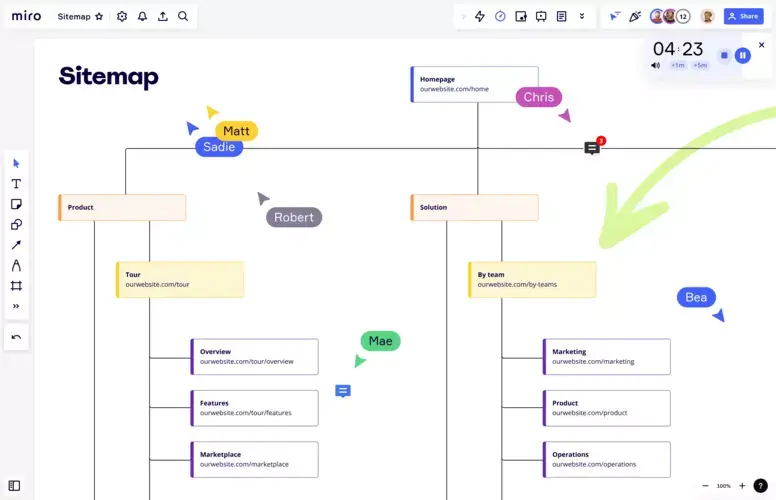
A sitemap is a file that lists every URL on a website along with its hierarchical structure.
It helps search engines index specific pages smoothly, and it’s especially useful for sites with lots of dynamic content or pages buried deep in the site architecture.
Sitemaps generally fall into two types: XML and HTML.
✅ XML Sitemap
A file that helps search engines index your website effectively. It helps search bots crawl and index your site quickly, and it’s used primarily for SEO optimization.
✅ HTML Sitemap
A page that helps visitors find what they’re looking for more easily within your site. It’s typically used on larger websites and helps visitors grasp your site’s overall structure at a glance.
These two types of sitemaps serve different purposes, but used together, they create an optimal experience for both search engines and users.
Why Do Sitemaps Matter?
A Better User Experience
A sitemap helps site visitors find what they’re looking for quickly.
When a site’s structure is complex or it has a lot of pages, visitors are more likely to bounce because they can’t easily find a specific page. A sitemap solves that: it lets users grasp the overall structure of your site and jump straight to the page they want.
The SEO Payoff
Search engines crawl your website and index new content as they go.
But since they don’t automatically find every single page, important pages run the risk of being left out of search results entirely.
A sitemap is essential to prevent that.
With a sitemap in place, search engines understand your site’s structure more clearly, which improves crawl efficiency.
That’s especially critical for large websites, where it’s essential for keeping search visibility stable.
Optimizing your sitemap can also help specific pages get prioritized in search results.
Analyzing and Improving Your Site Structure
Building a sitemap is also a chance to take a fresh look at your website’s overall structure — an opportunity to clean up unnecessary pages and improve your internal linking along the way.
How Sitemaps Affect Search Optimization (SEO)
Search engines crawl your website and index new content as they go.
But since they don’t automatically find every single page, important pages run the risk of being excluded from search results.
A sitemap is essential to prevent that.
With a sitemap in place, search engines understand your site’s structure more clearly, which improves crawl efficiency.
This matters most for large sites or sites that update frequently, where it’s essential for keeping search visibility stable.
Optimizing your sitemap can also help specific pages get prioritized in search results.
For B2B companies, a well-built sitemap is a real advantage for boosting your website’s visibility in search engines.
Including the product pages or service pages customers look for most often lets search engines recognize and index them faster.
How to Create a Sitemap
3 Required Elements
When building a sitemap, you need to get the core components exactly right.

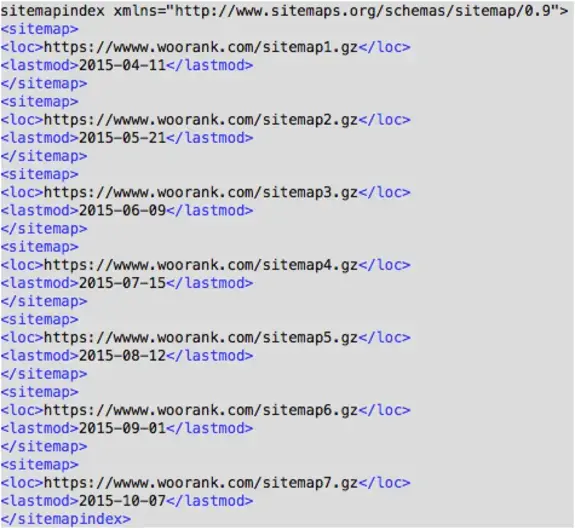
A sitemap has three required elements. The first is each page’s URL. The sitemap protocol standard (sitemaps.org) specifies that only the <loc> (page URL) inside each <url> entry is required — update frequency (changefreq) and priority (priority) are both optional.
Every important page needs to be in your sitemap, and search engines need to be able to access it easily.
The second element is update frequency.
Flagging pages that change often helps search engines crawl them more promptly.
The third is priority.
This helps search engines understand which pages on your site matter most.
3 Ways to Create a Sitemap
✅ Build it manually

Writing your XML file by hand gives you precise control and a clear picture of your site’s structure.
But for large sites with a lot of pages, hand-building a sitemap gets tedious and time-consuming fast.
✅ Use an automated tool: Tools like Screaming Frog and XML-Sitemaps.com automatically crawl your website and generate a sitemap for you.
This saves time and effort. The tradeoff is that fine-grained control — excluding specific pages, setting priority levels — can be harder to achieve.
✅ Use your CMS’s built-in feature: CMS platforms like WordPress and Wix offer automatic sitemap generation out of the box.
Convenient for site administrators, but you’re limited to whatever functionality the CMS platform provides.
How to Register and Maintain a Sitemap
Once you’ve built your sitemap, you need to register it so search engines recognize it properly. The most effective way to do that is through Google Search Console and Bing Webmaster Tools.
- Submit your sitemap in Google Search Console
- Log in to Google Search Console.
- In the “Sitemaps” menu, enter your new sitemap URL and submit it.
- After submitting, check the indexing status and fix any errors that appear.
- Submit your sitemap in Bing Webmaster Tools
- Log in to Bing Webmaster Tools.
- In the “Add Sitemap” menu, enter your sitemap URL and submit it.
Why Ongoing Sitemap Maintenance Matters
Registering your sitemap isn’t the end of the job — regular updates and maintenance are essential.
Whenever your site’s structure changes or new pages go live, update your sitemap right away so search engines can quickly recognize your latest pages.
It’s also important to clearly specify your sitemap’s location in your robots.txt file. Google’s official guide recommends adding a single line — Sitemap: https://example.com/sitemap.xml — to robots.txt alongside your Search Console submission.
Making it easy for search engines to find your sitemap further boosts crawl efficiency.
Worth Reading Next
- The Complete Technical SEO Guide: A Practical Hub Connecting Crawling, Indexing, Rendering, Speed, and Structure
- The Canonical Tag
- How to Fix Open Graph Tag Errors
- What Is the H1 Tag, and How Do You Use It Correctly?
- What Are SSL Certificates and HTTPS, and Why Do They Matter?
Want to apply this to your own business? — See how Growth approaches it on our SEO services page, or if you need a diagnosis of your specific situation, reach out through Contact us. We’ll answer with an eye on the one customer who becomes revenue — not just traffic volume.
Frequently Asked Questions
What’s the difference between an XML sitemap and an HTML sitemap?
An XML sitemap is an SEO file that helps search bots crawl and index pages quickly. An HTML sitemap is a user-facing page that helps visitors grasp your site’s structure at a glance. They serve different purposes, but used together, they create the best possible experience for both search engines and users.
What elements are absolutely required in a sitemap?
Under the sitemap protocol standard, the only required element is each page’s URL (<loc>). Update frequency (changefreq) and priority (priority) are optional — so above all, make sure every important page’s URL is complete and accurate.
How do I register a sitemap with search engines?
The most effective way is to submit your sitemap URL through Google Search Console and Bing Webmaster Tools. You can also add a single Sitemap: line to your robots.txt file to point to its location — search engines will pick it up automatically on their next crawl.
Does having a sitemap guarantee every page gets indexed?
No. A sitemap doesn’t guarantee indexing — it’s a tool that increases the odds search engines will discover your important pages. It’s especially effective at reducing missed discovery on sites that are large, lack internal links, or update frequently.