Why Image Search Optimization Matters, and How to Do It
 임재복
임재복
Image search optimization means applying search-visibility strategy not just to your text content, but to your images too — raising your website’s overall visibility and traffic in the process.
As search behavior keeps shifting, images have moved well beyond a simple visual aid and become a genuine channel for search traffic in their own right.
With visual-first search technologies like Google Image Search and Naver SmartLens advancing rapidly, images themselves are becoming a starting point for content discovery.
That shift means both companies and individuals need to treat image content strategically, and image search optimization has become a must-have piece of search engine optimization (SEO).
Why Image Search Optimization Matters
Steadily Rising Traffic
Users increasingly prefer a visual approach to absorbing information.
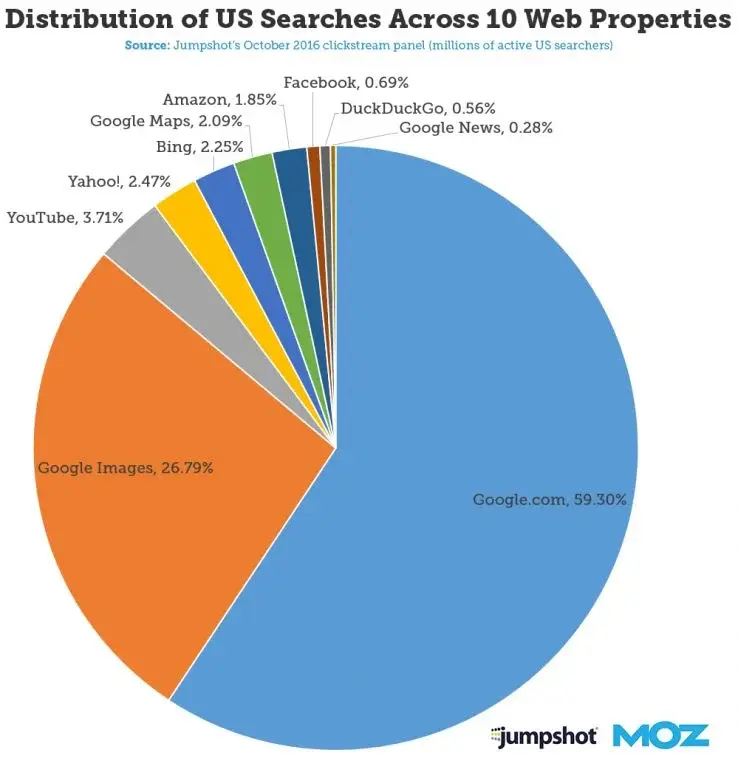
In fact, a Moz report found that more than about 20% of all search comes from image search. Given that trend, image optimization has moved well past being “supplementary content” to become a primary driver of website traffic.
In fields where visuals matter — online shopping, blogs, review content — images directly influence clicks and time on page.
An online store with unoptimized product images is at a real disadvantage in a competitive landscape full of similar products.
Growing image search traffic isn’t just a shift in the data — it’s a shift that changes the entire direction of your content strategy.
How Image Search Optimization Affects Your Overall SEO Strategy
Image search optimization isn’t just about the image itself.
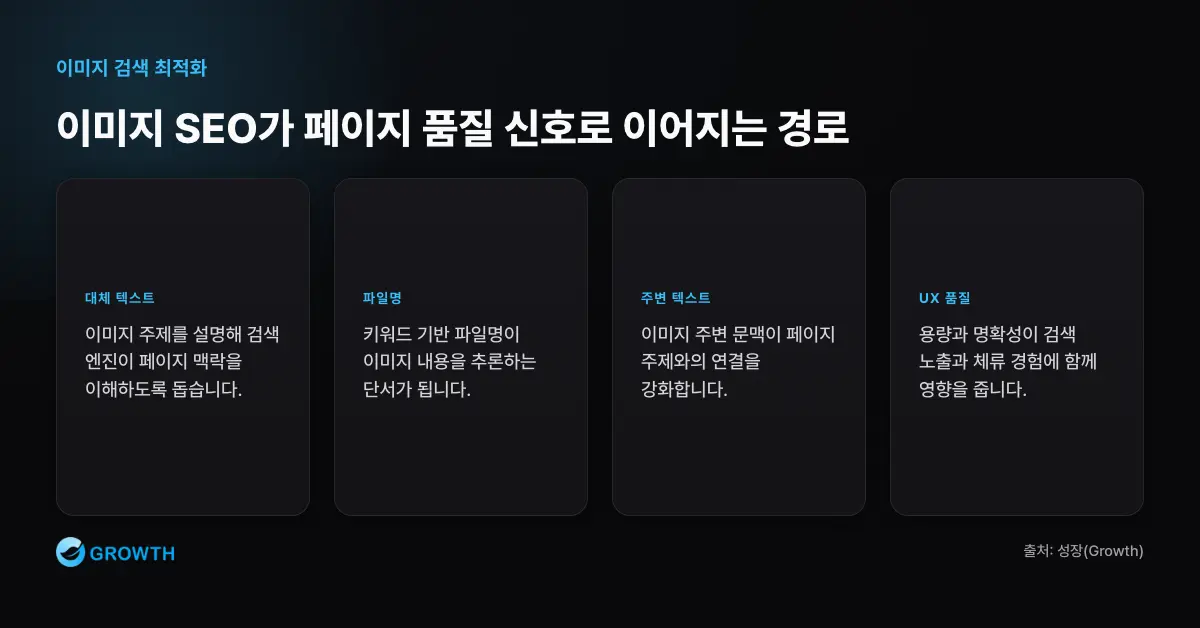
It’s a significant SEO factor that affects your entire site’s search ranking.
Add proper alt text to your images, use keyword-driven file names, and align the surrounding text and context around the image — and Google or Naver will understand your page’s topic far more clearly.
That, in turn, boosts your page’s overall credibility and visibility in search rankings.
Search engines also weigh a page’s UX quality as an evaluation criterion. Images that are needlessly large or unclear in content are penalized in search visibility.
Image search optimization is a strategic lever that lifts your entire page’s quality score — far beyond just driving traffic to that single image.
How to Use Alt Text Correctly for Image Search Optimization
One of the core factors determining image search optimization is alt text.
“Alt” stands for “alternative” — it’s the text description that displays in place of an image when the image fails to load.
Far from being a minor supporting caption, it’s key data search engines rely on to understand an image, and it’s an indispensable component of image SEO.
Google and Naver look at what’s in your alt attribute to determine what topic an image relates to. That means accurate alt text genuinely improves your odds of showing up in search. Google Search Central states this explicitly: “Google uses alt text along with computer vision algorithms and the content of the page to understand the subject matter of the image.”
The Mechanism That Lets Search Engines “Read” Images
Search engines can’t directly perceive the visual content of an image.

That’s why a text description is necessary to convey what an image means — and that’s exactly the job the alt tag does.
This description also plays a central role in how search engines interpret and categorize images.
For example, if you set a product image’s alt text to “black leather crossbody bag for women,” that image becomes far more likely to appear in search results related to that keyword.
For users, alt text is also how a screen reader conveys the meaning of an image, and it improves your website’s accessibility score.
Modern search algorithms increasingly weigh web inclusivity and accessibility as evaluation criteria. That’s exactly why it matters to write alt text that considers the full context of your content, rather than simply stuffing in keywords.
3 Core Strategies for Writing Alt Text That Boosts Search Visibility
Alt text is more than a simple description — it’s a strategic tool for driving search traffic. Ahrefs also recommends keeping alt text concise and accurate rather than forcing keywords into it. Keep the following principles in mind for effective alt text.
First, accurately describing the image’s content is the foundation.
Skip words like “image,” “photo,” or “picture,” and build your sentence around the core keyword instead.
Second, work keywords in naturally. Include keywords with search in mind, but avoid awkward or excessive stacking.
For example, “A graph illustrating SEO optimization results” scores better for search relevance than a keyword-stuffed phrase like “SEO, optimization, search, image.”
Third, make sure the image’s context connects to the page’s topic.
Understand what the image is supporting and what message it’s meant to convey before writing your alt text — that’s what lets search engines judge your page’s expertise and relevance.
Well-written alt text doesn’t just help with image search results — it boosts your entire page’s search ranking and strengthens content credibility. It’s well worth the extra care.
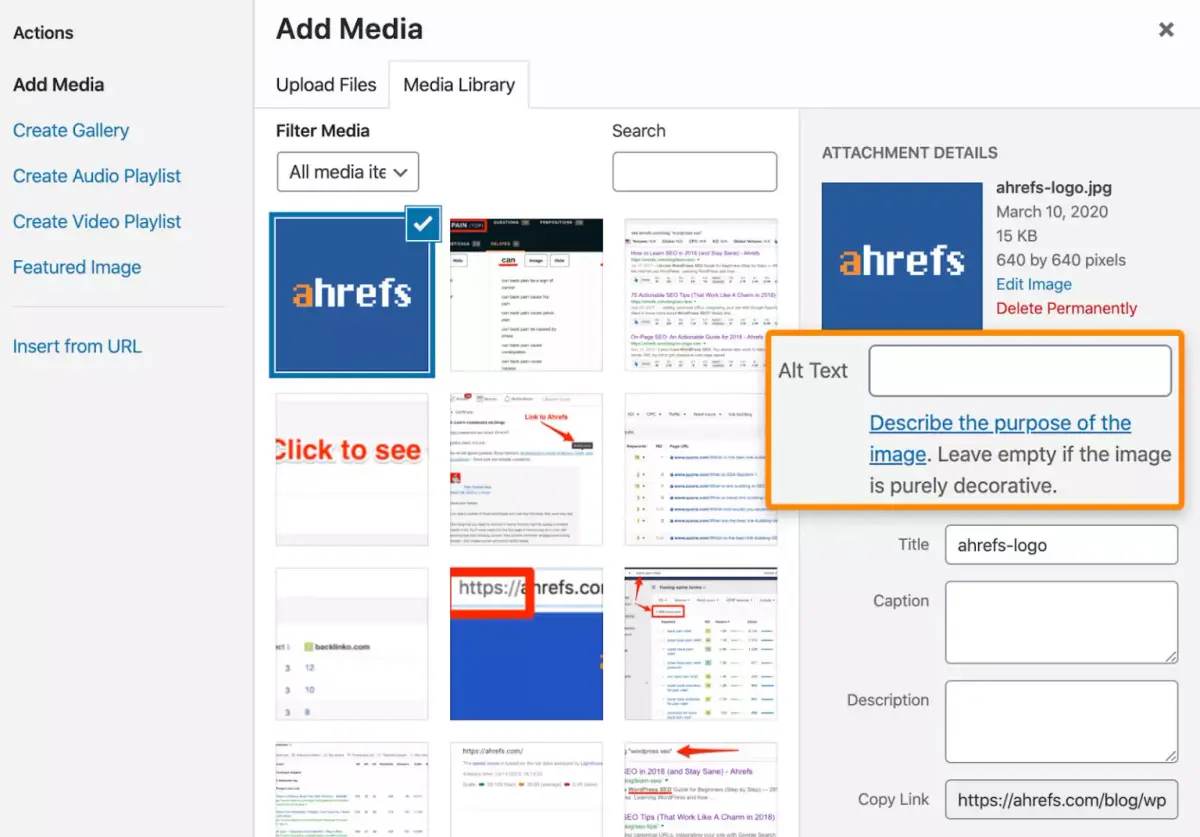
Alt Text Mistakes to Avoid — and What to Do Instead
Plenty of site owners fill in alt tags with repetitive, boilerplate text.
One of the most common mistakes is dropping in meaningless labels like “image1,” “banner2,” or “photo” that have nothing to do with the actual content.
That delivers zero value to search engines — and can actually cause them to disregard the image entirely.
The next mistake is stuffing in an excessive list of keywords.
Alt text that’s just a pile of keywords with no real sentence — something like “SEO, marketing, search engine, traffic, keywords” — can be flagged as spam, and it can actually drag down your search score.
The right approach is to express the image’s core message in a short, specific sentence.
Something like “a pie chart showing online marketing performance” or “a chart analyzing website traffic results” — a sentence that genuinely describes the image while naturally including relevant keywords — is the way to go.
On pages where visual information carries real weight, like blogs or product detail pages, the most effective approach is to write alt text that fills in information the image itself can’t convey.
File Name Strategy for Image Search Optimization
To do image search optimization properly, you need a deliberate keyword strategy not just in your image description, but in your file names too.
Search engines infer an image’s content from its file name and analyze how closely it relates to surrounding text.
Skip meaningless number strings or auto-generated names, and use a deliberate, keyword-focused file name instead — it genuinely improves your odds of showing up in search.
Why “seo-image-optimization.jpg” Outperforms “image001.jpg” in Search
Many websites make the mistake of simply keeping the default file name assigned when an image is uploaded.
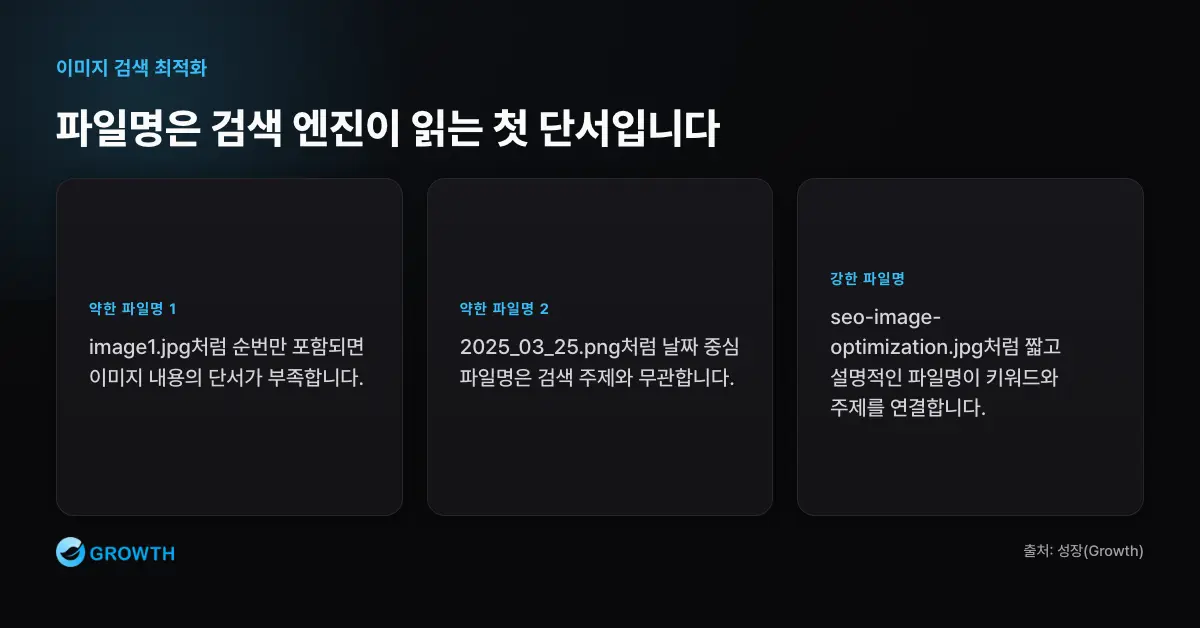
A file name that’s just a date or sequence number — “image1.jpg,” “2025_03_25.png” — conveys zero meaning to a search engine.
Search bots simply can’t infer anything about that image’s content from a name like that, and they have no basis for deciding whether it’s worth surfacing in search.
By contrast, a specific, keyword-focused file name like “seo-image-optimization.jpg” sends a clear signal to search engines. Google itself recommends short, descriptive file names over something like “IMG00023.JPG,” since the file name gives a real clue about the image’s subject.
If you’re writing a blog post about “image search optimization” and give your image file a name that includes that keyword, you strengthen the connection between the page’s topic and the image — and your search visibility score rises along with it.
Google Image Search analyzes file names together with alt text and surrounding text as a combined signal. That’s exactly why a file name should be treated as part of your content strategy, not a purely technical afterthought.
What to Keep in Mind When Setting Keyword-Based File Names
There are a few basic principles to follow when naming your files.
First, using English is generally the norm, and separating words with a hyphen (-) instead of spaces helps search engines parse the name accurately.
Second, a concise combination of core keywords works better than an overly long phrase.
For example, “search-engine-image-seo.jpg” is a specific yet structurally clean file name.
Third, give each file a unique name to avoid duplicates — that prevents images from being mistaken for one another.
This strategy is especially valuable on image-heavy platforms like blogs, online stores, and portfolio sites, where it strongly reinforces content distinctiveness and search traffic.
Don’t treat this as a purely technical detail — design your file names systematically, factoring in your brand name, product name, and topical keywords. That’s the foundation of image search optimization.
The Hidden Variables in Image Search Optimization
Image search optimization isn’t just about content — the technical side matters just as much.
Among those factors, page speed directly affects both search rankings and user bounce rates, and images typically account for a large share of overall page weight.
That’s why format, resolution, and loading method all need to be managed systematically. It’s not enough to just use nice-looking images — you need optimization that considers both search engines and users together.
Image Load Speed Is a Technical Core of SEO
Your website’s load speed has a direct effect on search rankings.
When page load time stretches past two seconds, user bounce rates spike sharply, and search algorithms are reluctant to rank a slow site near the top.
Uploading a high-resolution image without compressing it first slows down your entire page load — and hurts your SEO score along with it.
So file-size optimization isn’t just a technical detail — it’s a genuine prerequisite for search traffic.
The fix starts with resizing and compressing images to an appropriate size before you upload them.
JPEG beats PNG, and next-generation formats like WebP or AVIF beat JPEG, for improving load speed — Google actively recommends them. These formats shrink file size without sacrificing image quality, which search engines evaluate favorably.
On image-heavy pages like blogs or online stores, applying lazy loading — so images only load once a user actually scrolls to that spot — dramatically speeds up initial page load.
Technical Optimization Through Image CDNs and Format Strategy
Using a CDN (Content Delivery Network) is also an effective way to deliver images faster.
An image CDN serves images from the server closest to each user, cutting down load time and keeping performance stable even for a global audience or a high-traffic page.
Modern formats like WebP and AVIF are the image optimization approach Google itself recommends, and they’re also a proven way to satisfy technical optimization and search visibility at the same time.
As you can see, image optimization goes well beyond design — it’s a sophisticated strategic effort that shapes both SEO and user experience.
Fine-tuning the technical side genuinely gives you an edge in how search algorithms weigh your content. To do image search optimization right, you need a hybrid strategy that addresses content and technology together.
Worth Reading Next
- The A-to-Z Guide to Search Engine Optimization Marketing
- How to Write Title Links That Boost Search Rankings (+ Prompts)
- SEO Marketing Case Studies — Content Strategy Built on Keyword Analysis
- Video Search Optimization: How to Use YouTube Titles, Descriptions, and Tags
- An SEO Strategy for Infographics and Visual Content
Want to apply this to your own business? — See how Growth approaches it on our SEO services page, or if you need a diagnosis of your specific situation, reach out through Contact us. We’ll answer with an eye on the one customer who becomes revenue — not just traffic volume.
Frequently Asked Questions
Which matters more — alt text or file name?
Both matter, but they play different roles. Alt text is the core data search engines use to understand an image’s subject, and it’s also an accessibility feature for screen-reader users; the file name is a supporting clue that hints at the image’s content. Since Google uses alt text alongside page content and computer vision — and also references the file name — writing both descriptively is the most effective approach.
Is it good to pack a lot of keywords into alt text?
No. Overloading alt text with keywords gets flagged as spam and can actually hurt your search score. Rather than a bare keyword list like “SEO, marketing, search engine, traffic,” write a sentence that accurately describes the image while naturally including a core keyword — something like “a pie chart showing online marketing performance.”
Is it okay to use Korean in image file names?
English is generally recommended where possible. Separate words with a hyphen (-) instead of spaces, and favor a concise combination of core keywords over an overly long phrase. A file name like “search-engine-image-seo.jpg,” for example, is specific yet structurally clean, sending a clear signal to search engines. Also make sure each file name is unique to avoid images being mistaken for duplicates.
Does image file size (load speed) affect search rankings?
Yes, directly. Slower page loads drive up bounce rates, and search algorithms are reluctant to rank a slow site near the top. Resize and compress images to an appropriate size before uploading, prefer next-generation formats — JPEG over PNG, WebP or AVIF over JPEG — and apply lazy loading on image-heavy pages to significantly improve initial load speed.