Page Speed Optimization: Just Follow These Steps
 임재복
임재복
The brief moment your website is loading decides whether a visitor stays or leaves. Remarkably, research shows that once a page takes more than 3 seconds to load, 53% of visitors abandon it. That’s a serious problem with a direct impact on your business.
Today we’re covering website speed optimization anyone can apply, no development knowledge required. We’ve stripped out the technical jargon as much as possible and kept only tips you can actually put into practice. Optimize your speed, and you’ll improve the user experience and lift your search engine ranking at the same time.
Why Does Page Speed Matter?
The Correlation Between Page Speed and Revenue
“Time is money” hits differently in digital business. Amazon revealed the striking finding that every additional second of page load time costs it 1% in sales. For a site doing $100,000 a month in revenue, a single second of delay means a $1,000 loss every single month.
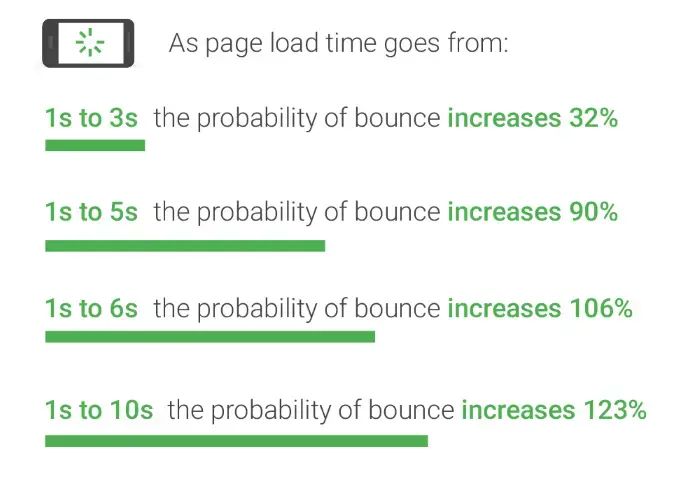
Visitor patience keeps shrinking. According to Google’s own research, bounce rate rises 32% when mobile load time goes from 1 second to 3 seconds — and by a staggering 90% at 5 seconds. Picture your prospects walking straight over to a competitor’s site instead.
One online retailer saw conversion rate rise 7% just from shaving one second off page load time. It also saw longer session times and a lower cart abandonment rate. In the end, improving website speed isn’t just about a better user experience — it’s an investment that translates directly into revenue growth.
This isn’t guesswork — it’s backed by published, real-world data. According to Google’s own developer site, web.dev’s “Why does speed matter?”, the BBC lost an additional 10% of users for every extra second of load time, Vodafone improved LCP by 31% and saw revenue rise 8%, and redBus also saw a 7% revenue increase from speed improvements. Multiple companies’ real-world numbers confirm the same proposition: speed is revenue.
The Impact on Search Engine Ranking
Google officially made page speed a mobile search ranking factor back in 2018. In 2021, the Page Experience update reinforced its importance even further. That means page speed has become a core piece of SEO strategy, not just a nice-to-have for user experience.
Google’s own “page experience” documentation states plainly that “Core Web Vitals are used in our (Google’s) ranking systems,” and that its ranking systems are designed to reward content that delivers a good page experience.
Google’s John Mueller has said explicitly, “if your pages are slow, the crawler will crawl fewer pages.” In other words, a slow website can keep Google from properly recognizing your content in the first place. No matter how good your content is, it’s useless if the search engine never sees it.
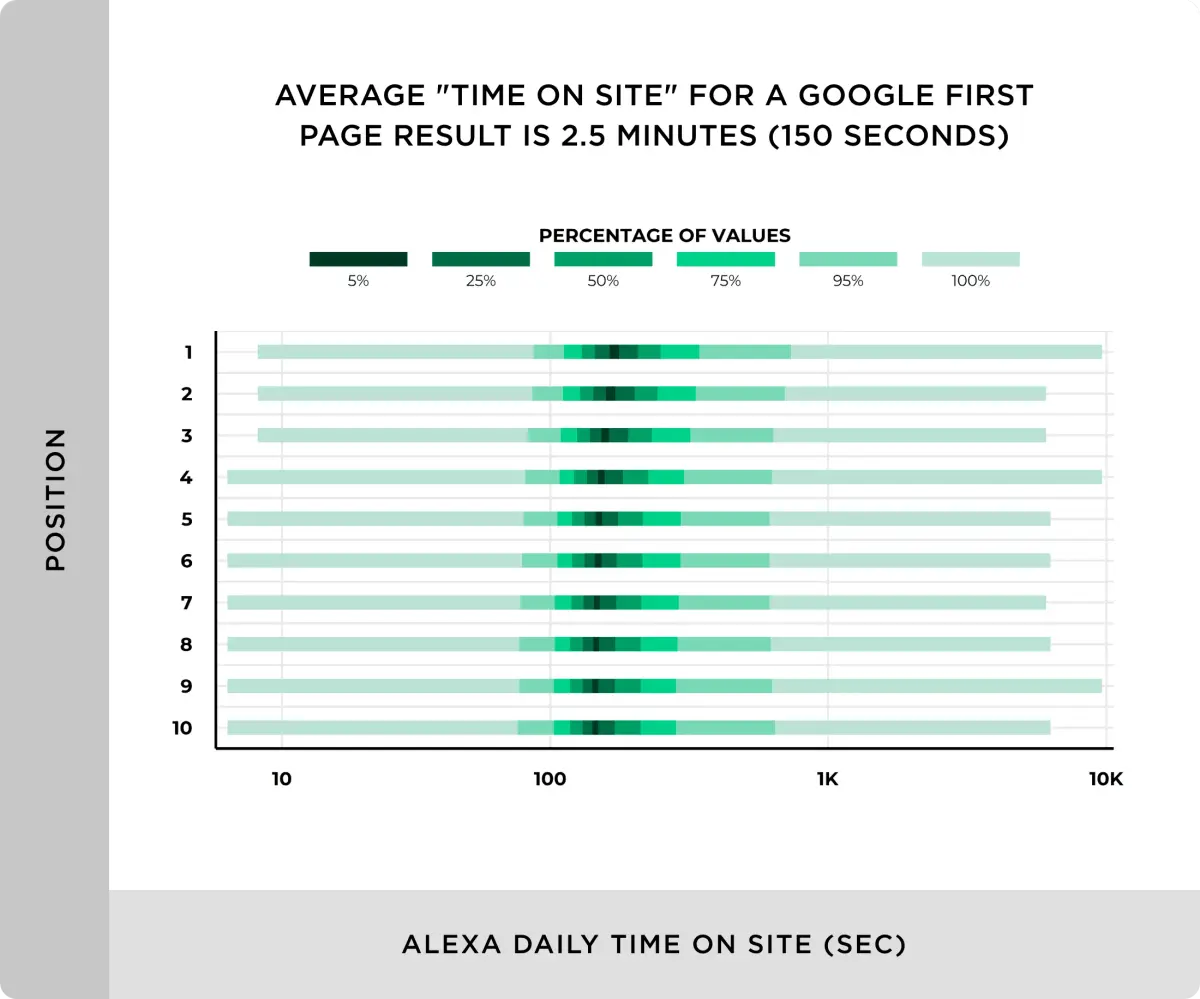
One study found that websites appearing on page 1 of Google search results had an average load time of just 1.65 seconds, compared to 4.5 seconds for sites on page 10. That’s a clear correlation between search ranking and page speed.
Page speed’s impact on SEO matters even more for highly competitive keywords. With every other SEO factor equal, the faster website wins the higher ranking. In the end, improving page speed can be seen as the first step in search engine optimization.
Page Speed Optimization, Step 1 — Measure Your Speed
Before you start optimizing, you need to accurately measure your website’s current speed. Figuring out where to start improving is the first step. With objective data, you can prioritize your work and compare how much you’ve actually improved after the fact.
Use Free Page Speed Measurement Tools
The most widely used free speed measurement tool is Google’s own PageSpeed Insights. Just enter your website’s URL, and it gives you a detailed performance score and improvement suggestions for both mobile and desktop.

Here’s how simple it is to use:
- Go to PageSpeed Insights in your browser.
- Enter the URL of the page you want to analyze.
- Click “Analyze.”
A few seconds later, you’ll get a performance score from 0 to 100, along with a detailed breakdown. A score of 90 or above is considered good, while anything under 50 needs immediate attention.
Besides PageSpeed Insights, free tools like GTmetrix and WebPageTest are also available. Each tool measures from a slightly different angle, so using two or more together gives you a more comprehensive picture.
GTmetrix, in particular, records and shows you a visual filmstrip of your page loading, which makes it intuitive to understand exactly what a visitor actually experiences. It also gives you a graph showing exactly where the biggest delays happen during load.
It’s a good habit to measure your key pages’ speed regularly, roughly once a week. Prioritize checking your highest-traffic pages first — homepage, product pages, blog posts.
Understanding Your Page Speed Results
Among all the metrics a speed measurement tool provides, which ones should you actually focus on? Perfecting every single metric simply isn’t realistic. So you need a strategy that tackles the metrics with the biggest impact first.
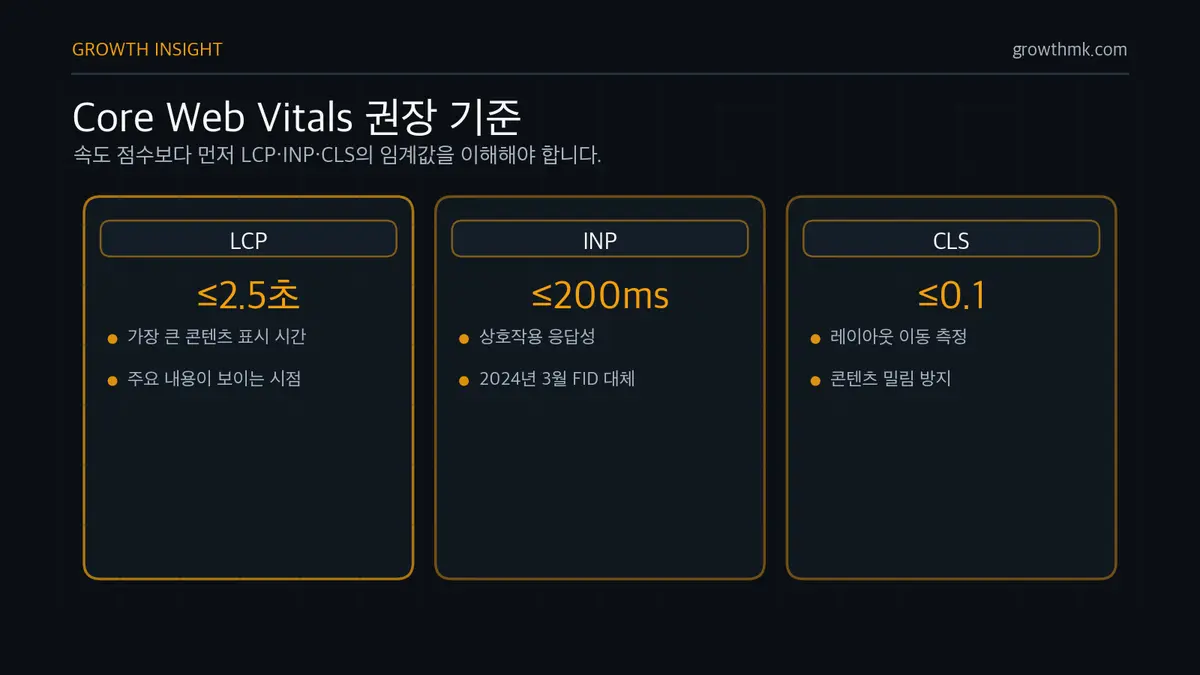
Here are the three key metrics worth watching closely:
- LCP (Largest Contentful Paint): The time it takes for the largest piece of content to render on screen — essentially, when the main content of a page actually becomes visible to a user. A value under 2.5 seconds is considered good.
- INP (Interaction to Next Paint): Measures how responsive a page is when a user interacts with it. It shows how quickly a website responds when someone clicks a button or taps a link, and under 200 milliseconds is ideal. (As of March 2024, INP replaced the earlier FID — First Input Delay — as the official responsiveness metric among Core Web Vitals.)
- CLS (Cumulative Layout Shift): Measures how much a page’s layout shifts around while it loads. Content suddenly getting pushed down because an ad loaded on top of text you were reading is exactly the kind of thing that damages user experience. A value of 0.1 or below is considered good.
These are the metrics Google calls “Core Web Vitals” — user experience indicators that directly affect SEO ranking. Improving them helps both user experience and search engine optimization. You can find each metric’s recommended threshold (LCP under 2.5s, INP under 200ms, CLS at 0.1 or below) in Google web.dev’s official Core Web Vitals guide.
PageSpeed Insights doesn’t just hand you a score and a list of metrics — its “Opportunities” section also lays out specific ways to improve. You can work your way down recommendations like “optimize image formats” or “remove unused CSS” one at a time.
Speed measurement isn’t a one-and-done task — it’s an ongoing monitoring process. Measure again after every improvement to confirm the impact, check regularly, and respond immediately whenever a problem shows up.
Page Speed Optimization, Step 2 — Remove Unnecessary Elements
One of the leading causes of a slow website is simply too many elements loading at once.
From a practical standpoint, keeping only what’s truly necessary and boldly removing everything else can improve your website’s speed immediately. This kind of optimization is a basic technique anyone can apply, no development knowledge needed.
Clean Up Excess Plugins and Widgets

Websites running on a CMS like WordPress, in particular, keep accumulating plugins over time. Plugins you installed because you needed them once, but barely touch now, can drag your website’s speed down significantly.
Take the time to review every plugin currently installed. Ask yourself whether each one is genuinely necessary, or whether it could be replaced some other way.
For example, teams often install separate plugins for social sharing buttons, analytics, related posts, and more — but these functions can frequently be replaced with a single, integrated plugin.
The same goes for widgets. Review whether the various widgets in your sidebar or footer actually deliver value to visitors. Anything with a low click-through rate is a good candidate to remove outright.
Set a rule: keep only what’s “essential” for plugins and widgets, and remove anything that’s merely “nice to have.” For a high-traffic site especially, even this small change can significantly cut server load.
Minimize Complex Sliders and Animations
Flashy sliders and animations look visually impressive, but they’re a serious drag on website speed. A full-screen image slider on the homepage, in particular, significantly increases page load time.
If you’re using a slider, minimize the number of slides. If you have 5-10 slides, keep just the 3 most important ones. Research shows most visitors barely look past the first or second slide anyway.
Where possible, replacing a moving slider with a single image or banner carrying your core message is a good approach. Not only does it cut load time significantly, it can be more effective at delivering your marketing message too.
Use animation only where it’s genuinely needed. Scroll-triggered animations, hover effects, and elaborate transitions may look impressive, but they burden your website’s performance. On mobile especially, these animations often don’t run smoothly and end up hurting the user experience instead of helping it.
Manage Non-Essential Third-Party Scripts
Third-party scripts add a range of useful functions to your website, but they’re also a major cause of slower page speed. Common examples include visitor analytics tools, social media buttons, ad scripts, chat widgets, and survey pop-ups.

Start by checking exactly what third-party scripts are currently loading on your website. Boldly remove any that aren’t actually in use, or that duplicate another script’s function.
Consolidating multiple analytics tools into one integrated solution is another option. For social sharing buttons too, keep only the 2-3 platforms your audience actually uses rather than including every platform available.
Apply chat widgets and survey pop-ups selectively, only on the pages that need them — not every page. Landing pages and product pages, where conversion matters most, especially benefit from minimizing third-party scripts to optimize load speed.
Page Speed Optimization, Step 3 — A Checklist You Can Start Right Now
Build a Weekly Speed-Check Routine
Website speed isn’t something you fix once and forget. Regular checks are essential. Just 10 minutes every Monday morning is enough.
Use Google PageSpeed Insights to log scores for your homepage and your three key landing pages. Recording scores by date in Excel or Google Sheets lets you spot trends at a glance. 90+ is good, under 50 needs immediate action.
Always check speed after adding any new feature or content. If speed unexpectedly drops by 10 points or more, immediately track down what caused it. In most cases, it’s whatever you just added.
In the Korean market, mobile users make up more than 70% of traffic. If your mobile score is 20 points or more below your desktop score, focus harder on mobile optimization. Real-world data shows that sites taking more than 3 seconds to load on mobile see a bounce rate as high as 53%. That’s essentially giving up half your revenue.
Adding a speed check to your marketing team’s weekly meeting agenda is also a good idea — it naturally builds awareness of why speed optimization matters across the organization.
Prioritize Your Optimization Work

Trying to fix every problem all at once is a trap that ends with nothing actually getting fixed. Data-driven prioritization is the key.
Use PageSpeed Insights’ “Opportunities” section. It gives you concrete numbers — “save 4.2s by optimizing images,” “save 2.1s by removing unused JavaScript.” Start with whichever item promises the biggest time savings.
Generally, image optimization delivers the best return for the least effort. Shrinking a 10MB image down to 1MB takes less than five minutes, but the impact is immediate. Real-world data shows images make up 50-80% of total page weight on most websites.
Priorities also shift depending on the type of website. For ecommerce sites, focus on product image and checkout page speed. For content sites, focus on initial load and scroll experience. For B2B sites, the speed of your lead-generation landing pages matters most.
The right approach is to make optimization changes one at a time and measure the impact of each. Applying several changes at once makes it hard to tell which one actually worked. If a single change improves your score by 5 points or more, that’s a success — if there’s no change, move on to another element.
Approach website speed optimization as an ongoing process of improvement, not a quest for perfection. Instead of aiming for a perfect 100 from day one, start by aiming to raise your current score by 10-20 points. Remember that small improvements add up to something big. In an era where customers won’t wait more than 3 seconds, that adds up fast.
Related Reading
- The Complete Guide to Technical SEO: A Practical Hub Connecting Crawling, Indexing, Rendering, Speed, and Structure
- The Canonical Tag
- Why a Sitemap Matters, and 3 Ways to Create One
- How to Fix Open Graph Tag Errors
- Defining the H1 Tag and Using It Correctly
Want to apply this to your own business? Take a look at how Growth approaches it in our SEO service, or if you need a diagnosis of your specific situation, reach out through our contact page. We answer in terms of the one lead who becomes revenue — not raw traffic volume.
Frequently Asked Questions
What page speed score counts as good?
On PageSpeed Insights, 90 or above is good, and under 50 needs immediate improvement. That said, getting your Core Web Vitals real-world values (LCP under 2.5s, INP under 200ms, CLS at 0.1 or below) into the “good” range matters more than the score itself. Check both desktop and mobile scores, and focus especially on mobile.
What’s the difference between FID and INP?
Both measure how responsive a website is to user interaction, but FID (First Input Delay) only measures the delay on the very first interaction, while INP (Interaction to Next Paint) comprehensively evaluates the responsiveness of every interaction throughout a visit. That’s exactly why INP replaced FID as the official Core Web Vitals responsiveness metric starting in March 2024. INP under 200 milliseconds is recommended.
Can I improve page speed without any development knowledge?
Yes. As covered above, cleaning up unused plugins and widgets, minimizing complex sliders and animations, removing unnecessary third-party scripts, and optimizing image size alone can drive substantial improvement. Image optimization in particular delivers the best return for the least effort, since images make up 50-80% of total page weight on most sites.
Does page speed really affect search ranking?
Yes. Google made page speed a mobile search ranking factor in 2018, and reinforced it with the 2021 Page Experience update. Google’s own Search Central documentation explicitly states Core Web Vitals are used in its ranking systems. That said, speed is just one of many ranking signals — content relevance and quality remain the most important factors overall.