Recycling Old Content to Strengthen Your SEO
 임재복
임재복
Why Should You Recycle Old Content?
Constantly churning out new content is genuinely exhausting, isn’t it? And it’s not cheap either. You already have content sitting there — it feels like a waste to just let it collect dust. Plenty of marketers fall into the trap of pouring all their energy into new content while leaving genuinely valuable existing material to languish. The fact that time has passed doesn’t mean its value has vanished entirely.
Did you know that in the time it takes to write one new post, you could update three or four existing ones instead? Recycling clearly wins on efficiency alone. And content that’s already indexed by search engines has the added advantage of getting reassessed faster than brand-new content does.
Some of your older content probably already has a solid number of backlinks. From an SEO standpoint, that’s a genuinely valuable asset. Simply updating it to reflect the present lets you tap into that existing SEO equity — a real two-birds-one-stone situation.
Analyzing Your Data to Find Content Worth Recycling
A Data-Driven Approach to Content Analysis
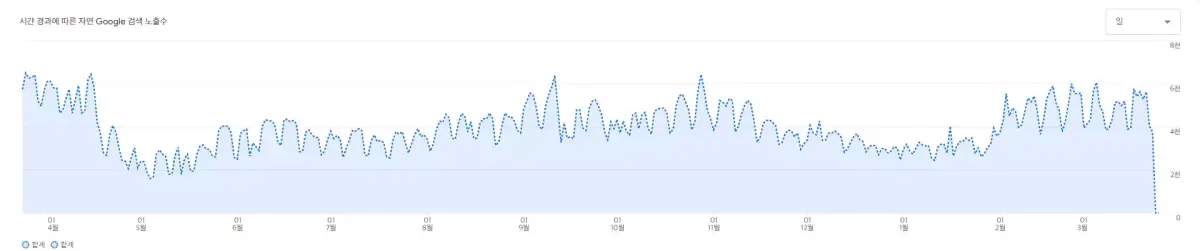
Before you touch anything, look at your data first. The first step is figuring out which content is actually worth recycling. Head into Google Analytics, pull up “views by page title and screen class,” and review the past year’s worth of data.
The metric worth paying special attention to is the relationship between bounce rate and traffic. Articles that get a lot of traffic but also have a high bounce rate should be your top recycling candidates — it’s a clear signal that people are interested, but the content itself isn’t satisfying them.
Beyond traffic, conversion rate matters just as much. If a piece of content used to convert well but has slipped in performance recently, that’s another strong candidate for an update. Content like this has usually either lost ground to a competitor offering better information, or its information has simply gone stale and lost credibility.
Be sure to check your Search Console data too. Are there pages with a lot of impressions but a low click-through rate? Improving the title or meta description on pages like these can deliver quick wins. And if there’s a keyword that used to rank well but has since dropped, the content tied to that keyword should also be high on your recycling list.
Based on your data analysis, sort your content into three groups: content that’s still performing well and needs only minor tweaks; content with middling performance that needs a partial refresh; and content performing poorly enough that it needs a full rewrite. This kind of triage lets you work through your recycling efforts efficiently.
Checking In on Current Keyword Trends

Keywords from a few years ago and keywords today are almost entirely different animals. Users’ search habits and interests are always shifting. So when you update old content, re-researching your keywords is non-negotiable.
Use tools like Naver’s search trend data and Google Keyword Planner to find current keywords tied to your existing topic. What matters most is finding several low-competition, rising-volume long-tail keywords. If you wrote about “diet methods” a few years back, for instance, something more specific — like “does intermittent fasting at home actually work” — might perform better today.
Beyond the keyword itself, you also need to understand user search intent. Even for the same keyword, the kind of information users are actually looking for can shift substantially over time.
What used to be primarily informational searches might now be purchase- or comparison-driven. Look at the type of content that ranks at the top of Google for your target keyword today, and you’ll get a decent read on current search intent.
Don’t forget to analyze your competitors either. Study the competitor content currently ranking well for the keywords you’re targeting, and you’ll pick up useful hints about what information they’re missing and how to structure your content more effectively. The goal should be to offer something deeper and more useful than what they’ve published.
How to Execute an Effective Content Recycling Strategy
Optimizing Content Structure and Substance

Google catches on quickly when all you do is change the date. Without an actual improvement in quality, you shouldn’t expect much of an SEO boost. That means giving the content a genuinely thorough review, from its structure down to the fine details.
This is Google’s own official stance, too. Google Search Central’s “creating helpful content” guide explicitly names “Are you changing the date of a page to make it seem fresh, without the content actually changing substantively?” as a warning sign of search-engine-first content, and states plainly that “content added or removed at scale purely to make a site appear ‘fresh’ doesn’t help your ranking.” What matters isn’t the date — it’s whether the content genuinely became more useful to the user.
Start by updating every statistic to current data. If you’re citing figures from 2021, go find the 2025 numbers and swap them in. Outdated statistics undermine your content’s credibility and, ultimately, hurt the user experience too.
Your document structure — the H2s and H3s — needs to be reorganized to match current search intent as well. Google has increasingly favored surfacing content that matches what users are actually intending to find.
So rather than simply stuffing in keywords, it’s more effective to turn the questions your readers are actually wondering about into your H2 and H3 headings. Adding sections like “Frequently Asked Questions” or “Common Mistakes” is another good approach.
Readability improvements matter too. Cap paragraphs at three or four sentences, and avoid sentences that drag on too long.
It’s also reader-friendly to bold important information and add a plain-language explanation right next to any technical term you use. And with mobile users making up such a large share of your audience, don’t forget your structure needs to stay easy to read on a smartphone screen too.
The intro and conclusion deserve extra care during an update as well. The intro’s job is to grab the reader’s attention, while the conclusion should reinforce the key points and guide the reader toward a next step. Your CTA (call to action), in particular, needs updating to match your current marketing goals.
Improving the User Experience with Multimedia
Content that includes multimedia elements like images and video tends to boost user comprehension and time-on-page compared to text-only content. Search engines care about whether content is genuinely useful to users, so adding multimedia elements that actually fit the context of your writing benefits both user experience and SEO.
Consider adding an infographic to your original content. Complex information or statistical data is easier to understand — and stays memorable longer — when presented visually. If producing one yourself feels daunting, free tools like Canva or Piktochart can help.
Adding step-by-step images to sections that explain a process can also boost comprehension.

Using video matters too. Embedding a short video that reflects a current trend can meaningfully boost the value of a piece of content. Embedding a video you’ve uploaded to YouTube, specifically, gives you two benefits at once.
One is longer time-on-page. The other is the possibility of extra traffic coming in through YouTube search itself. Don’t forget to include your target keywords in the video’s title, description, and captions.
Every multimedia element needs its own optimization. For images, include keywords in both the filename and the alt tag. Use a descriptive filename like “effective-content-recycling-strategy.jpg” rather than something like “IMG_1234.jpg,” and work relevant keywords naturally into the alt tag as well. Also keep an eye on file size — images that are too large slow down page load times, so optimize them to a web-appropriate size.
Interactive elements that drive engagement are also worth considering. Adding a simple quiz, calculator, or checklist can improve the user experience and increase time-on-page. A checklist in particular is a genuinely practical element that helps readers turn what they’ve read into action, adding another layer of value to your content.
Strengthening Your Internal Link Structure
Linking old content to newer content gets Googlebot crawling your site more often. Internal links strengthen your site’s overall structure and are a key SEO factor for building relevance between pages.
Add natural links from your updated content to relevant articles you’ve published within the past six months. This gives readers additional context while also helping the newer content gain search visibility.
That said, the goal isn’t stuffing in as many links as possible — link only to content that’s genuinely relevant and valuable.
Don’t forget to add links from your newest content back to the older content you’ve just updated. This raises the value of both pieces of content at once.
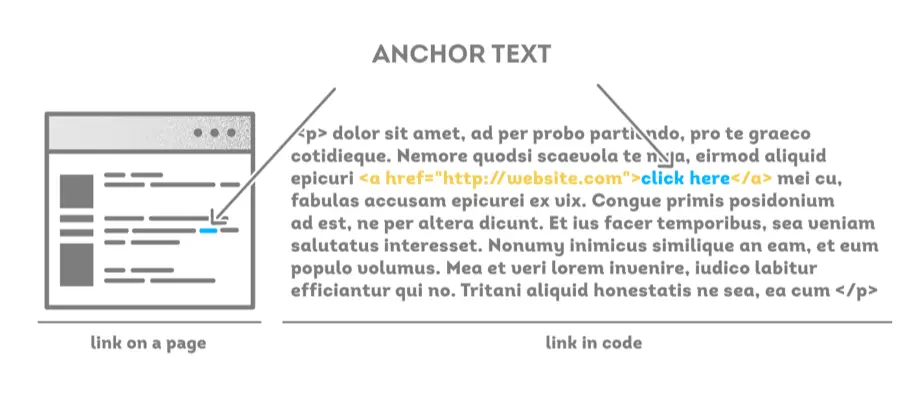
Pay close attention to your anchor text (the text your link is attached to) whenever you add a link. Anchor text that includes a real keyword — something like “social media marketing strategy” — is far more effective for SEO than a generic phrase like “click here” or “this article.”
When you’re auditing your internal link structure, also check for broken links. Old content may well include links pointing to pages that no longer exist. Broken links like these hurt the user experience and drag down your SEO, so make sure to fix them.
It’s also effective to place links to important pages near the top of an article. Since readers tend to focus mostly on the beginning of a piece, surfacing links to key information or important pages as early as possible tends to help. This raises your click-through rate.
Recycling, Expanding, and Managing Your Content
Turning Content into Different Formats
A single piece of content can be reshaped into all kinds of formats. This is called “content repurposing” — offering the same content in different formats to reach a wider set of prospective customers.
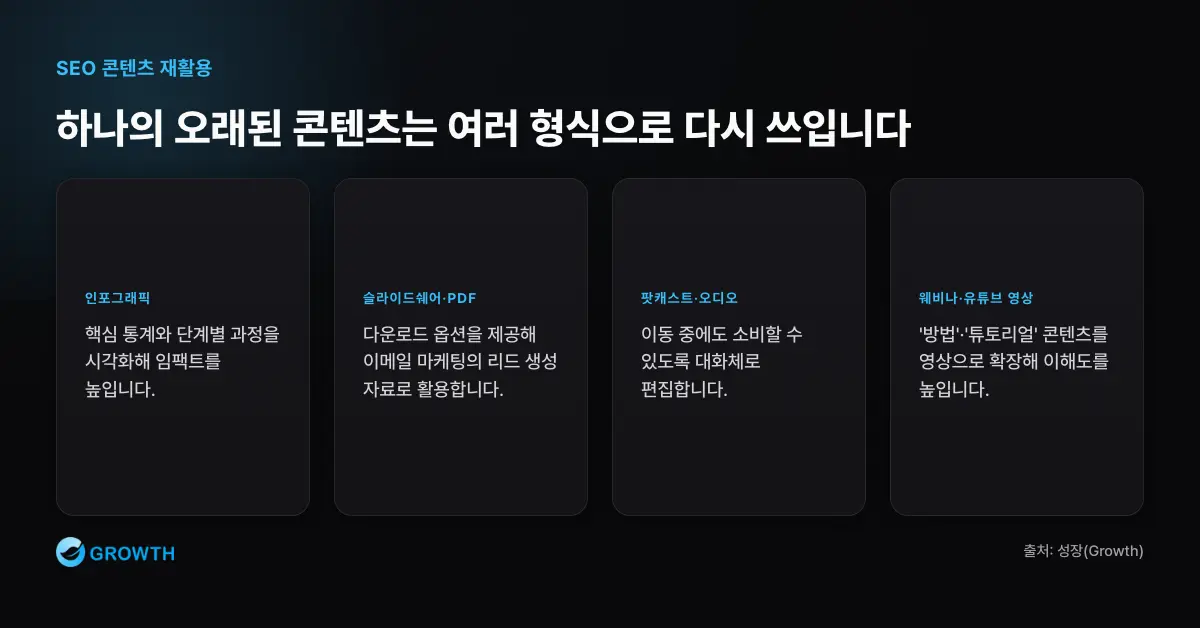
A blog post can become an infographic. Key statistics or a step-by-step process land with far more impact when presented visually — and it’s also a format that’s especially easy to share on social media.
You can also turn the same content into a SlideShare deck or a downloadable PDF, offering it as a download that doubles as a lead magnet for your email marketing.
Converting content into a podcast or audio format is worth considering too. As more and more people want to consume content while commuting or doing something else, audio can be a real advantage.
Rather than simply narrating the written piece word for word, it’s more effective to edit it into a conversational style suited to audio.
Expanding into a webinar or YouTube video is another option. “How-to” or tutorial-style content in particular tends to become more comprehensible in video form. Offering content across all these formats lets you meet the needs of users with different learning styles.
Managing Follow-Up After Recycling Your Content

Updating your content doesn’t mean the work is finished. A few follow-up steps are necessary for it to actually pay off in SEO.
First, request reindexing from Google. Inspect the URL in Search Console, then click “Request Indexing” — this helps Google recognize your updated content faster. This step matters especially when you’ve made a significant update.
Google’s own guidance on the URL Inspection tool also recommends clicking “Request Indexing” from the inspection results screen for any newly published or updated URL. That said, if you’ve updated multiple pages at once, submitting a sitemap with modification dates marked via <lastmod> is a more efficient approach. It’s also worth providing an accurate dateModified value per Google’s Article structured-data documentation, which helps update information show up more reliably in search results.
Resharing on social media is another important follow-up step. Rather than simply reposting the same link, add a line like “We just refreshed this with the latest info!” to give people who’ve already seen it a reason to click again.
It’s also effective to tailor how you share across platforms. On Instagram, lead with the infographic; on Facebook, highlight the key takeaways in summary form; on LinkedIn, emphasize the professional insight.
Measuring the results after an update is another essential step. Track your traffic changes at the two-week, one-month, and three-month marks after an update, and you’ll be able to tell which type of update was most effective. Using that data to shape your next round of content recycling makes your overall SEO management far more efficient.
It’s also a good idea to gather user feedback on the content you’ve updated. Comments, social media reactions, and direct feedback all help you keep identifying ways to improve. Fold that feedback into your next round of updates, and your content quality keeps climbing over time.
Why Ongoing Content Management Matters
Old content isn’t trash to throw away — it’s a raw gem worth polishing. This is especially true for small businesses or startups working with a limited budget, where raising the value of existing assets is a far more efficient strategy than pouring everything into new content.
Content recycling should be treated as an ongoing process, not a one-time task. It’s worth building the habit of running a content audit every six months to a year and updating whatever needs it. This keeps your website consistently offering fresh, valuable information.
The insight you gain from recycling content also feeds directly into how you create new content going forward. Knowing which topics stay popular over the long haul, or which content formats drive the highest engagement, becomes genuinely valuable input for your content strategy.
Pick just one piece from the past few years, apply the strategy above, and you’ll likely see a bigger shift than you expect. A content recycling strategy that delivers outsized results for relatively little effort can take your SEO performance to the next level.
Related reading
- Must-Read Before Choosing a Website CMS: Comparing 6 CMS Platforms for 2025
- SEO-Friendly CMS Recommendations: A Guide to Choosing the Best Content Management System for SEO
- Why SEO Experts Are Hard to Find in Korea
- SEO Trends Driven by Shifting Search Market Share in South Korea
- A Checklist for Choosing an SEO Agency
If you want to apply this to your own business — you can see Growth’s approach on our SEO services page, and if you need a concrete assessment of your situation, reach out through our consultation contact form. We answer in terms of the one customer who becomes revenue, not raw traffic volume.
You can see the full picture of this topic in “The Complete Guide to Writing SEO Content — From Search Intent Analysis to Publishing and Updates.”
FAQ
Does simply changing the date on old content help SEO?
No. Google treats changing a page’s date to make it look fresh, without any substantive change to the content, as a warning sign of search-engine-first content. The benefit only shows up when you genuinely update statistics, examples, and strategy to be more useful to users — and updating your dateModified and requesting reindexing should come after that, not instead of it.
Which content should I recycle first?
Let your data set the priority. As covered above, your top candidates are (1) articles with high traffic but a high bounce rate, (2) articles that used to convert well but have recently slipped, and (3) articles in Search Console with a low click-through rate relative to impressions, or that have dropped in ranking. Sort these into “minor update,” “partial refresh,” and “full rewrite” groups to work through them efficiently.
How do I let Google know after I’ve updated content?
Inspect the URL using Google Search Console’s URL Inspection tool, then click “Request Indexing.” If you’ve updated multiple pages at once, submitting a sitemap with modification dates marked via <lastmod> is more efficient. Keep in mind that indexing typically takes at least a day, and requesting it doesn’t guarantee it’ll happen.
How often should I recycle content?
Treat it as an ongoing process, not a one-off task. Building the habit of running a content audit every six months to a year, checking and refreshing underperforming articles, keeps your site consistently offering fresh, useful information. Tracking traffic changes at the two-week, one-month, and three-month marks after an update also helps you identify which type of update works best.