Redirects: From the Basic Concept to Fixing Them
 임재복
임재복
Hearing the word “redirect” can feel a bit like being trapped in a maze.
You don’t land where you meant to, you get bounced somewhere unexpected, or you get stuck in an endless loop of page transitions — it’s genuinely disorienting.
But redirects are actually an essential, unavoidable part of managing a website. Understand and use them correctly, and they become a genuinely powerful tool for improving both usability and search rankings.
In this article, we’ll walk through everything in plain terms — from the core concept, to diagnosing problems, to effective fixes.
Let’s stop wandering the redirect maze and find some clear answers together.
What Is a Redirect?
Concept and Definition
A redirect is a setting that automatically sends a user to a different address when they try to access a specific web address.
Website operators use redirects for reasons like page restructuring, domain changes, and content consolidation. They let you preserve existing traffic and have a positive effect on search engine optimization.
Set up correctly, a redirect also improves user experience and helps search engines correctly recognize your pages.
On the other hand, an improperly configured redirect can cause page loss, traffic drops, and ranking declines — so it needs to be applied carefully.
The Main Types of Redirects
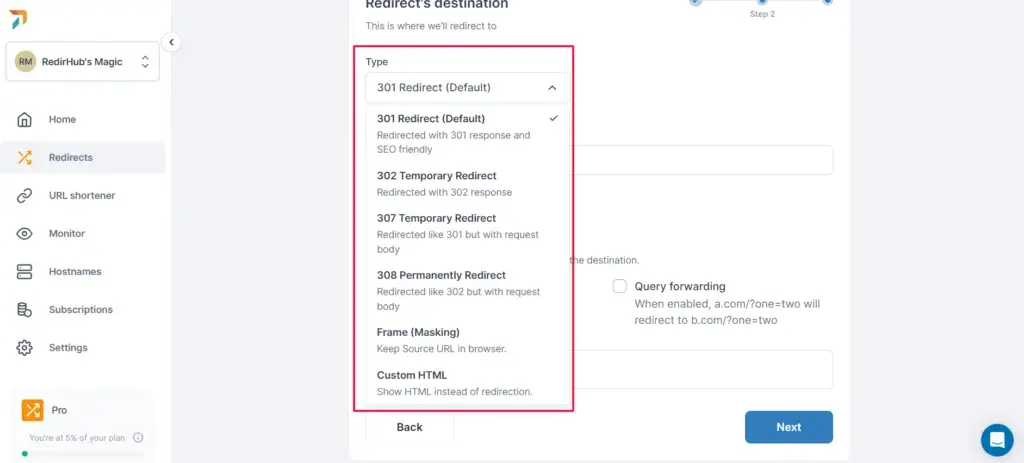
A 301 redirect is used when a specific URL has changed permanently.

Search engines transfer the old URL’s ranking to the new URL, and users who type in the old address get automatically sent to the new page. Google Search Central explains that Googlebot follows permanent redirects (301/308) and treats the redirect target as a signal for the canonical page. This is the most commonly used redirect method for domain changes and content consolidation.
A 302 redirect is used when a URL has changed temporarily.
Because search engines assume the original page will stay in place, the old URL’s ranking does not transfer to the new URL. Google likewise notes that temporary redirects (302/303/307) aren’t treated as a canonical signal, and the original page can remain in the index.
These are useful for event pages or testing purposes, but overusing them can hurt your search rankings.
A 307 redirect is similar to a 302, but differs in that it preserves the original request method (GET, POST, etc.). The MDN documentation notes the same thing: a 307 (Temporary Redirect) doesn’t change the method or body, while 301 and 302 can convert a non-GET method to GET.
This is useful when a specific request needs to keep the exact same method, but it’s rarely used in typical website operations.
How to Fix Problems by Redirect Type
Managing Permanent and Temporary Redirects
When applying a 301 redirect during a domain change, redirect the old URL to the new domain to preserve your search ranking.
When consolidating old pages into new ones, link to the most relevant URL so search engines can evaluate it correctly. It’s also worth updating internal links to point directly to the new URL, minimizing unnecessary redirect hops.
To use 302 redirects appropriately, reserve them for genuinely temporary situations, like an event page.
If you’re planning to keep something in place long-term, switch it to a 301 redirect, and periodically audit whether any 302 redirects are still in use so search engines don’t get confused.
Fixing Redirect Chains and Loops
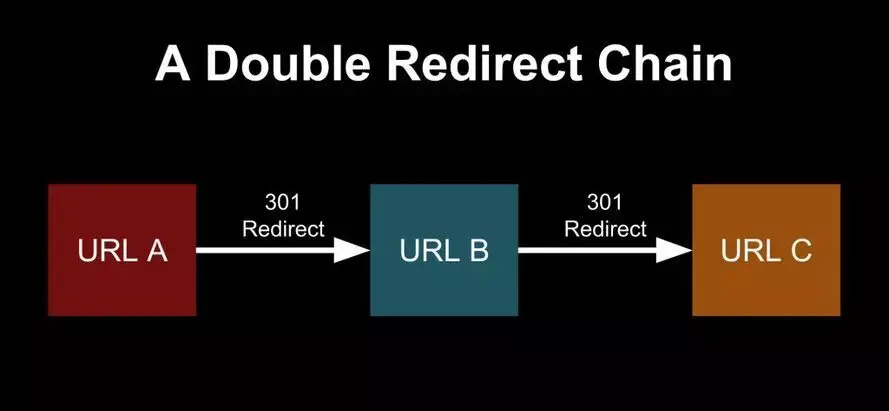
It’s important to configure redirects so they don’t pass through multiple hops. For example, sending traffic straight from A to C is better for search engine optimization than routing it through A → B → C.
Using a crawling tool to find and fix pages with multiple chained redirects is also an effective approach.
Second, to resolve infinite redirect loops, checking your web server configuration is essential.
Review the redirect rules in your Apache or Nginx server configuration to confirm there aren’t any unnecessary repeated redirects.
On top of that, check your .htaccess or server.conf configuration files to fix any URL that keeps looping back to the same address. It’s also worth clearing your browser cache and testing again afterward to confirm the changes actually took effect.
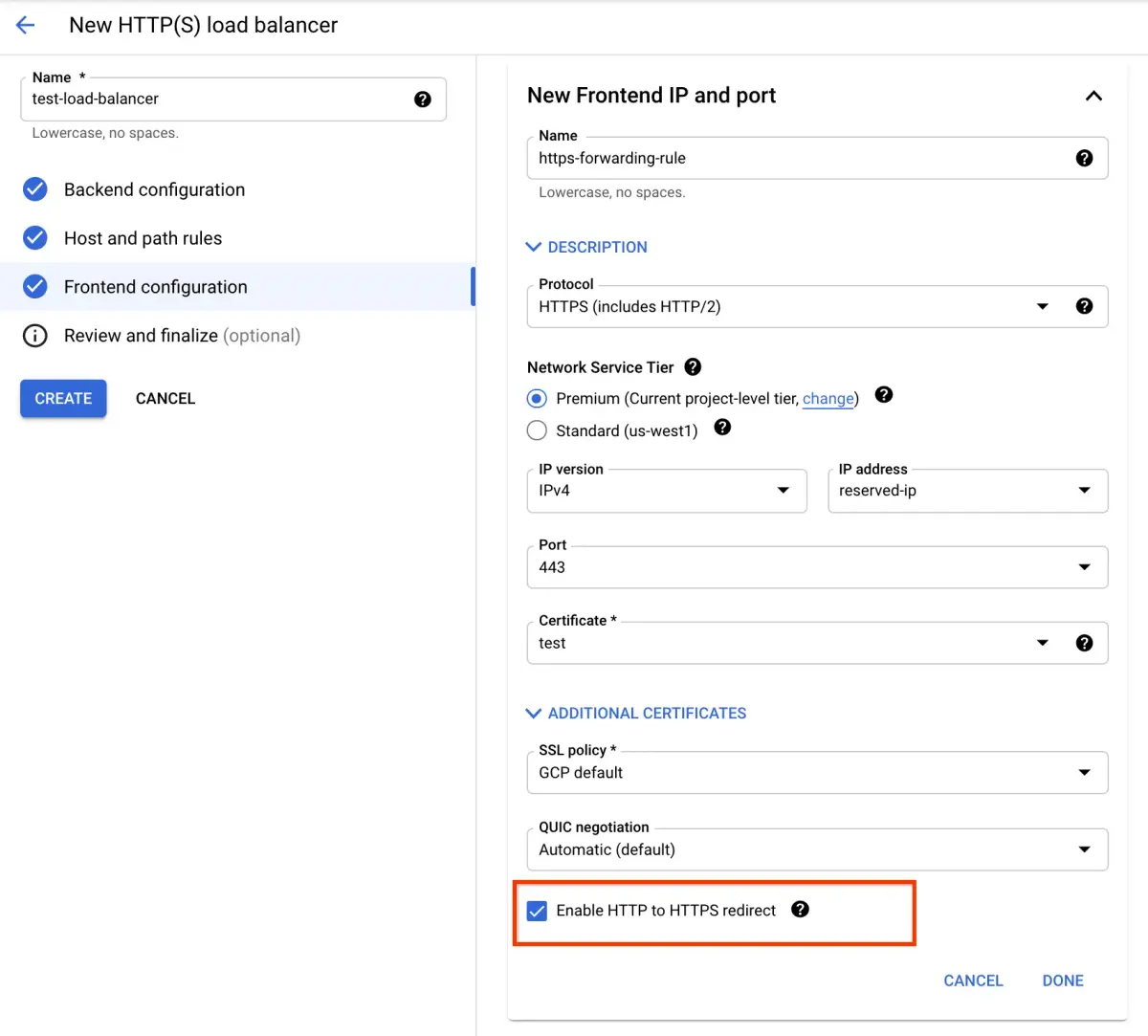
To prevent HTTPS redirect errors, use a 301 redirect when redirecting from HTTP to HTTPS to strengthen security.
Update all internal links to HTTPS to avoid unnecessary redirects, and confirm your SSL certificate is applied correctly. This plays a genuinely important role in running a website — configured correctly, it preserves your search ranking and improves user experience.
But a misconfiguration here can cause traffic loss and SEO problems, so we’d recommend auditing and optimizing this regularly.
If you want to apply this to your own business — see how Growth approaches this in our SEO service, or if you need a concrete diagnosis of your specific situation, reach out through our contact page. We answer with the one customer who becomes revenue in mind — not raw traffic volume.
Frequently Asked Questions About Redirects
Is a redirect the same thing as a URL change?
A redirect and a URL change work differently.
A URL change means replacing an old URL with a new one. A redirect is the setting that automatically sends users who access the old URL to the new one. A URL change alone won’t preserve your existing traffic — to keep your search ranking, you need to apply a redirect alongside it.
Can overusing redirects cause problems?
Yes — use too many, and search engines may struggle to recognize your site correctly.
When a page sits behind multiple chained redirects, there’s a real chance search bots waste crawl budget following that chain. It’s best to cut unnecessary redirects and configure everything as a single hop wherever possible.
What should I watch for when setting up redirects on a mobile site?
When configuring redirects on a mobile site, confirm you’re serving the same content. When redirecting from a desktop version to a mobile version, Google evaluates whether users are being routed to the correct mobile-friendly page.
A misconfigured redirect here can both degrade user experience and hurt your search rankings.
How do I redirect from HTTP to HTTPS?
Adopting HTTPS strengthens security, but you also need to route users still accessing your old HTTP address to the new HTTPS address.
Applying a 301 redirect in your server configuration handles this transition smoothly. You’ll also need to apply your SSL certificate correctly and update internal links to HTTPS.
How do I check for redirect errors during an SEO audit?
When auditing SEO performance, it’s important to use Google Search Console and crawling tools to check for errors.
Check for 404 error pages and excessively long redirect chains, and fix anything you find quickly.
If you see a sudden drop in search traffic in particular, it’s worth reviewing your redirect configuration again.
Related Reading
Marketing Insights
Marketing insights, delivered weekly
Practical growth and GEO/B2B marketing insights, summarized in your inbox every week.
Subscribe for insights