What Is a 404 Error Code, and How Do You Fix It?
 임재복
임재복
Did you know that repeated 404 errors can actually drag down your search ranking?
If you’re trying to figure out why your website traffic is declining, it’s worth checking how search engines are evaluating your site before assuming it’s just a content problem.
For B2B marketers especially, optimizing a company website’s search visibility and traffic is one of the most important tasks there is.
No matter how good your content is, if a flood of errors keeps search engines and users from reaching your pages, it eats into brand trust and conversion rate — and that hits your marketing too.
In this article, we’ll break down what a 404 error code actually is, in plain terms, along with a detailed look at other error codes and how to fix them.
If you want to maximize search visibility and protect your website’s credibility, we recommend reading all the way through.
What Is a 404 Error Code?
Defining 4XX Errors
This is a status code returned when a client’s request is invalid, or the server simply can’t understand the request.
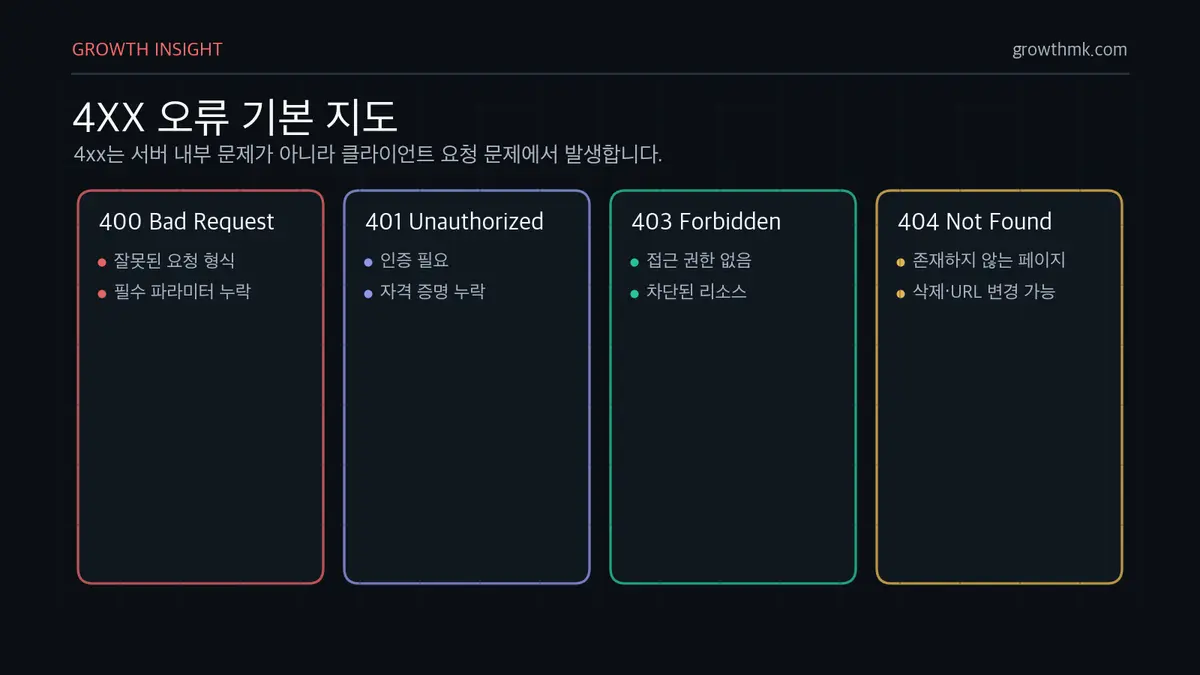
When a request is malformed, lacks required credentials, or asks for a resource the client isn’t authorized to access, the server responds with a 4xx error.
This error stems from a problem with the client’s request, not an internal server issue — the user needs to correct the request or complete additional authentication before they’ll get a normal response.
A “400 Bad Request” error can occur when a request includes invalid syntax or malformed data.
A “401 Unauthorized” status code is returned when a page requires authentication but the correct credentials weren’t provided.
A “403 Forbidden” appears when a user requests a resource they don’t have permission to access, and a “404 Not Found” appears when they request a page that doesn’t exist.
These 4xx errors can hurt both user experience and search engine optimization (SEO), so resolving them quickly matters.
How This Differs From Other HTTP Status Codes (2xx, 3xx, 5xx)
When a server successfully processes a client’s request, it returns a 2xx status code.
“200 OK,” for example, means the request succeeded, and “201 Created” means the request created a new resource. A 3xx status code means the requested resource has moved, or the client needs to take some further action.
“301 Moved Permanently” signals a resource has moved for good, while “302 Found” signals a temporary move.
4xx errors show up when the client’s request is at fault, while 5xx errors show up when the server itself fails to process the request properly.
“500 Internal Server Error,” for example, is returned when something unexpected goes wrong inside the server,
and “503 Service Unavailable” occurs when the server is overloaded or under maintenance.
Since 4xx and 5xx have different root causes, the way you fix them needs to differ too.
404 Error Codes, Explained in Detail
400 Bad Request
When a client’s request isn’t in the right format, the server returns a “400 Bad Request” error.
This can happen when the request data is corrupted, a required parameter is missing, or it includes unsupported character encoding.
It can also appear when a URL includes invalid characters or the request is excessively long. Double-check the request, fix the format, and resend it.
401 Unauthorized
A “401 Unauthorized” appears when authentication is required to access a protected resource, but the client didn’t provide the correct credentials.
This can also be returned when an API request lacks a valid auth token, or a login session has expired.
The server communicates how to authenticate through a “WWW-Authenticate” header, and the client needs to authenticate properly before requesting again.
403 Forbidden
A “403 Forbidden” occurs when a user lacks permission to access a specific resource.
This can happen even after successful authentication, if the user simply isn’t authorized for that particular resource.
For example, it appears when a server is configured to block a specific IP address, or when a regular user requests a page restricted to admins only.
Check the permission settings, and request access from the server admin if needed.
404 Not Found
A “404 Not Found” error appears when the requested resource doesn’t exist or has been deleted. MDN Web Docs explains that 404 only signals that a resource is “missing,” without distinguishing whether that’s temporary or permanent — for a permanent removal, it recommends using 410 Gone instead.
This can happen when a page’s URL has changed but no proper redirect was set up, or when a user simply mistypes a URL.
Users should double-check the URL they requested, and website admins should set up a 301 redirect to the correct page.
405 Method Not Allowed
A “405 Method Not Allowed” appears when the server doesn’t support a particular HTTP method.
For example, this error can be returned if you send a POST request to an API endpoint that only accepts GET requests.
Check which HTTP methods the server allows, and change your request method accordingly.
429 Too Many Requests
Sending too many requests in a short window can trigger a “429 Too Many Requests” error.
This is returned by a rate-limiting policy the server has set to cap traffic, and it can also show up when a search engine crawler or an automated bot sends repeated requests.
Pause requests for a while, or have the server admin adjust the allowed request rate.
Understanding HTTP status codes correctly and responding to them properly can improve both your website’s search performance and its user experience.
With SEO in mind, it’s important to reduce unnecessary 4xx error codes and set up proper redirects and error pages.
How Do 404 Error Codes Affect a Website?
Impact on SEO Performance and Search Engine Crawling
When 404 errors keep showing up on a website, search engine crawlers can’t navigate the site smoothly. According to Google’s own documentation, 404 and 410 pages get dropped from the index and crawled progressively less often — and a large number of “soft 404s” in particular can waste crawl budget, meaning your important pages might not get crawled and indexed in time.
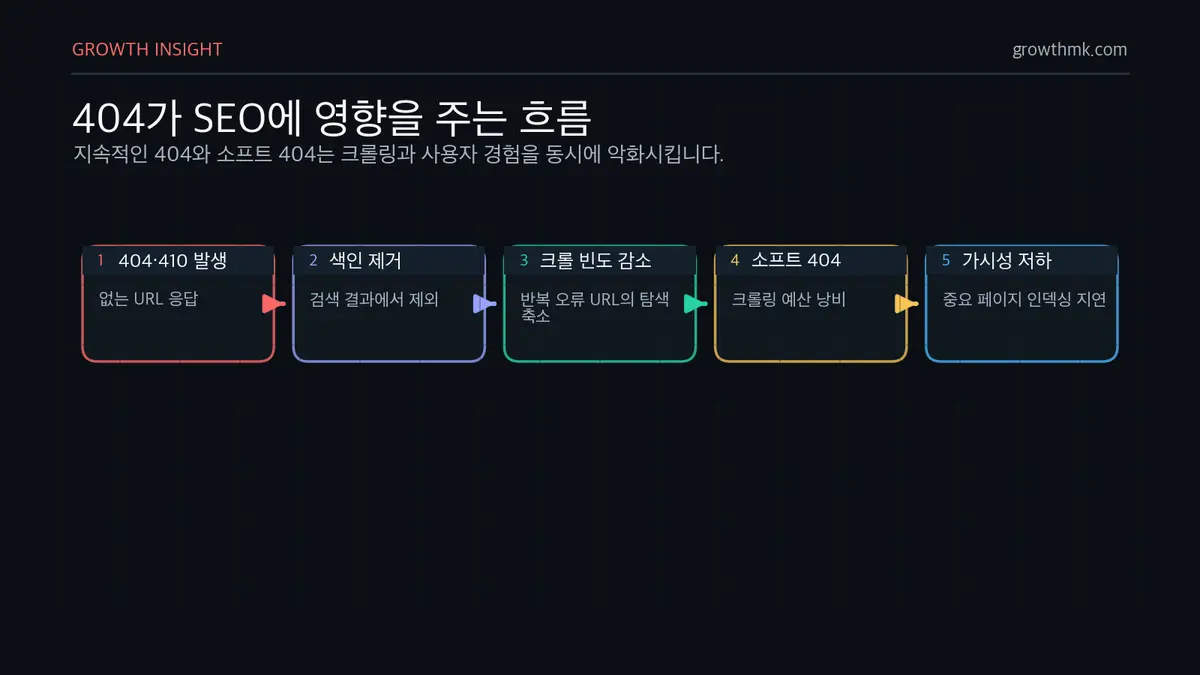
Crawlers, in particular, are likely to judge the overall quality of a site with persistent 404s as low.
That can lead to a drop in search ranking, and it can create indexing problems that keep new content from ever appearing in search results.
Crawl efficiency is an important factor in how a search engine assesses a website’s overall credibility.
If internal links return 404 errors, your site’s structure can look inefficient, which can also hurt search visibility.
That’s why it’s worth minimizing errors through regular checks.
Impact on Conversion Rate and Bounce Rate
When website visitors repeatedly hit error pages, trust drops and bounce rate rises.
For a B2B website, errors on a key information page or product page in particular can degrade the user experience and cost you real business opportunities.
That drives prospects away, which is likely to end in a drop in conversion rate.
When a user can’t find the information they expected and hits a 404 instead, they’re far more likely to leave the site and visit a competitor’s instead.
Repeated 401 or 403 errors, taken further, can leave visitors frustrated by access restrictions and cause them to stop using the site altogether.
To address this, it’s effective to prevent errors proactively and set up 301 redirects so users are naturally guided to an alternate page.
How to Find 404 Error Codes
Analyze Website Logs and Use Monitoring Tools
To effectively manage errors, it’s essential to regularly analyze server logs and use website monitoring tools.
Reviewing server log files lets you see which specific URLs keep generating errors, which you can then use to analyze and fix the root cause.
A website analytics tool like Google Analytics lets you identify how often, and in what pattern, users hit an error on a specific page.
Using that data, you can optimize your website’s structure and give visitors a smoother navigation experience.
Use Google Search Console
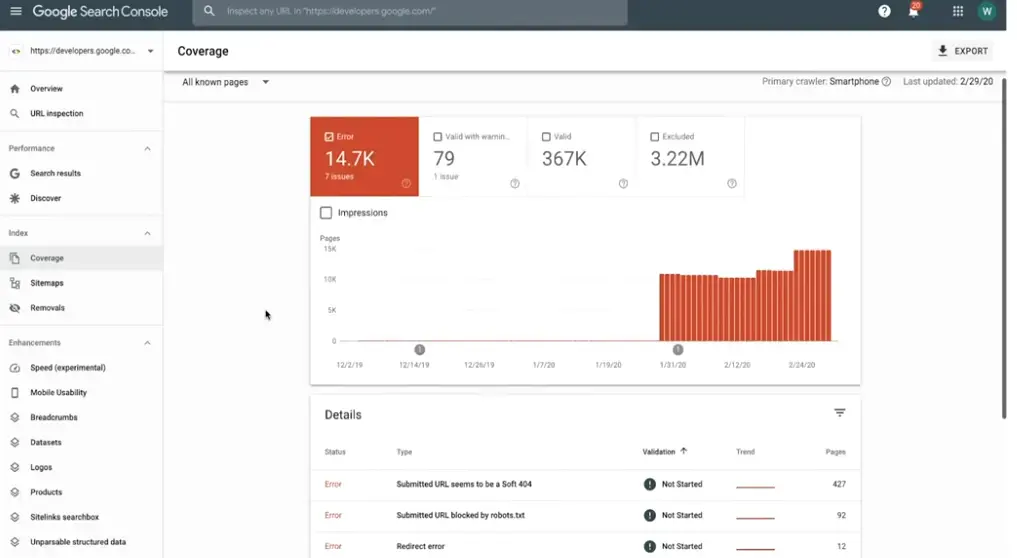
Google Search Console is a useful tool for analyzing a website’s crawling status and indexing problems.

Site owners can use it to easily identify 4xx error pages that turn up as search engines crawl the site.
Reviewing the list of pages with errors, analyzing the cause, and taking corrective action can prevent search visibility from declining.
That’s exactly why regular monitoring — catching problems early and responding fast — matters.
Check Your Sitemap and robots.txt
Thorough management of your sitemap and robots.txt file is necessary to let search engines crawl your website smoothly.
If a sitemap includes pages that have been deleted or moved, that can generate 4xx errors, which can in turn lead to a drop in search ranking.
Keep your sitemap up to date, and make sure search engines can smoothly index your important pages.
Your robots.txt file also needs checking.
Confirm that no page or directory is unintentionally blocked, and keep the settings in place that let search engines access what they need.
Reviewing these files regularly reduces unnecessary errors and improves search performance.
How to Fix Each HTTP 4xx Error
These are all problems a website operator can fix directly, and taking the right action can improve both search performance and user experience. Here’s a rundown of how to resolve each major 4xx error.
Fixing a 400 Error (Correcting a Bad Request)
A 400 error (Bad Request) occurs when a request is malformed or contains invalid data.
It’s returned when the server can’t parse the client’s request. Here are the main causes.
First, a 400 error can occur when an input value doesn’t match the expected format, or a required field is missing.
Verify that the form data submitted by the user is valid, and convert input values into a format the server can process.
For example, this error occurs when a number field contains letters, or an email address isn’t in the right format.
Second, a 400 error can occur when a URL isn’t constructed correctly.
If a requested URL isn’t properly encoded, or contains an unexpected special character, the server can’t parse the request.
Fix any URL containing a double slash (//) or a malformed query string, and encode the URL properly when needed.
Finally, a 400 error can occur when a browser’s cache or cookies hold stale information.
This happens when cached data is corrupted, or an old cookie interferes with the session with the server.
To fix this, users should clear their browser’s cache and cookies, then reload the page.
These approaches can help prevent 400 errors and resolve them quickly when they do occur.
Fixing 401/403 Errors (Authentication and Permission Problems)
A 401 error (Unauthorized) occurs when a client doesn’t provide valid credentials for a requested resource.
This can happen because a login session expired, an incorrect username or password was entered, or an API call used an invalid access token.
To fix it, provide the correct credentials and refresh any expired session or token.
A 403 error (Forbidden) occurs when a client isn’t authorized to access a requested resource, even after authenticating.
This can arise from incorrect file or directory permissions on the server, IP blocking, a misconfigured .htaccess file, or a missing default index file setting.
To fix it, set the correct permissions on files and folders, check whether an IP block is in place, and review your .htaccess file and server index file settings.
In short: a 401 error stems from a problem with the client’s credentials, while a 403 error occurs when the client is authenticated but still lacks permission for that particular resource.
A Step-by-Step Guide to Fixing 404 Errors
A 404 error occurs when a request targets a page that’s been deleted or moved, and it can hurt search engine optimization (SEO).
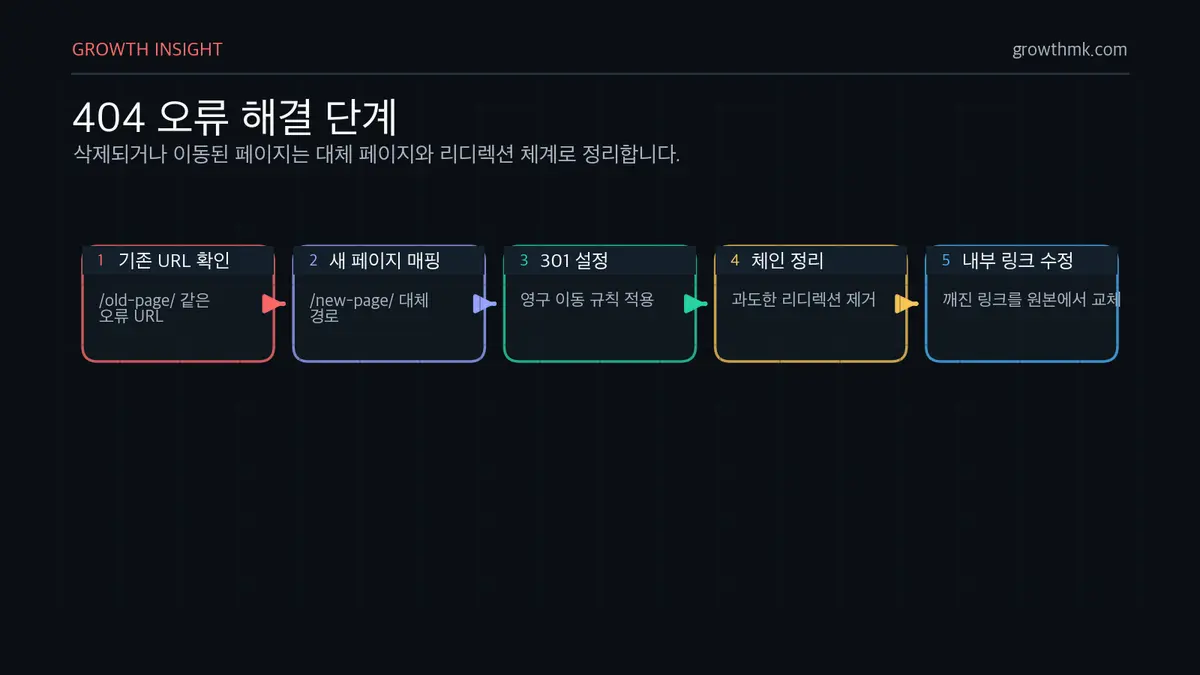
Setting up a 301 redirect fixes this by automatically sending visitors to the right page, while also encouraging search engines to index the new page.
For example, if a page moved from /old-page/ to /new-page/, a redirect rule like this resolves the problem:
Redirect 301 /old-page/ https://example.com/new-page/Too many redirects can slow a site down, so it’s worth cleaning up any unnecessary redirect chains.
Regularly review internal links, fix any broken ones, and keep your website’s structure systematically organized.
More Tips for Fixing 4xx Errors
Keeping your sitemap current is essential for minimizing website errors and optimizing search performance.
If a deleted page isn’t removed from the sitemap, search engines will keep attempting unnecessary crawls, which can raise your rate of 4xx errors.
We recommend using Google Search Console to regularly update and review your sitemap.
You also need to configure your robots.txt file correctly.
Make sure search engine crawlers can access the pages they need, and be careful not to unintentionally block a specific directory or page.
Overly aggressive “Disallow” rules can interfere with crawling and indexing, so it’s worth periodically reviewing your settings.
Analyze your web server logs to identify any recurring pattern of 4xx errors.
Regular log reviews let you identify what’s causing errors, and respond by fixing pages or setting up redirects as needed.
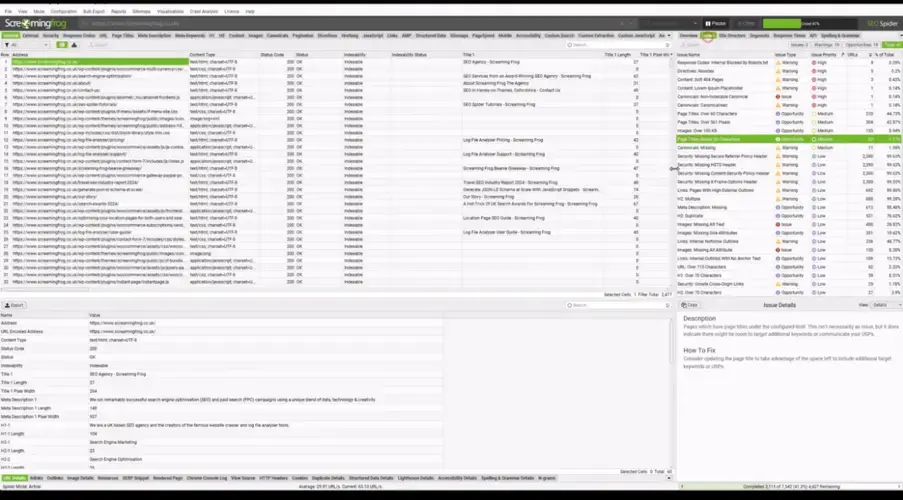
Analysis tools like Ahrefs and Screaming Frog SEO Spider can quickly surface broken links, which you can then fix to keep navigation smooth for visitors.
Conclusion
A 404 error code by itself is a common issue in website management, but leaving it unaddressed can seriously damage search engine optimization (SEO) and user experience.
For a B2B company website, where lead generation and conversion rate really matter, systematic monitoring and a fast response are essential.
Use the causes and fixes covered in this article to optimize your site’s search performance and user experience.
Actively using tools like Google Search Console, Ahrefs, and Screaming Frog to check your website’s health and minimize errors goes a long way toward protecting your search ranking.
Want to apply this to your own business? Take a look at how Growth approaches it in our SEO service, or if you need a diagnosis of your specific situation, reach out through our contact page. We answer in terms of the one lead who becomes revenue — not raw traffic volume.
Frequently Asked Questions
What’s the difference between 4xx and 5xx errors?
A 4xx error occurs when the client’s request is at fault, while a 5xx error occurs when the server itself fails to process the request properly.
A 4xx error can usually be fixed by having the client correct the request, while a 5xx error stems from a server configuration or performance issue, which requires an admin to directly diagnose and fix the underlying cause.
How damaging is a 404 error to SEO?
A large volume of 404 errors can lead a search engine to conclude a website isn’t well maintained.
If a crawler repeatedly encounters 404 error pages, that wastes crawl budget unnecessarily, and it raises the chance that new content simply won’t get properly indexed. That can drive down search ranking, and it can also raise visitor bounce rate.
To prevent this, using a 301 redirect to route visitors from a deleted page to a suitable alternate page is an effective fix.
Do you need to fix every single 4xx error?
You don’t need to fix every error immediately, but any 4xx error on a high-importance page absolutely needs fixing.
A 4xx error on a high-traffic landing page, a product detail page, or a major blog post can degrade the user experience and lower your conversion rate.
It’s best to first check the URLs where errors occur most frequently, then act — setting up a redirect or fixing internal links as needed.
Related Reading
Marketing Insights
Marketing insights, delivered weekly
Practical growth and GEO/B2B marketing insights, summarized in your inbox every week.
Subscribe for insights