Schema Validation Errors: How to Fix Structured Data Problems
 임재복
임재복
Applied schema markup and now getting error messages in Google Search Console?
Structured data is a crucial element that helps search engines understand your website’s information more accurately.
But what do you do when you’ve applied the markup and rich snippets still aren’t showing up — or you’re seeing errors like “missing required field” or “invalid value format”?
These errors happen more often than you’d think. Deciding between JSON-LD and Microdata, or figuring out whether you need to keep up with schema updates, trips people up constantly.
On top of that, it’s often unclear exactly how validation errors affect SEO, which can add to the confusion.
In this article, we’ll walk through the causes and fixes for schema validation errors in structured data, including how to resolve them using Google Search Console.
What Is a Schema Validation Error?
Schema is a markup technology that structures your website’s content, making it easier for search engines to understand.
Applied correctly, it activates advanced search-result features like rich snippets, which can have a genuinely positive effect on SEO optimization.
But validation errors show up fairly often during the process of setting up schema markup.
Leave these errors unresolved, and your structured data won’t be reflected properly — which can confuse how accurately search engines interpret your information.
So genuinely understanding and fixing schema validation errors matters.
The Role of Schema and Structured Data
Structured data clearly defines the content of a webpage, helping search engines process that information effectively.
That’s why schema supports a wide range of data types, each with properties and fields suited to it.
A product page, for example, might include price and stock information, while a blog post might include an author and publish date.
Define this data accurately, and search engines can trust your content more, increasing the odds of it appearing more prominently in search results.
But if the markup isn’t applied correctly, errors show up — and that can drag down your SEO performance.
Why Schema Validation Errors Happen
There are several common reasons validation errors crop up while implementing schema.

First: a required field is missing, or the wrong data format is used. If your date format doesn’t follow ISO 8601, for example, that alone can trigger an error. The Schema.org guide specifies that dates, times, and durations follow the ISO 8601 standard, with dates written in “YYYY-MM-DD” format.
Second: not using the latest version schema provides, or using an unsupported property, can also cause issues.
Third: validation errors can occur when a markup format — JSON-LD, Microdata, RDFa — isn’t applied correctly. Leave errors like these unaddressed, and search engines can’t interpret your structured data properly, making it hard to see any real SEO benefit.
The Main Types and Causes of Schema Validation Errors
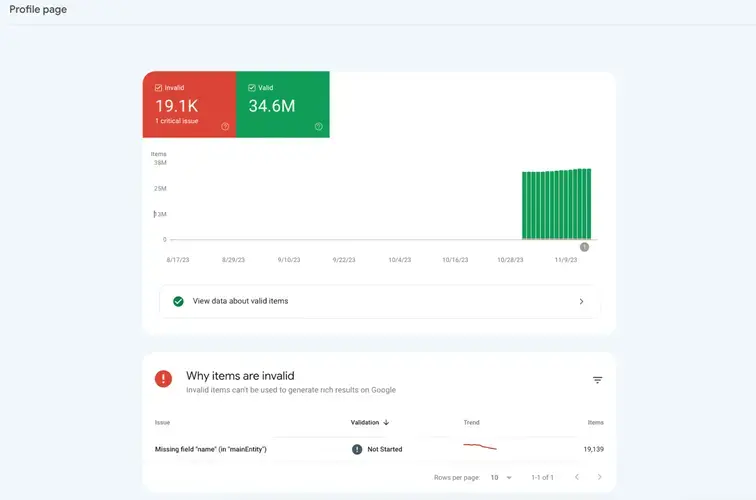
Missing Required Field Errors
Certain fields must always be included when applying schema. For the Article type, the “headline” field is required, for example, while the Product type requires “price” and “availability.” Google’s general structured data guidelines specifically state that items missing required properties aren’t eligible for rich results.
Miss one of these fields, and Google Search Console will flag it as an error, making rich results difficult to achieve. When writing markup, always cross-check the official schema documentation to make sure you haven’t left out a required field.
Invalid Data Format Errors
Certain fields in structured data have to follow a specific format. Dates need to be entered as “YYYY-MM-DD,” and price fields need to contain numbers only.
Break these rules, and you’ll trigger a validation error — and search engines may not be able to process that data at all. Before applying schema, it’s worth checking each property’s expected data format in advance, and making sure your input values are set up correctly to avoid errors.
Unsupported Properties and Version Issues
Schema is constantly evolving, and some properties get added or removed with newer versions. Use outdated markup, and a given property may no longer be supported — which triggers a validation error. That’s why it’s worth checking the current version on schema’s official site, and confirming your markup is compatible with the latest standard.
JSON-LD, Microdata, and RDFa Format Errors
There are several ways to apply structured data: JSON-LD, Microdata, and RDFa. Google recommends JSON-LD, but some sites still use Microdata or RDFa.
Each of these has a different implementation approach, and errors can crop up if a tag isn’t closed properly or a property value is entered incorrectly. Whenever you apply markup, it’s essential to run it through a validation tool to catch errors beforehand. Google recommends using its Rich Results Test first to check which rich results a page is actually eligible to generate.
How to Fix Schema Validation Errors
Using Google’s Structured Data Testing Tool and Search Console
To fix schema validation errors, make active use of Google’s structured data testing tool and Search Console.

The structured data testing tool lets you check in real time whether your applied markup contains errors, and it tells you specifically where any problems are.
You can also monitor structured data errors across your entire site, fix issues as needed, and request revalidation afterward.
How to Fix JSON-LD and Microdata Markup
When a validation error shows up, you need to fix the underlying issue in your JSON-LD or Microdata.
Start by adding any missing fields, and correcting the data format where needed. If a date format is wrong, for example, bring it in line with ISO 8601, and make sure price fields contain numeric values only.
It’s also worth checking the latest schema version to confirm the properties you’re using are still supported.
Checking Compatibility With the Latest Schema Version
Because schema keeps evolving, you need to periodically check whether your markup is compatible with the current version.
Newer versions can change existing properties or add new ones — and failing to account for that raises the odds of a validation error. It’s worth referring to schema’s official documentation regularly to keep your markup aligned with the current standard.
Related Reading
- The Complete Technical SEO Guide: A Practical Hub for Crawling, Indexing, Rendering, Speed, and Structure
- The Canonical Tag
- Why Sitemaps Matter, and 3 Ways to Create One
- How to Fix Open Graph Tag Errors
- The H1 Tag: What It Is and How to Use It Correctly
If you want to apply this to your own business — see how Growth approaches this in our SEO service, or if you need a concrete diagnosis of your specific situation, reach out through our contact page. We answer with the one customer who becomes revenue in mind — not raw traffic volume.
Frequently Asked Questions
Do schema validation errors hurt my search rankings?
The validation error itself doesn’t directly lower your standard search ranking. But as covered above, an unresolved error keeps you from qualifying for enhanced search results — rich results — like rich snippets. So the real impact isn’t a ranking drop, it’s losing eligibility for rich results, which can still cost you click-through rate.
Do I have to fix “recommended” field warnings too?
Missing required fields disqualify you from rich results, so those absolutely need fixing. Recommended-field warnings, on the other hand, don’t block rich results outright — but filling them in raises the odds your listing displays in a richer format. It’s most efficient to fix required errors first, then fill in recommended fields as time allows.
Should I use JSON-LD or Microdata?
Google recommends JSON-LD. It’s separate from your HTML code, which makes it easier to manage and more approachable for beginners. If you already have Microdata or RDFa implemented, it’s fine to leave it as-is — but for new implementations, or if you’re hitting frequent errors, standardizing on JSON-LD is easier to maintain long-term.
Once I fix an error, does it show up in search results right away?
No, not immediately. After fixing your markup, confirm the error is resolved with the Rich Results Test, then request revalidation in Search Console so the search engine re-crawls and re-evaluates the page. Re-crawling and re-indexing take time, so it’s worth monitoring for a while after the fix to confirm it’s actually taken effect.