Schema Markup: Definition, Implementation, and SEO Benefits
 임재복
임재복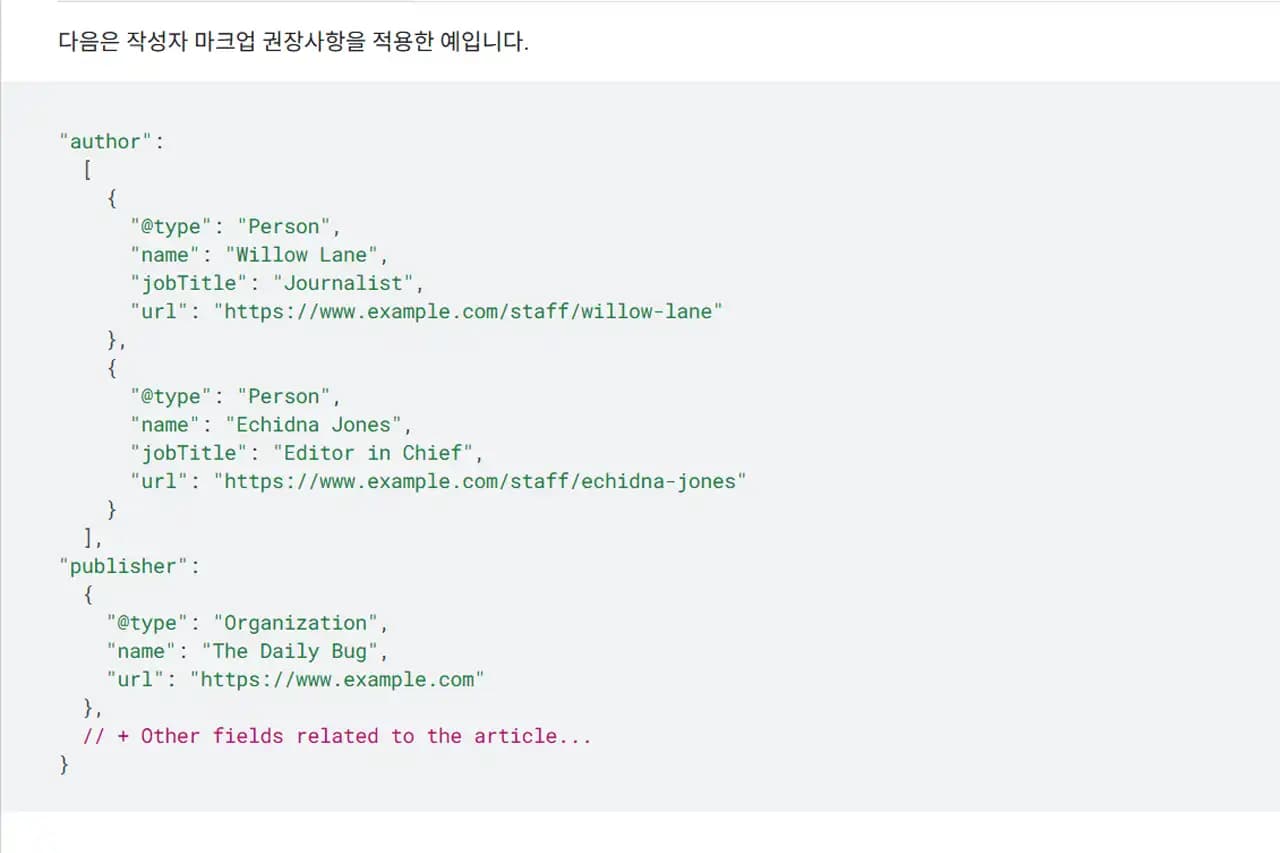
What is schema markup?
Schema markup is a tool that helps search engines grasp the meaning of a web page the way a person understands it just by reading it. Search engines can parse text and images, but fully understanding the meaning hidden beneath them is much harder.

Schema markup provides extra information about a web page so that search engines can understand its content more fully. By clearly conveying a page’s content, content type, and structure, it makes a kind of “conversation” with search engines possible.
Just as people use language to communicate with each other, schema markup is a standardized language for communication between search engines and web pages.
In other words, schema markup is added to a web page’s HTML as standardized tags, helping search engines understand the content and its context so it can be reflected more effectively in search results.
For example, applying schema markup to a recipe page lets you clearly convey information like ingredients, cooking time, temperature, and calories to a search engine. When a user searches “chicken recipe,” the recipe’s key details can appear directly in the search results, driving clicks.
How to implement schema markup
Schema markup offers several ways to add information to a web page — JSON-LD, Microdata, and RDFa, each with its own pros, cons, and characteristics. Choosing the right method depends on the page’s purpose, structure, and development environment.
JSON-LD
JSON-LD (JavaScript Object Notation for Linked Data) is a JSON-based standard for expressing structured data. It’s implemented via a <script> tag inside the <head> or <body> of an HTML page, kept separate from other HTML tags, which makes it easy to manage.

JSON-LD is the schema markup format recommended by Google, and its advantage is that it’s relatively simple and easy to understand, even for beginners. Because it’s separate from the HTML code, it keeps the code readable and easy to maintain. That said, keep in mind that some platforms or tools may not support JSON-LD.
Microdata
Microdata structures a web page’s data by adding attributes directly into a markup language like HTML or XHTML. Its advantage is that it can express metadata alongside a page’s content without needing separate tags or structure.

However, its drawback is that because markup has to be added directly inside the HTML code, the code can become more complex and harder to maintain.
RDFa
RDFa (Resource Description Framework in Attributes) is a way to express RDF within XML-based languages like HTML, XHTML, and SVG. Like Microdata, it adds markup directly inside the HTML code, but it has the drawback of being more complex and harder to learn than Microdata.
| Implementation method | Advantages | Disadvantages |
| JSON-LD | Recommended by Google, simple and easy to understand, separate from HTML code for easy management | May not be supported by some platforms/tools |
| Microdata | Markup can be added directly in HTML code, no separate tags needed | Code can become complex, harder to maintain |
| RDFa | Markup can be added within HTML code, supports XML-based languages | More complex and harder to learn than Microdata |
The benefits of implementing schema markup
Applying schema markup to a web page brings a range of benefits — search engine optimization (SEO), improved web accessibility, and better data usability.
SEO (search engine optimization)
Schema markup plays a very important role in SEO. It helps search engines understand a web page better, raising the site’s visibility in search results, and improves the user experience in ways that drive more traffic to the site.
- Improved visibility in search results
- Schema markup improves a website’s visibility in search results. By surfacing more information right in the search results, it lifts click-through rate (CTR) and helps search engines understand a page’s content and context more accurately, producing more relevant results.
- It also increases the odds of appearing in rich snippets and other enhanced results, helping a site stand out in search results. Schema markup lets a website claim more real estate on the results page — an effect similar to paid advertising, but without the cost.
- A better user experience
- Schema markup improves the user experience by surfacing useful details — event dates, product prices, review ratings — before a user even clicks.
- Because details are easier to access up front, users become more likely to click through to the page from search results.
- Stronger E-E-A-T
- Schema markup, especially Organization and LocalBusiness schema, can help strengthen a website’s E-E-A-T. E-E-A-T is a concept representing a website’s expertise, authoritativeness, and trustworthiness, and is an important factor influencing Google search rankings.
- By clearly presenting information about your website through schema markup, you can strengthen E-E-A-T and earn a search engine’s trust.
- Responding to Google’s MUM update
- Google’s MUM (Multitask Unified Model) update aims to understand and connect information across many different formats to deliver more comprehensive search results to users.
- Because schema markup helps build a web page’s entities and the relationships between them, it lets a site respond effectively to the MUM update.
- Voice search optimization
- Schema markup helps voice assistants understand a web page’s content more easily and relay it to users.
- As voice search usage grows, schema markup can raise a website’s visibility in voice search results.
| Schema Type | Description | Example Use Case |
| Product | Information about a product (name, price, reviews, etc.) | E-commerce websites |
| Event | Information about an event (date, time, location, etc.) | Event listing websites |
| LocalBusiness | Information about a local business (address, contact info, hours, etc.) | Businesses with a physical storefront |
| Recipe | Information about a recipe (ingredients, cooking time, nutrition info, etc.) | Cooking recipe websites |
| Article | Information about an article or blog post (title, author, publish date, etc.) | News websites, blogs |
Web accessibility
Schema markup can help improve web accessibility by structuring a page’s information. Assistive technologies like screen readers can use schema markup to understand a web page’s content better and relay it to users.
This helps users who are visually impaired or have cognitive disabilities access web content more easily.

Data usability
Schema markup helps make data more usable by structuring information on a web page. By extracting and analyzing information through schema markup, that data can serve a range of purposes — for example, extracting product information for a price-comparison site, or extracting event information for a calendar app.
Things to watch out for when implementing schema markup
There are a few things worth keeping in mind when implementing schema markup.

- Troubleshooting errors
- Errors in your schema markup can prevent a search engine from properly understanding your web page. Use a schema markup validation tool to check for and fix errors.
- Tools like Google Search Console can help diagnose and resolve schema markup errors.
- Keeping information current
- Schema markup is continually updated, so it’s important to keep up with the latest information.
- Check the Schema.org website for the latest schema markup information and update your page’s markup as needed.
- Providing accurate information
- Schema markup should provide information that accurately reflects your web page’s actual content.
- Providing incorrect information can undermine a search engine’s trust in your site and negatively affect your search rankings.
- Avoiding excessive markup
- You don’t need to apply schema markup to every piece of content.
- Focus schema markup on your most important information and avoid over-marking your content.
- Following the structured data guidelines
- Implement schema markup in line with Google’s structured data guidelines. Google’s general structured data guidelines explicitly state that you shouldn’t mark up content that isn’t visible to users, or misleading content like fake reviews.
- Failing to follow the guidelines can mean a search engine won’t recognize your schema markup, or worse, that you get penalized.
- Marking up author information
- Every author displayed on a web page should be included in the markup.
- When marking up author information, use the Person type for an individual and the Organization type for an organization.
- Using the wrong type can cause a search engine to misinterpret the information.
- Image guidelines
- When using images in schema markup, the image should represent the marked-up content and be in a file format supported by Google Images.
- For best results, it’s recommended to provide multiple high-resolution images (with width times height of at least 50,000 pixels) in aspect ratios of 16×9, 4×3, and 1×1. These are the image specifications recommended in Google’s Article structured data documentation.
Useful tools and resources
A range of tools and resources can help you create and validate schema markup.
- Schema markup generators: A schema markup generator helps you create markup without writing any code. Options include Google’s Structured Data Markup Helper and Hall Analysis’s Schema Markup Generator, among others.
- Validation tools: A schema markup validation tool helps you find and fix errors in your markup. Options include Google’s Rich Results Test and Schema.org’s schema markup validator.
- Learning resources: The Schema.org website offers detailed information and a range of examples on schema markup. Google’s Search Central guides are another good source of information on schema markup.
Conclusion
Schema markup is an important tool that helps search engines understand a web page more fully. Through schema markup, you can raise a page’s visibility, improve web accessibility, and increase how usable your data is. When implementing schema markup, it’s worth keeping the cautions above in mind and making use of the tools and resources available.
Schema markup is an essential tool that website owners and developers should use to improve a site’s visibility, accessibility, and overall performance. In a constantly evolving digital landscape, actively using schema markup helps a website stay competitive and deliver a better experience to its users.
Worth reading next
- The Complete Guide to Technical SEO: A Practical Hub Connecting Crawling, Indexing, Rendering, Speed, and Structure
- The Canonical Tag
- Why Sitemaps Matter and 3 Ways to Create One
- How to Fix Open Graph Tag Errors
- What the H1 Tag Is and How to Use It Correctly
If you’d like to apply this to your own business — you can see Growth’s approach on our SEO service page, or if you need a diagnosis of your specific situation, reach out via consultation. We’ll answer with the one customer who becomes revenue in mind — not traffic volume.
Frequently asked questions (FAQ)
Does adding schema markup immediately boost search rankings?
Schema markup isn’t a direct ranking factor. As covered above, its core value is indirect — helping search engines understand your content better and raising your odds of appearing in rich results, which improves click-through rate (CTR). It’s more accurate to think of it as contributing to visibility and CTR in search results, rather than to rankings themselves.
Should I choose JSON-LD, Microdata, or RDFa?
Google recommends JSON-LD. It’s separate from your HTML code, so it’s easy to manage and maintain, and even beginners can apply it fairly easily. As covered in the comparison table above, Microdata and RDFa require adding markup directly inside your HTML, which can make your code more complex — so unless you have a specific constraint, JSON-LD is generally the safest choice.
Do I need to apply schema markup to every page?
No, you don’t. As emphasized above, avoid over-marking your content and focus instead on the important pages where structured information is clear — products, events, recipes, articles. Also, the information in your markup must always match what’s actually visible on the page, or it can violate the guidelines.
How do I check whether my schema markup was implemented correctly?
Google’s Rich Results Test lets you check which rich results your page can generate and flag any errors, while a Schema.org-based validator can check overall validity. After implementation, it’s good practice to periodically check Google Search Console’s structured data report for any errors or warnings.
Marketing Insights
Marketing insights, delivered weekly
Practical growth and GEO/B2B marketing insights, summarized in your inbox every week.
Subscribe for insights